
Below you’ll find a WordPress Cheat Sheet that is split into three parts:
- WP-CLI (Beginners)
- WordPress Theme Development (Developers)
- WordPress Keyboard Shortcuts
We’ve made it available both in PDF and PNG (as an infographic). Updated for late 2025 and relevant for 2026 WordPress development.
PDF Version of WordPress Cheat Sheet
WordPress Cheat Sheet (Download PDF)
Infographic Version of WordPress Cheat Sheet (PNG)
WordPress Cheat Sheet (Download PNG)
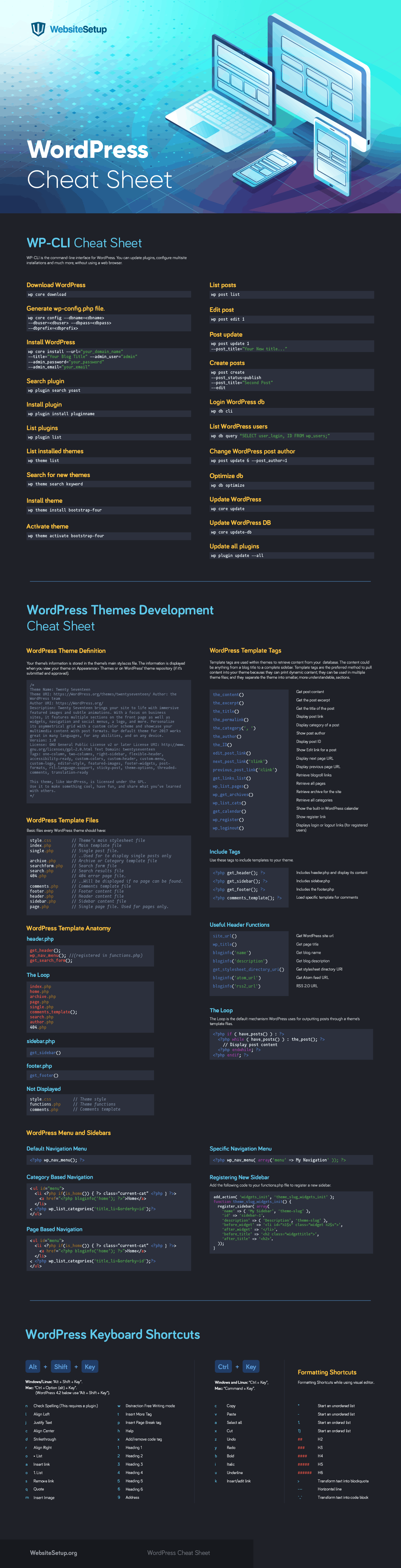
WordPress Cheat Sheet
Most common functions, commands, and keyboard shortcuts to help you with your WordPress theme development journey in 2025 and beyond.
WP-CLI Cheat Sheet
WP-CLI is the command-line interface for WordPress. You can update plugins, configure multisite installations, manage blocks, and much more without using a web browser. Essential for developers heading into 2026.
Download WordPress
wp core download
Generate wp-config.php file
wp core config --dbname=<dbname>
--dbuser=<dbuser> --dbpass=<dbpass>
--dbprefix=<dbprefix>
Install WordPress
wp core install --url="your_domain_name" --title="Your Blog Title" --admin_user="admin" --admin_password="your_password" --admin_email="your_email"
Search plugin
wp plugin search yoast
Install plugin
wp plugin install pluginname
List plugins
wp plugin list
List installed themes
wp theme list
Search for new themes
wp theme search keyword
Install theme
wp theme install twentytwentyfive
Activate theme
wp theme activate twentytwentyfive
List posts
wp post list
Edit post
wp post edit 1
Post update
wp post update 1 --post_title="Your New title..."
Create posts
wp post create --post_status=publish --post_title="Second Post" --edit
Login WordPress db
wp db cli
List WordPress users
wp db query "SELECT user_login, ID FROM wp_users;"
Change WordPress post author
wp post update 6 --post_author=1
Optimize db
wp db optimize
Update WordPress
wp core update
Update WordPress DB
wp core update-db
Update all plugins
wp plugin update --all
WordPress Themes Development Cheat Sheet
WordPress Themes Development Cheat Sheet (Expand)WordPress Theme Definition
Your theme’s information is stored in the theme’s main style.css file. The information is displayed when you view your theme on Appearance > Themes or on WordPress’ theme repository (if it’s submitted and approved). This applies to classic themes; Block Themes (FSE) use theme.json for configuration, which is increasingly relevant for 2026 development.
/*
Theme Name: Twenty Twenty-Five
Theme URI: https://wordpress.org/themes/twentytwentyfive/
Author: the WordPress team
Author URI: https://wordpress.org/
Description: Twenty Twenty-Five is a modern block theme designed for flexibility and performance. Optimized for Full Site Editing, it features refined typography, dynamic color palettes, and responsive layouts. Perfect for businesses, portfolios, and blogs looking to leverage the latest WordPress capabilities in 2026.
Version: 1.0
Requires at least: 6.4
Tested up to: 6.7
Requires PHP: 7.4
License: GNU General Public License v2 or later
License URI: https://www.gnu.org/licenses/gpl-2.0.html
Text Domain: twentytwentyfive
Tags: block-patterns, block-styles, custom-colors, custom-logo, custom-menu, editor-style, featured-images, full-site-editing, one-column, responsive-layout, rtl-language-support, template-editing, theme-options, threaded-comments, translation-ready, wide-blocks
*/
WordPress Template Files
Basic files every classic WordPress theme should have (note: Block Themes use HTML templates in the /templates folder):
style.css // Theme's main stylesheet file
index.php // Main template file
single.php // Single post file.
// ..Used to display single posts only
archive.php // Archive or Category template file
searchform.php // Search form file
search.php // Search results file
404.php // 404 error page file.
// ..Will be displayed if no page can be found.
comments.php // Comments template file
footer.php // Footer content file
header.php // Header content file
sidebar.php // Sidebar content file
page.php // Single page file. Used for pages only.
functions.php // Theme functions and features
theme.json // Block theme configuration (for FSE themes)
WordPress Template Anatomy
header.php
get_header(); wp_nav_menu(); // (registered in functions.php) get_search_form();
The Loop
index.php home.php archive.php page.php single.php comments_template(); search.php author.php 404.php
sidebar.php
get_sidebar()
footer.php
get_footer()
Not Displayed
style.css // Theme style functions.php // Theme functions comments.php // Comments template theme.json // Block editor configuration
WordPress Template Tags
Template tags are used within themes to retrieve content from your database.
The content could be anything from a blog title to a complete sidebar.
Template tags are the preferred method to pull content into your theme because: they can print dynamic content; they can be used in multiple theme files; and they separate the theme into smaller, more understandable sections.
the_content() Get post content the_excerpt() Get the post excerpt the_title() Get the title of the post the_permalink() Display post link the_category(', ') Display category of a post the_author() Show post author the_ID() Display post ID edit_post_link() Show Edit link for a post next_post_link('%link') Display next page URL previous_post_link('%link') Display previous page URL wp_list_pages() Retrieve all pages wp_get_archives() Retrieve archive for the site wp_list_cats() Retrieve all categories get_calendar() Show the built-in WordPress calendar wp_register() Show register link wp_loginout() Displays login or logout links
Include Tags
Use these tags to include templates to your theme.
<?php get_header(); ?> Includes header.php and display its content <?php get_sidebar(); ?> Includes sidebar.php <?php get_footer(); ?> Includes the footer.php <?php comments_template(); ?> Load specific template for comments
Useful Header Functions
site_url() Get WordPress site url wp_title() Get page title bloginfo('name') Get blog name bloginfo('description') Get blog description get_stylesheet_directory_uri() Get stylesheet directory URI bloginfo('atom_url') Get Atom feed URL bloginfo('rss2_url') RSS 2.0 URL
The Loop
The Loop is the default mechanism WordPress uses for outputting posts through a theme’s template files.
<?php if ( have_posts() ) : ?>
<?php while ( have_posts() ) : the_post(); ?>
// Display post content
<?php endwhile; ?>
<?php endif; ?>
WordPress Menu and Sidebars
Default Navigation Menu
<?php wp_nav_menu(); ?>
Specific Navigation Menu
<?php wp_nav_menu( array('menu' => 'My Navigation' )); ?>
Category Based Navigation
<ul id="menu">
<li <?php if(is_home()) { ?> class="current-cat" <?php } ?>>
<a href="<?php bloginfo('home'); ?>">Home</a>
</li>
<?php wp_list_categories('title_li=&orderby=id');?>
</ul>
Page Based Navigation
<ul id="menu">
<li <?php if(is_home()) { ?> class="current-page-item" <?php } ?>>
<a href="<?php bloginfo('home'); ?>">Home</a>
</li>
