Is jQuery still relevant in 2026?
Short answer: yes, but with an asterisk. jQuery 4.0.0 shipped on January 17, 2026, so the library is still alive and still maintained. And it still runs on a huge share of the web. Most WordPress themes and plenty of plugins load it, so if you touch WordPress at all, you touch jQuery whether you planned to or not. That installed base is not going anywhere soon, which is exactly why a working reference still earns its place on your desk.
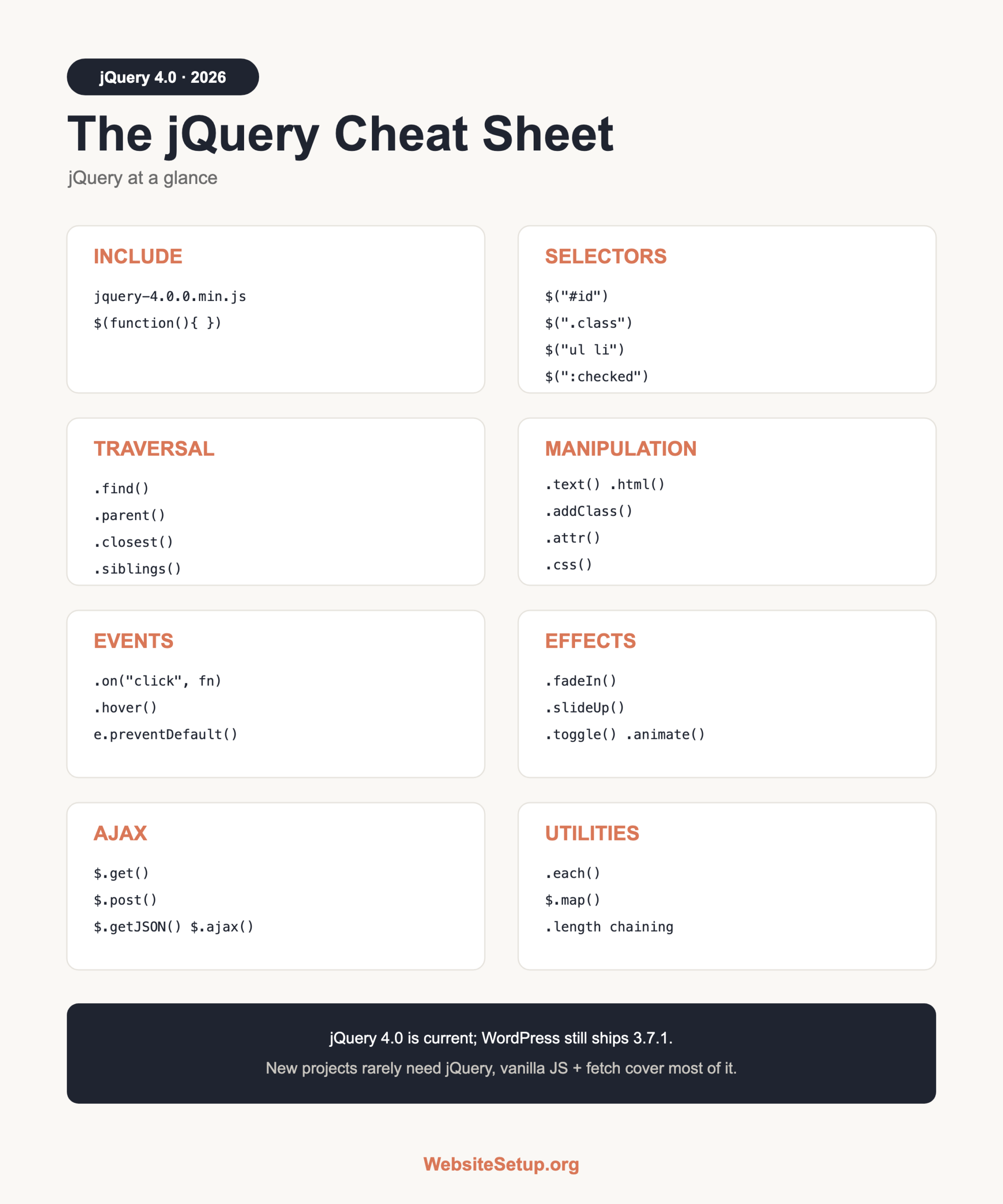
This sheet is built for two kinds of reader. If you are learning, it shows you what each piece does with a plain example. If you are maintaining an existing site, it is the quick lookup you reach for when a snippet breaks and you need the right method name fast.
Here is the honest part. Modern browsers closed the gap. The features that made jQuery essential back in 2010, things like a sane way to select elements, add classes, and make AJAX calls, now ship in plain JavaScript. document.querySelector, classList, and fetch() cover most of the old use cases with no library at all. Browser inconsistencies, the real reason jQuery existed, mostly went away when Internet Explorer left the scene.
That does not make jQuery useless. It makes it a maintenance tool rather than a default. A jQuery build that works does not need rewriting for its own sake. And when you inherit a plugin, a theme, or a ten-year-old admin panel, knowing jQuery well is the difference between a five-minute fix and a bad afternoon.
So here is the rule of thumb. Maintaining a jQuery-based site or a WordPress build? Keep using jQuery and lean on this sheet. Starting something new from scratch? Reach for vanilla JavaScript first. Our JavaScript cheat sheet is the companion for that vanilla path, and if you are still setting things up, our guide on how to create a website covers the ground floor.
Everything below is grouped by task so you can jump straight to what you need: selectors, traversal, changing the page, events, effects, AJAX, and the parts that trip people up.
How to include jQuery
You load jQuery with a single script tag, usually from a CDN. Loading from a CDN means visitors may already have the file cached from another site, and you get one less asset to host. There are two lines you will see in the wild. The current major release is 4.0, and the older 3.7.1 is the version WordPress still bundles. Which one you pick depends entirely on where the code will run.
Latest release (new projects, modern browsers):
<script src="https://code.jquery.com/jquery-4.0.0.min.js"></script>Legacy and WordPress line (last of the 3.x series, ships with WP plus jQuery Migrate):
<script src="https://code.jquery.com/jquery-3.7.1.min.js"></script>Load jQuery before any script that uses it, or the $ function will not exist yet and you will get an error. Once jQuery is loaded, wrap your code so it runs after the page is ready. Waiting for ready means the elements you want to select actually exist by the time your code runs. The short form is all you need:
$(function() {
  /* runs when DOM is ready */
});
Selectors
This is the part people remember jQuery for. You pass a CSS-style string to $() and get back a set of matching elements. If you know CSS, you already know jQuery selectors, because they mirror CSS almost exactly. IDs use a hash, classes use a dot, and you can combine them the same way you would in a stylesheet. Our CSS cheat sheet lists the full selector vocabulary if you need a refresher. A selector that matches nothing is not an error in jQuery; it just returns an empty set, so calling methods on it does no harm.
| Selector | What it grabs |
|---|---|
$("#id") |
Element with that ID |
$(".class") |
All elements with that class |
$("p") |
All paragraphs |
$("ul li") |
List items inside a list |
$("a[target]") |
Links with a target attribute |
$(":checked") |
Checked inputs |
DOM traversal
Once you have a set of elements, you often need to move around the tree from there: up to a parent, down to children, sideways to siblings. These methods take a matched set and return a new one, which is what makes chaining work later. The two you will reach for most are .closest(), which walks up until it finds a match, and .find(), which searches down. Between them they cover most real navigation.
| Method | What it does |
|---|---|
.find(".x") |
Descendants matching .x |
.parent() |
Direct parent |
.children() |
Direct child elements |
.closest("div") |
Nearest matching ancestor |
.next() / .prev() |
Next or previous sibling |
.siblings() |
All siblings |
.each(fn) |
Run fn on each element |
DOM manipulation
This is the day-to-day work: reading and changing text, HTML, attributes, classes, and styles, then adding or removing nodes. Called with an argument, these methods set a value; called with none, most of them read the current value instead. That dual behavior keeps the API small. One thing to watch is .prop() versus .attr(), which trips people up constantly. More on that in the gotchas section. A quick safety note: prefer .text() over .html() for anything a user typed, because .html() will happily run markup you did not intend.
| Method | What it does |
|---|---|
.text("hi") |
Set text content |
.html("<b>hi</b>") |
Set inner HTML |
.val() |
Get or set a form value |
.attr("href") |
Get or set an attribute |
.prop("checked") |
Read live state (checked, disabled) |
.addClass("a") |
Add a class |
.removeClass("a") |
Remove a class |
.toggleClass("a") |
Toggle a class on or off |
.css("color","red") |
Set an inline style |
.append() / .prepend() |
Insert inside, at end or start |
.after() / .before() |
Insert outside, after or before |
.remove() |
Delete the element |
.empty() |
Clear the contents |
.clone() |
Copy the element |
Events
Attach behavior with .on(). It is the one event method you should use for everything now. The older shortcuts still exist, but .on() handles them all and supports delegation, which lets one handler cover elements that do not exist yet. Delegation matters when you add rows or list items after the page loads: bind to a parent that stays put, name the child selector, and new children are covered automatically. Inside the handler, $(this) is the element that fired the event, and the event object gives you e.preventDefault() to stop the browser default.
// Direct binding
$("#save").on("click", function() {
  console.log("clicked");
});

// Delegation: handles current and future <li> items
$("ul").on("click", "li", function() {
  $(this).toggleClass("active");
});

// Stop the default action
$("form").on("submit", function(e) {
  e.preventDefault();
});
Common event helpers include .submit(), .hover(), and .keyup(), though each maps to an .on() call under the hood.
Effects and animation
jQuery bundles a small set of animation helpers. They were a big selling point once. Today CSS transitions do most of this with better performance, since the browser can hand animation to the GPU, but the jQuery versions are handy for quick work in an existing codebase. Each effect takes an optional duration in milliseconds and an optional callback that fires when the animation ends, so you can chain a next step onto the finish.
| Method | Effect |
|---|---|
.show() / .hide() / .toggle() |
Show, hide, or flip visibility |
.fadeIn() / .fadeOut() |
Fade opacity in or out |
.slideUp() / .slideDown() |
Collapse or expand height |
.animate({opacity:0}, 400) |
Custom animation over 400ms |
AJAX
jQuery made background HTTP requests easy long before fetch() existed. The core method is $.ajax(), with shorthand helpers for the common cases. These still work fine, and you will see them all over legacy code.
$.ajax({
  url: "/api/data",
  method: "POST",
  data: { id: 5 },
  success: function(response) {
    console.log(response);
  }
});

$.get("/api/data", function(res) { /* GET */ });
$.post("/api/save", { id: 5 }, function(res) { /* POST */ });
$.getJSON("/api/data.json", function(data) { /* parsed JSON */ });
The success callback runs when the request comes back cleanly; pair it with an error callback to handle failures. On a new project, the built-in fetch() is the modern alternative and needs no library. It returns a promise, so you chain .then() instead of passing callbacks, which reads better once you have more than one step.
Utilities and chaining
jQuery ships a few array-style helpers, and the property you will use most is .length to count matches. Checking .length is also the standard way to ask whether a selector found anything: zero means nothing matched. The real convenience is chaining. Because most methods return the same set, you can string calls together on one line, which keeps related changes to an element in one place instead of scattered across several statements. Chaining reads left to right in the order the actions happen, so it stays easy to follow even when the line gets long.
// Iterate an array
$.each([1, 2, 3], function(i, val) {
  console.log(i, val);
});

// Transform an array
var doubled = $.map([1, 2, 3], function(n) { return n * 2; });

// Count matches
var count = $("p").length;

// Chaining
$("p").addClass("x").fadeIn();
jQuery vs vanilla JS
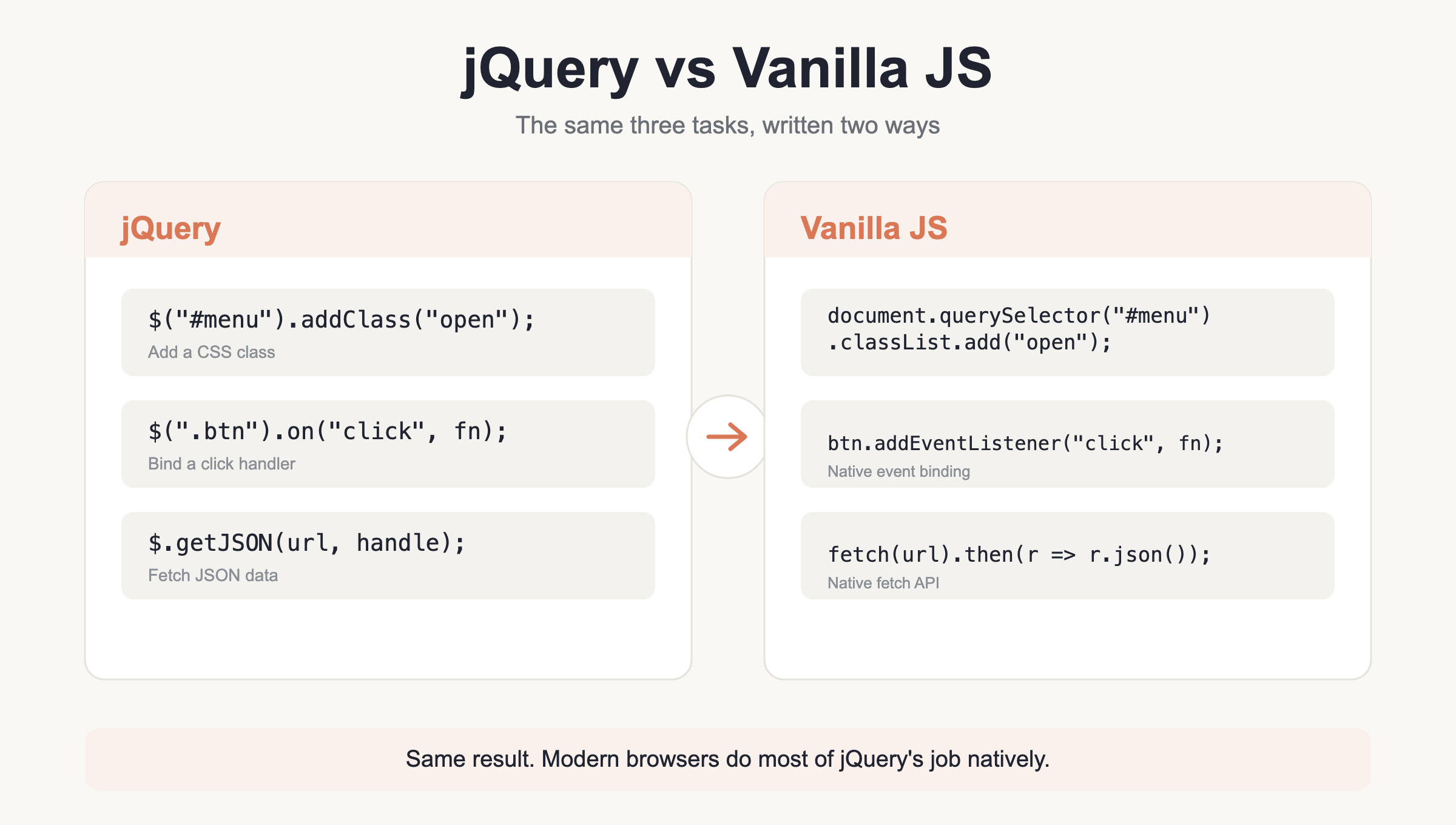
Here is the side-by-side that matters most. Almost everything jQuery does has a plain-JavaScript equivalent that is now well supported across every current browser. Read this table before adding jQuery to a fresh build, because in many cases you do not need it. The vanilla column is a little more verbose in places, but it ships nothing to the user and has no version to keep upgrading.
| Task | jQuery | Vanilla JS |
|---|---|---|
| Select one | $("#x") |
document.querySelector("#x") |
| Select all | $(".x") |
document.querySelectorAll(".x") |
| Set text | .text("hi") |
el.textContent = "hi" |
| Add class | .addClass("a") |
el.classList.add("a") |
| On click | .on("click", fn) |
el.addEventListener("click", fn) |
| Hide | .hide() |
el.style.display = "none" |
| Fetch JSON | $.getJSON(url) |
fetch(url).then(r => r.json()) |
Gotchas and common mistakes
A handful of things catch people out over and over. Most of them come from mixing old habits with the current library, from copying a snippet written for an older version, or from forgetting that WordPress plays by its own rules. Work through this list first when a jQuery script misbehaves.
Use .on(), not the old binders. The methods .bind(), .live(), and .delegate() are deprecated or gone. .on() replaces all three.
Use .prop() for live state. For checked, disabled, and selected, use .prop(). It reads the current state. .attr() reads the HTML default from the markup, which is often not what you want after a user clicks something.
WordPress runs in no-conflict mode. The $ shortcut is not available by default in WordPress. Use the full jQuery(...) name, or wrap your code so $ works inside:
(function($) {
  /* $ works here */
})(jQuery);
jQuery 4.0 has breaking changes. Version 4.0 drops support for old Internet Explorer, no longer auto-promotes a JSON request to JSONP (set dataType: "jsonp" when you actually need it), and removes .push, .sort, and .splice from jQuery objects. It also adds Trusted Types and CSP support. Run jQuery Migrate 4.0 over legacy code to surface these before they bite.
WordPress still ships 3.7.1. Do not assume 4.0 syntax on a WordPress site. WP bundles 3.7.1 plus jQuery Migrate, and removing Migrate is only proposed for a future release, not done. And on brand-new projects, you often need no jQuery at all.
Download the jQuery Cheat Sheet (PDF) and related
Grab the printable version below and keep it near your editor. It gathers every table on this page into a five-page reference you can pin up or drop into a project folder.
Download the jQuery Cheat Sheet (PDF)
Related reference from WebsiteSetup.org: the HTML cheat sheet covers the markup your jQuery selectors target.