
Color is one of the first things you set when you build a web page, and it is one of the easiest to get slightly wrong. This cheat sheet collects every way to write a color in HTML and CSS, from plain names to hex codes to the newer perceptual formats, with a swatch table you can scan at a glance. Bookmark it, keep it open while you style, and grab the PDF for offline use.
How colors work in HTML and CSS
Colors are set with CSS, not with HTML. The two properties you reach for most are color (the text color) and background-color (the fill behind an element). Old HTML attributes like bgcolor still render in some browsers, but they are deprecated and you should not write new markup with them. Style belongs in CSS.
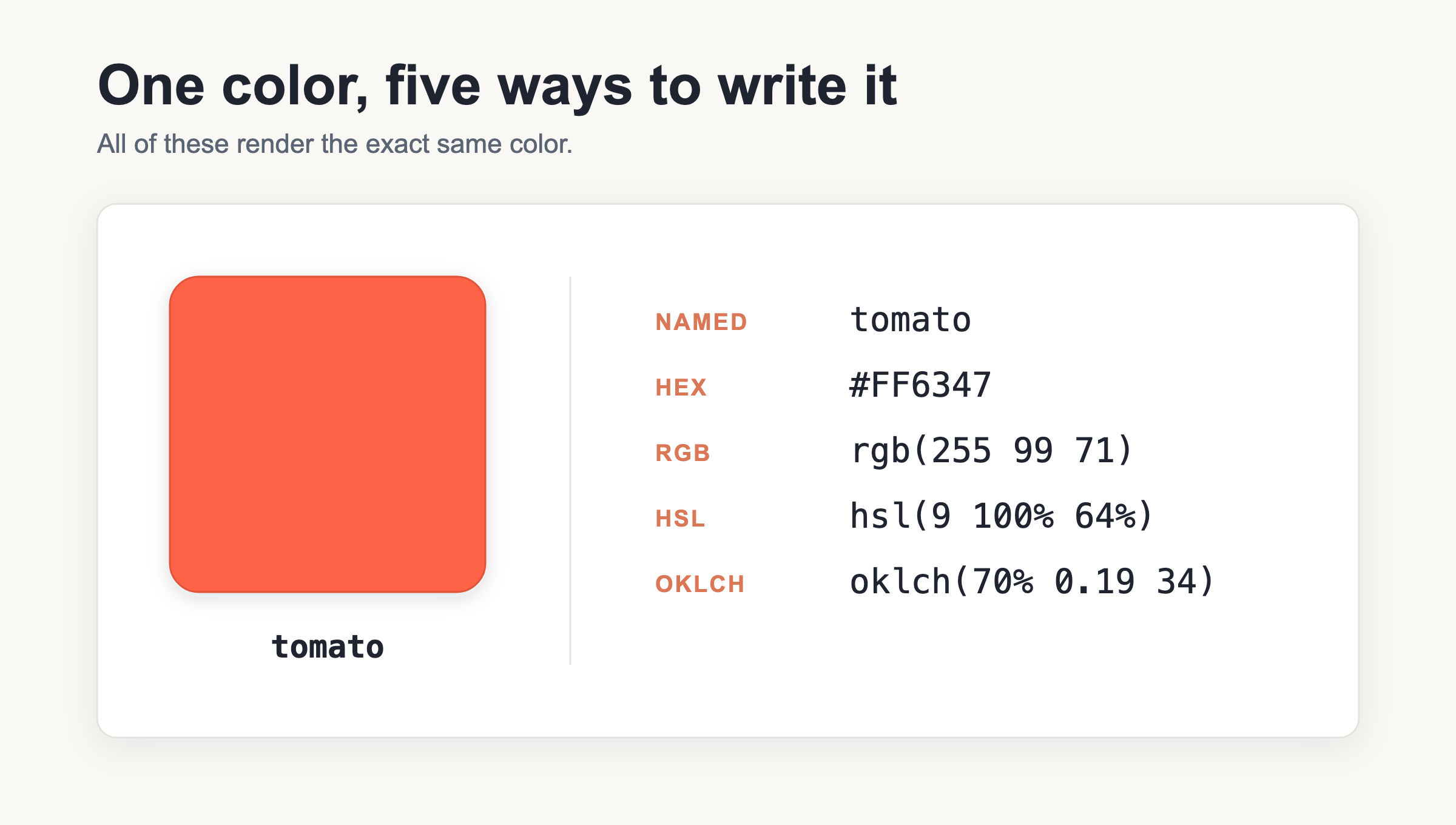
Here is the part that confuses beginners: one single color can be written several different ways. A shade of blue might appear as a name, a hex code, an rgb() value, an hsl() value, or a modern format like oklch(). They all paint the same pixels. Which one you pick is about readability and control, not about the result on screen.
For the wider picture of how CSS properties fit together, the CSS cheat sheet covers layout, typography, and the rest.
Hex codes
Hex is the format you will see most often in tutorials and design tools. It looks like #RRGGBB: a hash sign followed by three pairs of digits for red, green, and blue. Each pair runs from 00 (none of that channel) to FF (full strength). So Twitter blue is #1DA1F2: a little red, a lot of green, almost all blue.
There are two useful shortcuts. A three-digit form, #RGB, works only when each pair repeats. #F00 expands to #FF0000 (pure red) because F becomes FF. It cannot express #1DA1F2, since those pairs do not repeat. An eight-digit form, #RRGGBBAA, adds an alpha (transparency) channel at the end. #1DA1F2CC is that same blue at about 80 percent opacity.
One thing that saves arguments: hex is case-insensitive. #1da1f2 and #1DA1F2 are identical to the browser. This sheet uses uppercase for consistency, but lowercase is equally correct.
RGB
The rgb() function spells out the same three channels in decimal instead of hex. Modern CSS uses spaces between the values: rgb(29 161 242). The legacy form uses commas: rgb(29, 161, 242). Both work in every current browser, so you will run into each in the wild.
To add transparency, put a slash and an alpha value after the color: rgb(29 161 242 / 80%). You can write the alpha as a percentage or as a decimal from 0 to 1. If you learned CSS a few years ago you probably reached for rgba() for this. Good news: rgba() is now just an alias of rgb(), so the plain function accepts alpha and you rarely need the longer name.
HSL
HSL describes a color the way a person might think about it: hsl(203 89% 53%). The first number is the hue, an angle from 0 to 360 degrees around the color wheel (0 is red, 120 is green, 240 is blue). The second is saturation as a percentage, from gray to vivid. The third is lightness as a percentage, from black to white.
That structure makes HSL friendly for tweaks. Want a slightly darker button? Drop the lightness a few points and leave the rest alone. Want a muted version of the same hue? Lower the saturation. Alpha works the same as RGB: hsl(203 89% 53% / 80%). And like its cousin, hsla() is now an alias of hsl(), so you can skip the extra letter.
Named colors
CSS recognizes about 140 named colors, or roughly 147 keywords once you count aliases like gray/grey and cyan/aqua. CSS Color 4 also added one more: rebeccapurple, included as a tribute. Names are convenient for quick work and for readable code, but the palette is fixed and limited, so most real projects move to hex or one of the functions once the design tightens up.
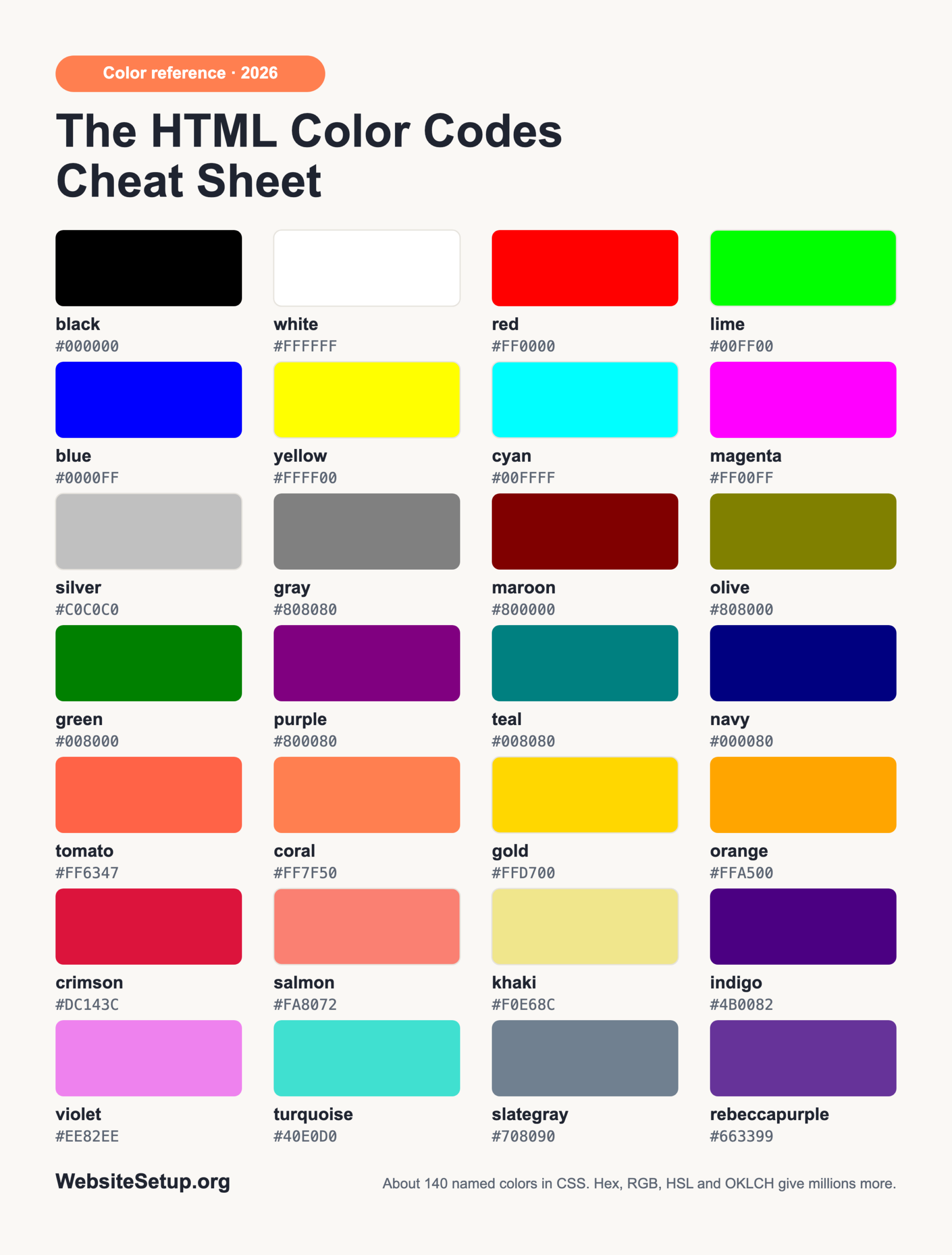
| Swatch | Name | Hex | Note |
|---|---|---|---|
| black | #000000 |
text/base | |
| white | #FFFFFF |
backgrounds | |
| red | #FF0000 |
errors | |
| lime | #00FF00 |
HTML “green” is lime | |
| blue | #0000FF |
classic links | |
| yellow | #FFFF00 |
highlights | |
| cyan/aqua | #00FFFF |
aliases | |
| magenta/fuchsia | #FF00FF |
aliases | |
| silver | #C0C0C0 |
light UI | |
| gray | #808080 |
neutral | |
| maroon | #800000 |
dark red | |
| olive | #808000 |
muted | |
| green | #008000 |
true green | |
| purple | #800080 |
accent | |
| teal | #008080 |
accent | |
| navy | #000080 |
dark blue | |
| tomato | #FF6347 |
warm CTA | |
| coral | #FF7F50 |
warm accent | |
| gold | #FFD700 |
badges | |
| orange | #FFA500 |
CTA | |
| crimson | #DC143C |
strong red | |
| salmon | #FA8072 |
soft accent | |
| khaki | #F0E68C |
muted | |
| indigo | #4B0082 |
deep accent | |
| violet | #EE82EE |
light purple | |
| turquoise | #40E0D0 |
bright accent | |
| slategray | #708090 |
UI text | |
| dimgray | #696969 |
muted text | |
| rebeccapurple | #663399 |
CSS4 tribute |
Modern CSS Color 4 formats
Recent CSS added a handful of formats that go beyond the old red-green-blue box. hwb(203 10% 5%) is hue-whiteness-blackness, an easy way to think in tints and shades. lab() and lch() are perceptually uniform, meaning equal numeric steps look like equal visual steps to the human eye; lch(55% 68 250) is one example.
The two worth learning first are oklab() and oklch(). They are the recommended choice for perceptually-uniform colors, and they shine when you build gradients or lighten and darken a shade programmatically, because the results stay even instead of turning muddy. A sample: oklch(70% 0.15 250). For wide-gamut displays there is also color(display-p3 1 0 0), which reaches reds and greens that plain hex cannot. All of these ship in evergreen browsers as of 2026: Chrome and Edge 111+, Safari 15.4+, and Firefox 113+.
currentColor, transparent, and opacity vs alpha
Three special values are worth memorizing. currentColor reuses whatever the element’s text color is, so a border or an SVG icon can follow the text without you repeating the value. transparent is a fully see-through color, equal to rgb(0 0 0 / 0).
Now the distinction that trips people up. The opacity property fades the whole element, including every child inside it, so a card at opacity: 0.5 also dims its text and images. An alpha channel, by contrast, fades only the one color it is attached to. If you want a semi-transparent background but crisp, solid text on top, use an alpha value on the background color, not opacity on the element.
Gotchas and common mistakes
A short list of traps that catch almost everyone:
- Hex is case-insensitive, so
#ff6347and#FF6347are the same. - The
#RGBshorthand only works when each pair repeats;#1DA1F2has no short form. rgba()andhsla()are now aliases ofrgb()andhsl(), but the old four-value syntax still works fine, so you do not have to rewrite existing code.- The classic name trap: HTML
greenis#008000, a mid-tone, whilelimeis#00FF00, the bright one most people picture as “green.” - Do not use the deprecated
bgcolororcolorHTML attributes; set color in CSS instead. - Opacity and an alpha channel are different tools; reach for the right one based on whether you want the whole element or a single color to fade.
Download the HTML Color Codes Cheat Sheet (PDF)
Want this reference at your desk or in your notes app? Grab the print-ready PDF below. It packs the formats, the swatch table with real color chips, and the gotchas into a few clean pages you can keep offline while you work.
Download the HTML Color Codes Cheat Sheet (PDF)
Related cheat sheets and FAQ
Keep building with the rest of the WebsiteSetup reference set. The HTML cheat sheet covers tags and structure, and the HTML5 Periodic Table gives you a visual map of every element as a sibling reference to this color sheet.
What is the difference between hex and RGB?
None, in terms of the result. They are two notations for the same color. Hex writes each channel as a pair of base-16 digits (#1DA1F2); RGB writes the same channels in plain decimal (rgb(29 161 242)). Pick whichever your tools produce and your team reads more easily.
How do I add transparency to a color?
You have several options. Add an alpha pair to a hex code (#RRGGBBAA), add a slashed alpha to a function (rgb(29 161 242 / 80%) or hsl(203 89% 53% / 80%)), or use the opacity property when you want the entire element and its children to fade together.
How many named colors are there?
CSS recognizes about 140 named colors, which comes to roughly 147 keywords once you count aliases such as gray/grey and cyan/aqua. CSS Color 4 also added rebeccapurple as a tribute.
Should I use oklch?
For most modern work, yes. oklch() is great for perceptually-uniform colors and for gradients that stay smooth, and it is supported across current browsers. If you still support very old versions, provide a hex fallback first and let oklch() override it where available.