Web hosting in 2026 looks different from the last time you shopped for it. Nearly every host now bundles an AI site builder into cheap plans, so you can describe a business and get a rough WordPress site back in a minute. NVMe storage, once a premium upgrade, is the baseline. Managed WordPress features that used to cost extra are folded into entry plans. And one old habit is now the biggest trap for beginners: the gap between the intro price and the renewal price, which can jump anywhere from 150% to more than 500% when your first term ends.
We looked at the hosts people actually sign up for in 2026, checked their current plans and prices, and ranked ten of them for real-world use. Most readers here are building a small site or a WordPress blog for a business, so that is the lens. If you want the wider category first, our web hosting overview covers the basics before you commit.
How we picked
A note on method, because a lot of hosting roundups skip it. We evaluate these platforms hands-on: signing up, building test sites, poking at the control panels, and reading the fine print on renewals that hosts would rather you skip. That tells us about setup, usability, and where the upsells hide.
For performance, we do not run our own year-long uptime lab any longer, so we do not pretend to. When we say a host loaded a test site in a certain time, that number comes from one of those labs, and we say which one. We do not invent uptime percentages or present someone else’s numbers as ours.
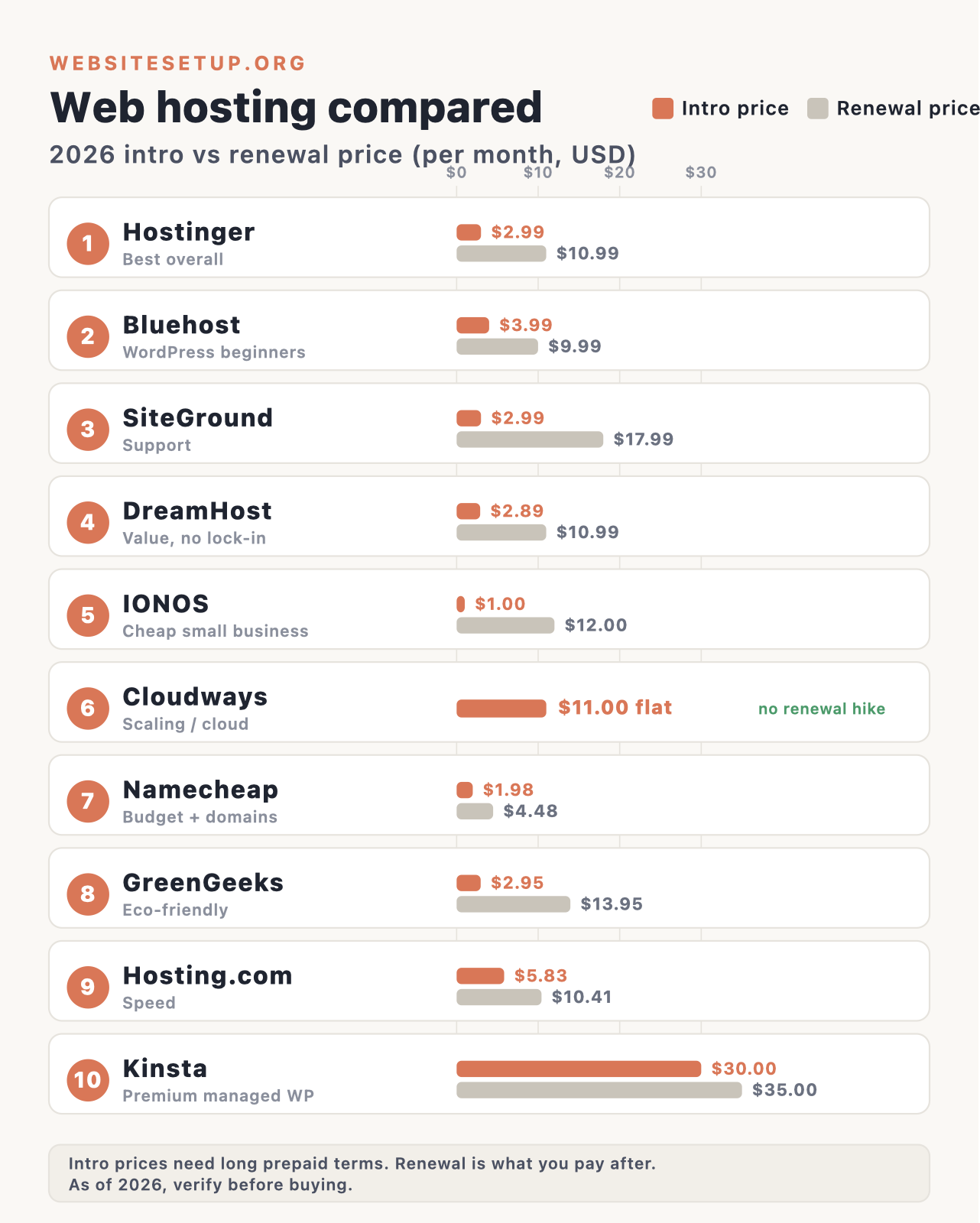
All prices below are as of 2026 and are US rates for the entry WordPress or shared plan at the best long-term intro rate. Hosting prices change often, and the renewal rate is the one that sticks, so check the current price before you buy. Where a host discloses its renewal openly, we credit that. Where it hides the renewal behind a marketing page, we say so.
| Host | Best for | Intro $/mo | Renewal $/mo | Free domain | Storage | Money-back |
|---|---|---|---|---|---|---|
| Hostinger | Best overall & cheapest | $2.99 | $10.99 | Yes (1 yr) | 20GB SSD | 30 days |
| Bluehost | WordPress beginners | $3.99 | $9.99 | Yes (1 yr) | 10GB NVMe | 30 days |
| SiteGround | Support & managed WP | $2.99 | $17.99 | No | 10GB SSD | 30 days |
| DreamHost | Value, no lock-in | $2.89 | $10.99 | Yes (1 yr) | 25GB NVMe | 30 days |
| IONOS | Cheap for small business | $1.00 | $12.00 | Yes (1 yr) | 25GB SSD | 30 days |
| Cloudways | Scaling / managed cloud | $11.00 | $11.00 | No | 25GB (DO plan) | None (3-day trial) |
| Namecheap | Budget + domains | $1.98 | $4.48 | Yes (1 yr) | 20GB SSD | 30 days |
| GreenGeeks | Eco-friendly | $2.95 | $13.95 | Yes (1 yr) | 25GB NVMe | 30 days |
| Hosting.com | Speed | $5.83 | $10.41 | Yes (1 yr) | 15GB NVMe | 30 days |
| Kinsta | Premium managed WP | $30.00 | $35.00 | No | 10GB | 30 days |
The table is the summary. The sections below explain who each host is actually for, what changed in 2026, and where the catch is.
1. Hostinger: Best overall
Hostinger is our pick for most people. It is the cheapest way onto a fast, modern stack, and the control panel (hPanel, not cPanel) is the friendliest one here for a first-timer. If you want a single recommendation and do not want to read all ten, start here.
What’s new in 2026: Hostinger leaned hard into AI. Its plans now bundle an AI Website Builder plus Kodee, an AI agent that handles routine admin and support tasks, and Hostinger says Kodee resolves the bulk of support requests. There is also Horizons, a prompt-to-app builder aimed at quick prototypes rather than production software. The infrastructure moved to all-NVMe on higher tiers with LiteSpeed and AMD EPYC, and the company added a data center in Malaysia in 2025, giving it a real global footprint across 11 countries.
Pros:
- Lowest entry price of any host we recommend, with a free domain for the first year, free SSL, and free Cloudflare CDN included.
- hPanel is easy for beginners, which matters more than most spec sheets.
- Strong independent results: Cybernews ranked it first on performance in 2026 testing, and Tooltester measured fast load times on its stack.
- The deepest bundled AI toolset of the group if you want that help.
Cons:
- The renewal jump is steep, roughly 2 to 3 times the intro price, and the cheapest rate needs a 48-month commitment.
- Support is AI-first with no phone line, so reaching a human can take patience.
- Entry plan backups run weekly, not daily.
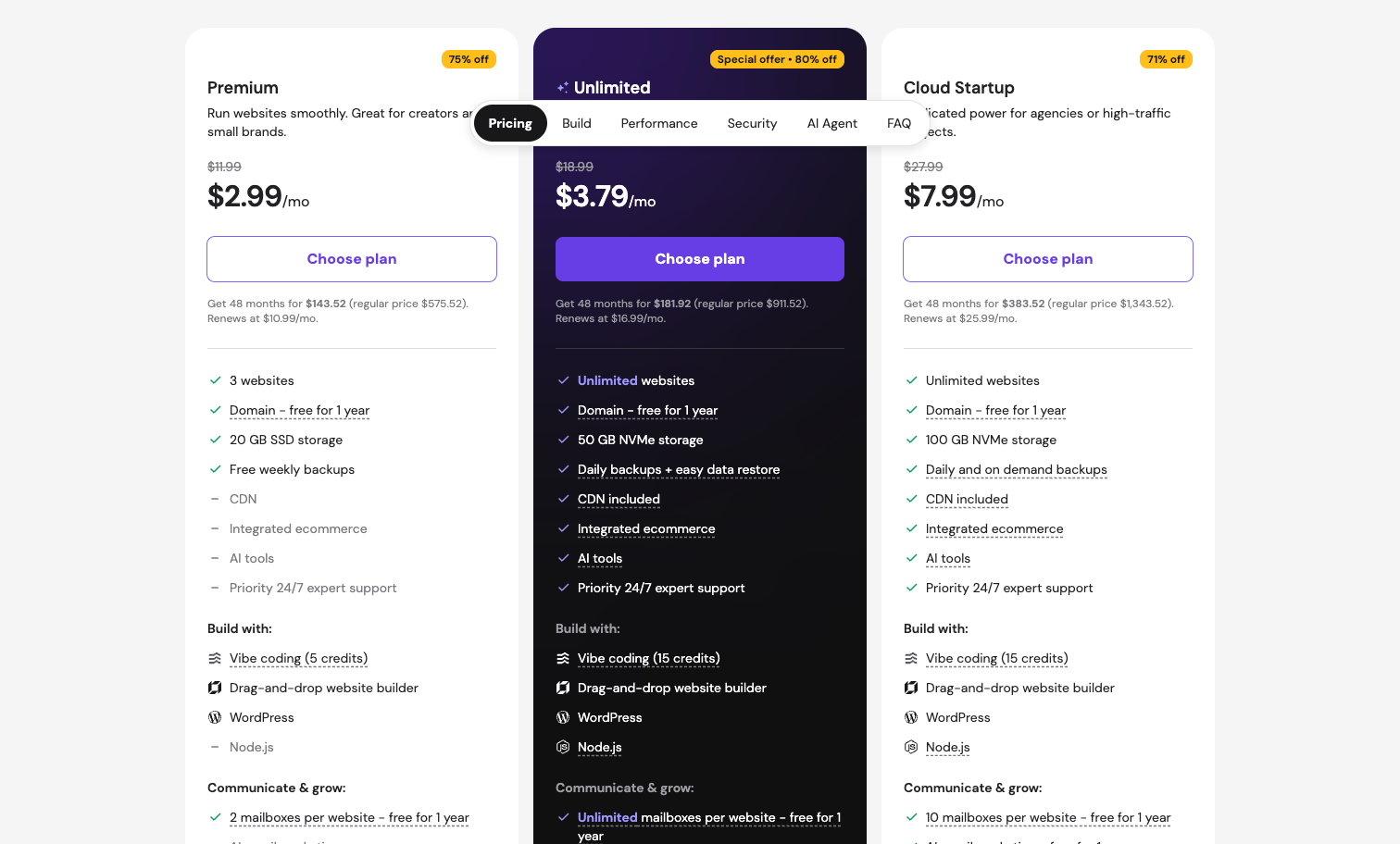
Pricing (as of 2026): The Premium plan is $2.99/mo intro on the 48-month term, renewing at $10.99/mo. That entry plan includes 3 websites, 20GB SSD storage, a free domain for one year, free SSL, a couple of mailboxes per site, free CDN, and weekly backups. The higher shared tiers (roughly $3.79 and $7.99/mo intro on the plans page, the top one being Cloud Startup) add more websites, NVMe storage, daily backups, and more mailboxes. There is a 30-day money-back guarantee. Prices change, so confirm the current rate.
Best for: Beginners and small sites that want the lowest all-in cost on a fast, modern platform.
2. Bluehost: Best for WordPress beginners
Bluehost is one of the few hosts WordPress.org officially recommends, and it is built around getting a WordPress novice live quickly. If your plan is a WordPress site and you want the most guided path, this is the safe default. Our guide to building a WordPress website pairs well with it.
What’s new in 2026: The biggest change is infrastructure. Newfold, Bluehost’s parent, migrated roughly a million customers to Oracle Cloud, which the company says cut response times sharply and added data centers in Europe, Asia, South America, and Australia. That fixes the old complaint that Bluehost was slow outside the US. On the software side, the free WonderSuite handles onboarding, block themes, patterns, and in-editor AI guidance. Note that Bluehost temporarily pulled its AI Site Creation tool as a policy decision with no firm return date, so treat that specific feature as pending.
Pros:
- Official WordPress recommendation plus the free WonderSuite tools for setup.
- Low intro price with a free domain for a year, SSL, CDN, and NVMe storage.
- Independent uptime looked strong, with Cybernews and others reporting figures near 99.95% in late 2025 and 100% in early 2026 testing.
- Improved global reach after the Oracle Cloud move, with European response times measured around 52ms.
Cons:
- Support leans on upsells and tends to push upgrades.
- Renewal roughly doubles the intro price, and Bluehost is not upfront about renewals on its own site.
- Entry backups are weekly, and Newfold’s consolidation has drawn skepticism.
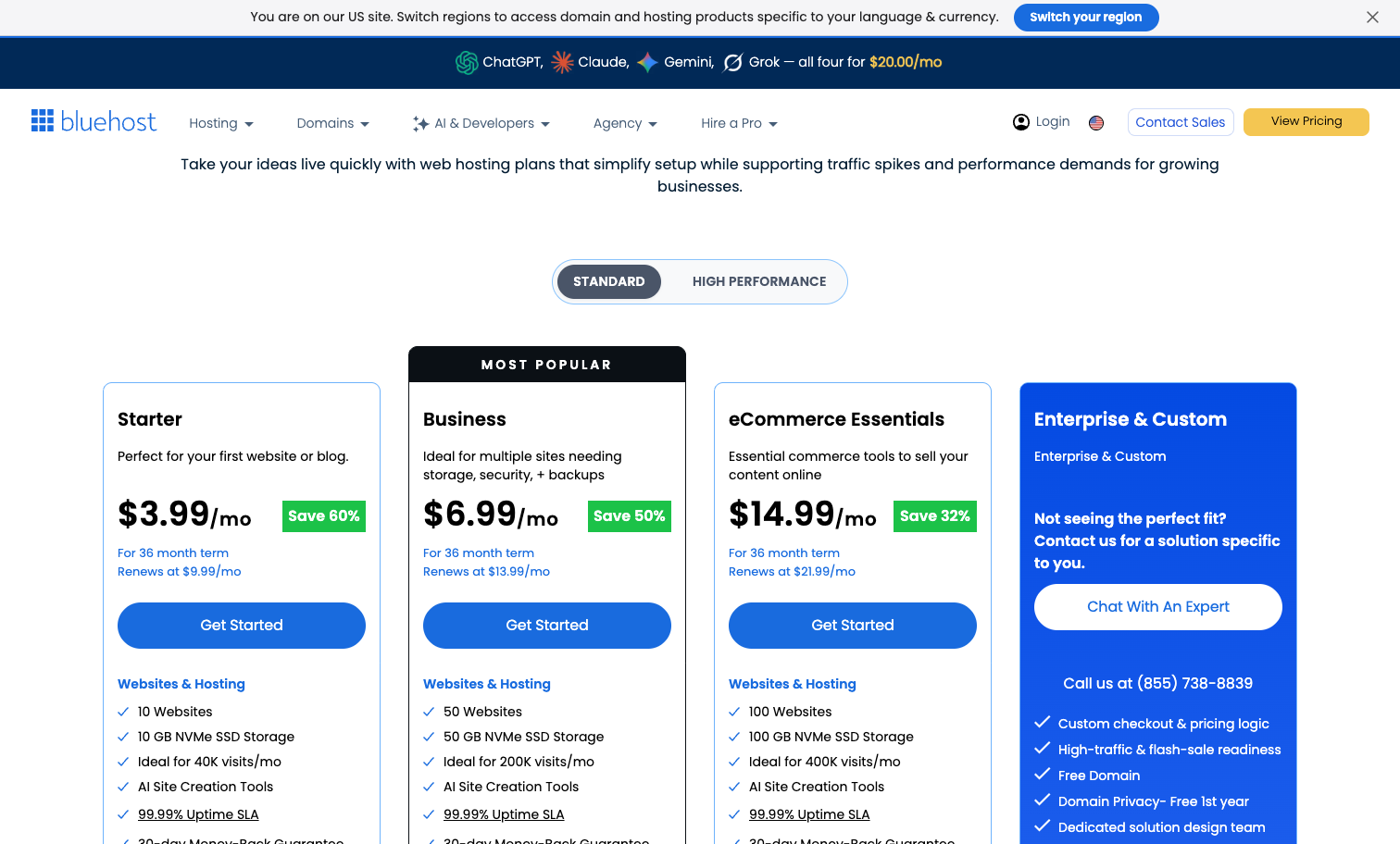
Pricing (as of 2026): The Basic plan is $3.99/mo intro on the 36-month term, renewing at $9.99/mo. It includes up to 10 websites, 10GB NVMe storage, a free domain for one year, free SSL, free CDN, and weekly backups. The Business tier is $6.99 renewing at $13.99. There is an optional AI All Access add-on at $20/mo if you want bundled access to several AI models. The 30-day money-back guarantee excludes the domain fee. Confirm current pricing before buying.
Best for: First-time WordPress users who want the most hand-holding.
3. SiteGround: Best support and managed WordPress
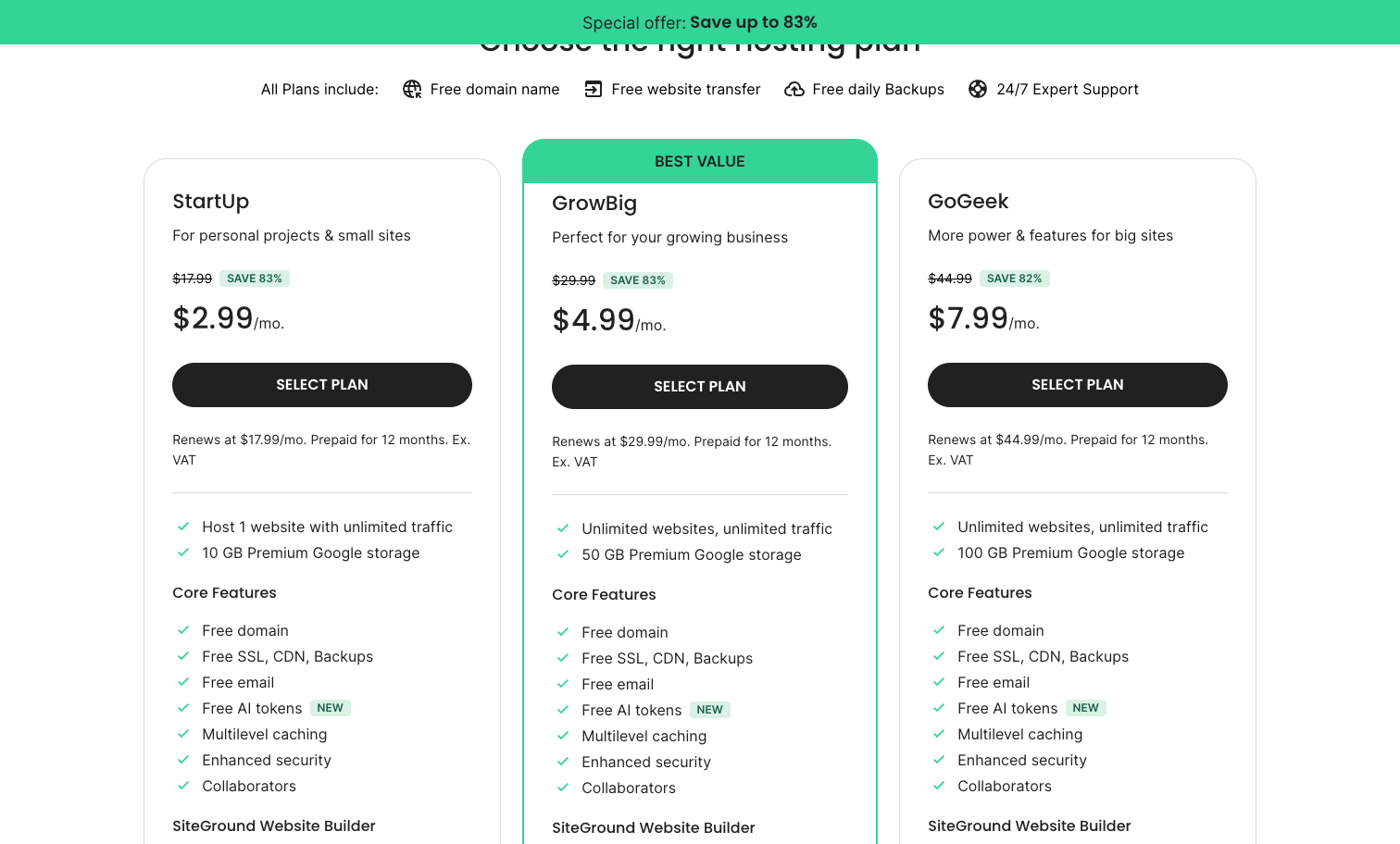
SiteGround is the host people recommend when they care about support and hands-off WordPress management. It runs on Google Cloud, keeps a clean custom panel instead of cPanel, and its help desk is the most consistently praised in this roundup. The catch is price, which we will get to.
What’s new in 2026: SiteGround is fully on Google Cloud across 11 data centers with private fiber, and its Ultrafast PHP claims about 30% faster performance on GrowBig and up. It launched an AI Agent for WordPress inside a new AI Studio, with free monthly tokens on entry plans. One misstep worth knowing: SiteGround auto-installed its AI plugin on customer sites and got pushback for it, so expect that plugin to show up.
Pros:
- Support is the standout: Tooltester and others report chat answers in around four minutes and phone waits under five.
- Free daily backups with 30-day retention, built-in CDN, and free SSL on every plan.
- Strong independent results, with 100% uptime in Tooltester testing and a GTmetrix grade A.
- Beginner-friendly Site Tools panel that avoids cPanel clutter.
Cons:
- The renewal is the steepest here, roughly 5 to 6 times the intro rate.
- Plans cap monthly visits and storage tightly, starting at 10,000 visits and 10GB.
- No free domain, so you register that separately.
Pricing (as of 2026): StartUp is $2.99/mo intro renewing at $17.99/mo, which SiteGround discloses openly. It covers 1 website, 10GB of Google Cloud SSD storage (not NVMe), about 10,000 monthly visits, free CDN, daily backups, free SSL, and unlimited email. GrowBig is $4.99 renewing at $29.99, and GoGeek is $7.99 renewing at $44.99. There is a 30-day money-back guarantee. Note there is no free domain, and prices change.
Best for: People who value responsive human support and managed WordPress and can stomach the renewal.
4. DreamHost: Best value with no long lock-in
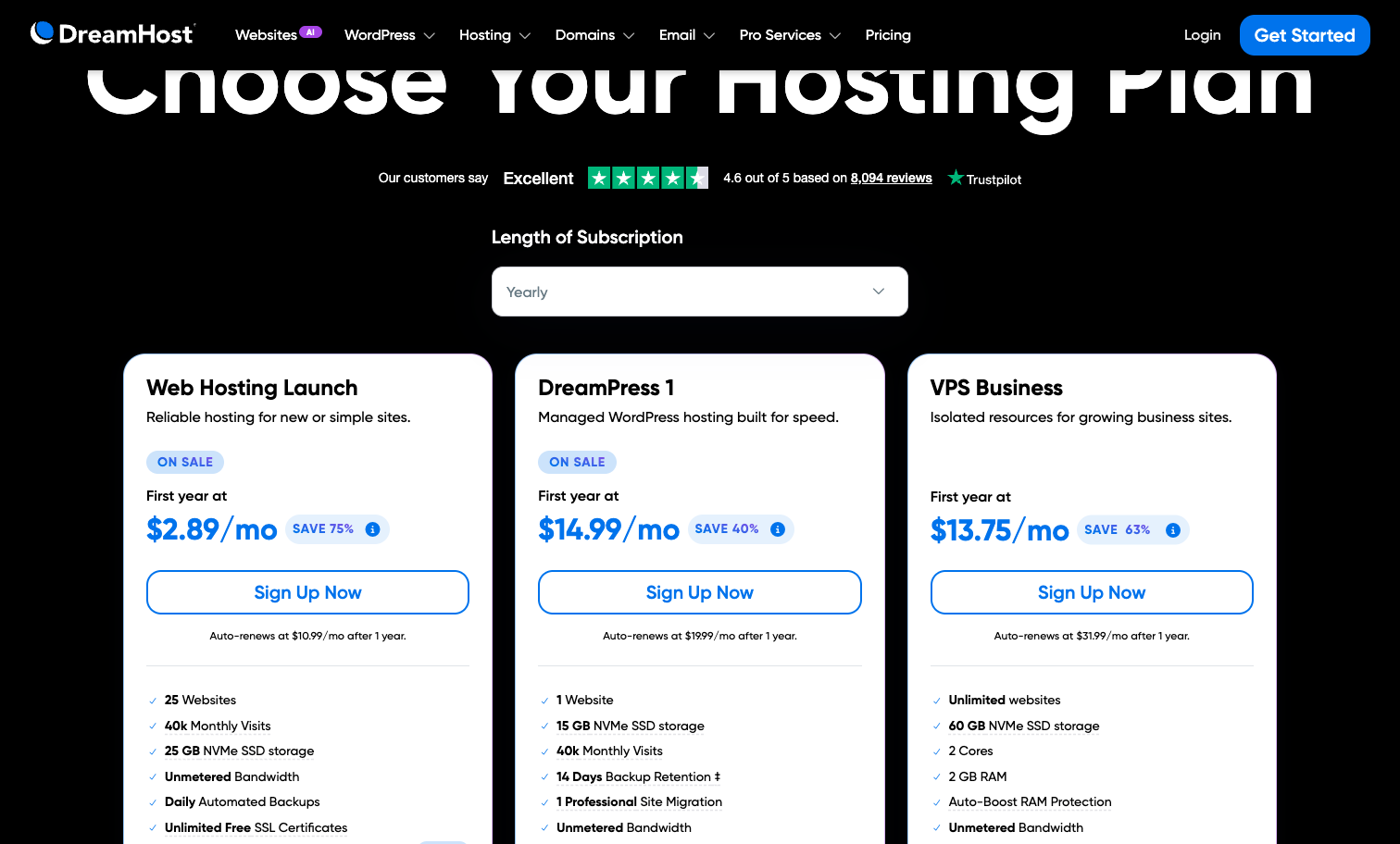
DreamHost is the pick if you dislike being trapped in a multi-year contract. It offers month-to-month billing, which is rare, and its entry plan now lets you run up to 25 sites. It is also privacy-friendly, independent, and another WordPress.org-recommended host.
What’s new in 2026: DreamHost renamed and reshuffled its shared lineup in late 2025; the entry shared plan is now called Web Hosting Launch. Storage that used to be unlimited is now capped, and one change worth flagging: the famous 97-day money-back guarantee was cut to 30 days in July 2025. On AI, DreamHost added an AI Business Advisor and Remixer, a site builder with a 30-day free trial.
Pros:
- Month-to-month billing is available, so you are not forced into a long term to get started.
- WordPress.org-recommended, with free SSL, a free domain for a year, and free domain privacy.
- The entry plan runs up to 25 sites on 25GB NVMe, which is generous.
- Solid measured performance, with Tooltester and GTmetrix reporting load times in the mid-hundreds of milliseconds and a grade A.
Cons:
- No call-in phone support; it is callback-only, and that is a paid add-on.
- US-only data centers and no CDN on the entry plan hurt global speed.
- Some security and malware features sit behind add-ons.
Pricing (as of 2026): Web Hosting Launch is $2.89/mo intro on the annual term, renewing at $10.99/mo. It includes up to 25 websites, 25GB NVMe storage, a free domain for a year, unlimited free SSL, mailboxes (free for three months, then paid), and daily backups; there is no CDN on this tier. Managed WordPress (DreamPress) and VPS plans sit above it. The money-back guarantee is now 30 days. Prices change, so verify.
Best for: Value hunters who want flexible billing and no long commitment.
5. IONOS: Best cheap for small business
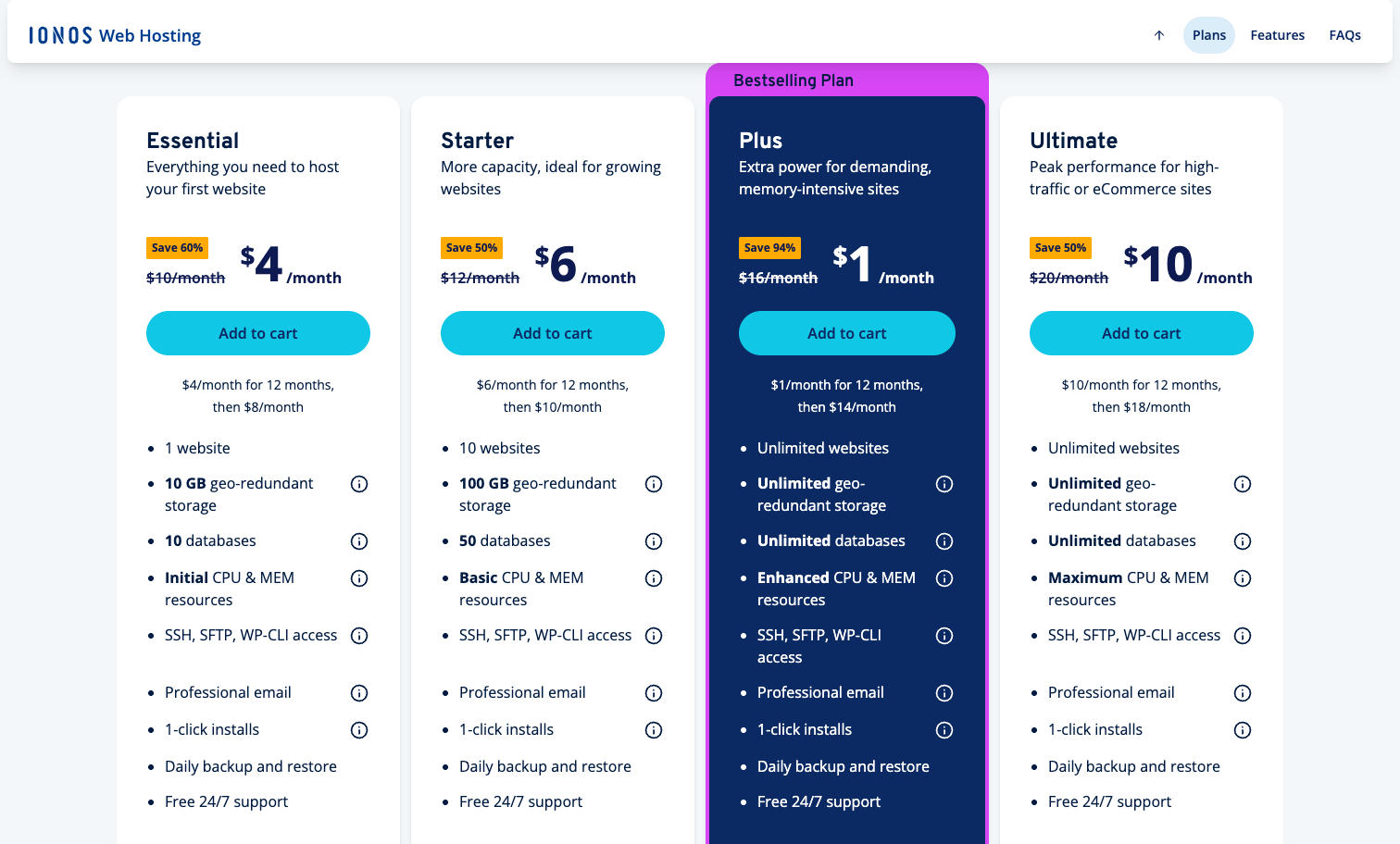
IONOS, owned by Germany’s United Internet, undercuts almost everyone on the intro price and adds a couple of small-business touches you rarely see cheap, like a named personal consultant and 24/7 phone support. It suits an everyday, low-traffic business site more than a high-traffic project.
What’s new in 2026: IONOS added AI to its MyWebsite Now builder, generating a site from your business name, industry, and description, along with AI images and SEO text. There is also an enterprise AI Model Hub. Less welcome: in 2025 IONOS raised prices on some existing contracts, citing operating and AI costs, and pushed a mid-contract increase on certain VPS plans.
Pros:
- The cheapest intro price here, starting at $1/mo, with WordPress renewals among the lowest of the group.
- Strong measured performance, with Cybernews reporting a fast first paint around 0.46s and response near 181ms.
- Free domain for a year, free wildcard SSL, daily backups, and 70-plus one-click apps.
- A named personal consultant plus 24/7 phone support, which small businesses appreciate.
Cons:
- The renewal jump after the first 12 months is steep.
- Only one email account regardless of tier, and no free migration.
- Reviews flag aggressive upsell calls and billing complaints.
Pricing (as of 2026): The web hosting plans start at $1/mo intro on a 12-month term, renewing around $12/mo. The WordPress line runs Start at $5 renewing at $8, Grow at $1 renewing at $12, and Boost at $12 renewing at $17. The entry plan covers 1 website, 25GB SSD storage, a free domain for a year, free wildcard SSL, and daily backups, with no CDN on entry. IONOS advertises a 99.99% uptime SLA and offers a 30-day money-back guarantee. Prices change.
Best for: Small businesses on a tight budget that want phone support and a simple, low-traffic site.
6. Cloudways: Best for scaling and managed cloud
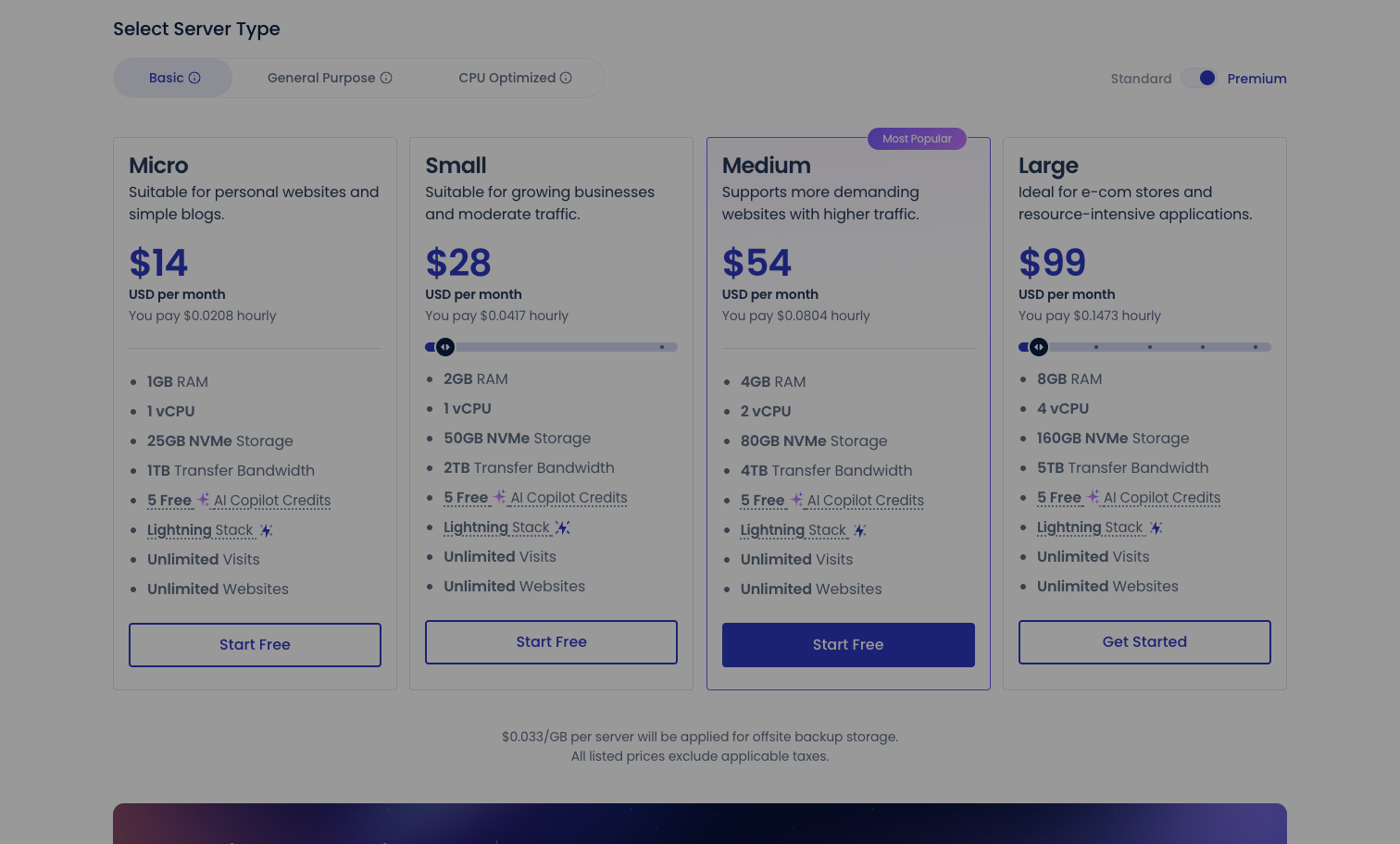
Cloudways is the odd one out here, and deliberately so. It is not shared hosting; it is managed cloud hosting that sits on top of providers like DigitalOcean, Vultr, and AWS. You pay by usage with no long contract and no renewal spike, which makes it the pick for a site you expect to grow. It is a scale-up choice, not a beginner’s first host.
What’s new in 2026: Cloudways launched Autonomous, a fully managed autoscaling WordPress product on Google Kubernetes Engine that bundles Object Cache Pro, Relay, and Cloudflare Enterprise CDN, with usage-based pricing that went live in November 2025. It also unified its panel across five cloud providers and added an AI Copilot with a few free credits. Cloudways is owned by DigitalOcean, which acquired it in 2022.
Pros:
- Five cloud providers to choose from, with pay-as-you-go billing and no contracts or renewal hikes.
- Fast in testing, with Cybernews reporting Vultr High Frequency response around 48ms.
- Free Object Cache Pro (a roughly $95/mo value) on plans with 4GB of memory and up.
- Autonomous handles traffic spikes without you managing servers.
Cons:
- No free domain and no included email; email is a paid add-on.
- Pricier than shared hosting, and prices rose after the DigitalOcean acquisition.
- No money-back guarantee, only a 3-day free trial, and support quality reportedly dipped post-acquisition.
Pricing (as of 2026): The cheapest DigitalOcean-based plan starts around $11/mo for 1GB RAM, 1 vCPU, and 25GB storage, and because billing is usage-based, there is no separate renewal rate; the price stays flat. DigitalOcean Premium NVMe and Vultr start around $14, AWS around $20.56, and Google around $37.33. There is no money-back guarantee, just a 3-day trial. Prices change.
Best for: Developers, agencies, and growing sites that need cloud power without server administration.
7. Namecheap: Best budget host with domains
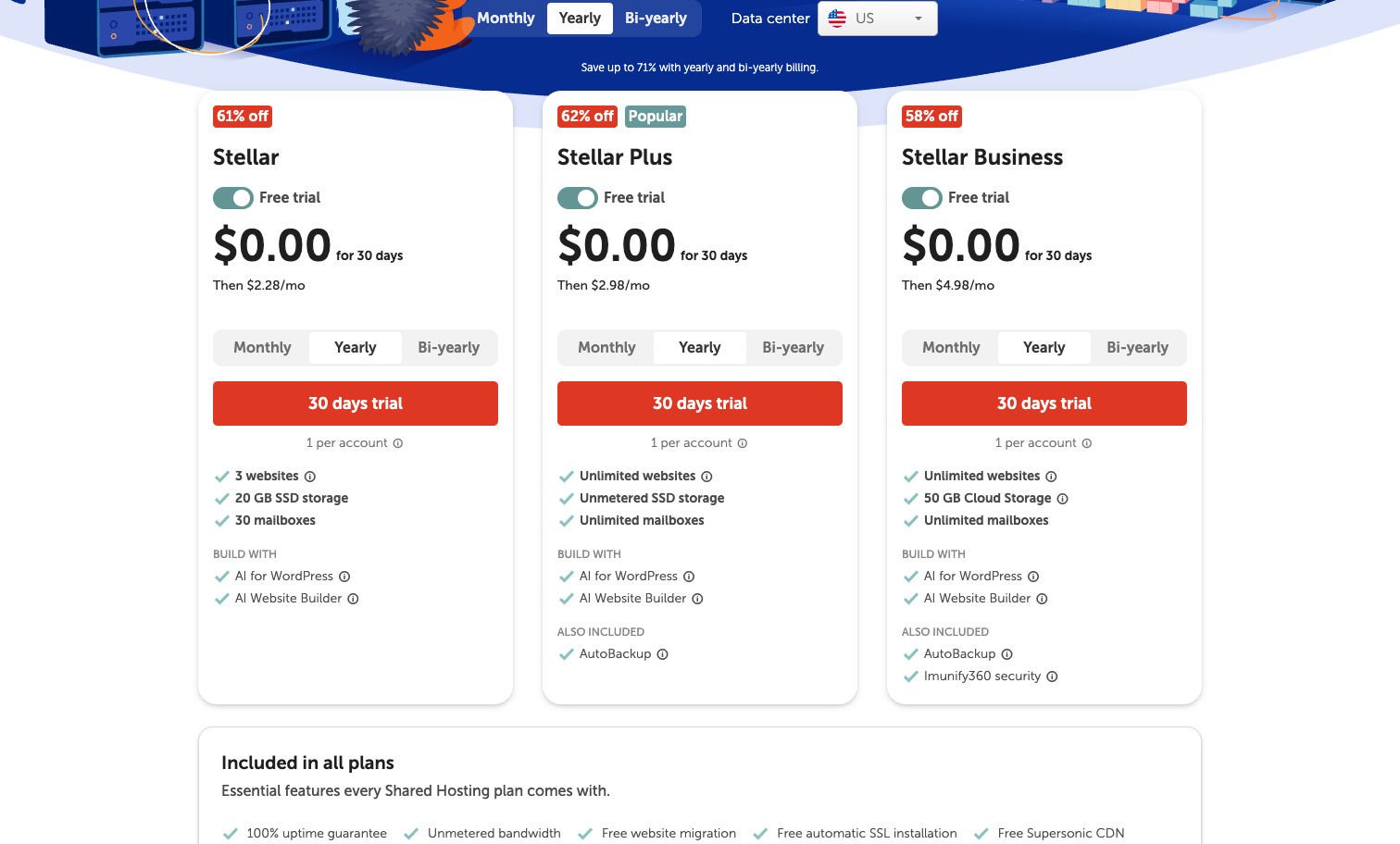
Namecheap made its name as a domain registrar, and its hosting carries that same low-cost, no-nonsense character. Its headline feature is the mildest renewal jump of the whole group, which is rare enough to matter. If you plan to register a domain anyway, keeping hosting and domains under one roof is convenient. If you are still choosing a name, our domain registration walkthrough helps.
What’s new in 2026: Namecheap continues to split its offering between the classic Stellar shared plans on cPanel and EasyWP, its managed WordPress product on NVMe. Both stay aggressively cheap. It remains independent, which is worth noting in a market full of consolidation.
Pros:
- The gentlest renewal of any host here, moving from $1.98 to $4.48 rather than multiplying several times over.
- Free domain for a year, up to 30 email accounts, and a free Supersonic CDN on Stellar.
- EasyWP managed WordPress runs on NVMe and handles roughly 50,000 visits on its starter tier.
- Domain-registrar pricing means your renewals stay predictable across the board.
Cons:
- Support is thinner and less polished than SiteGround or Bluehost.
- Backups on Stellar run twice a week rather than daily.
- EasyWP includes no email, so you handle mail separately.
Pricing (as of 2026): The Stellar shared plan is $1.98/mo intro renewing at just $4.48/mo. It includes 3 websites, 20GB SSD storage, a free domain for a year, up to 30 email accounts, free Supersonic CDN, and twice-weekly backups. EasyWP Starter runs $3.88/mo on the annual term with 10GB NVMe and no email. There is a 30-day money-back guarantee. Prices change.
Best for: Budget-focused users who want cheap hosting and domains with the smallest renewal surprise.
8. GreenGeeks: Best eco-friendly host
GreenGeeks is the host to pick if the environmental footprint of your site is on your mind. It has matched its energy use with renewable credits for years and backs that with verifiable arrangements, not just marketing. Performance holds up too, so you are not trading speed for conscience.
What’s new in 2026: GreenGeeks added a free AI-powered WordPress site builder in early 2025 that spins up a site in about a minute, and it revamped its dashboard in September 2025 with a new Account Manager alongside cPanel and one-click wildcard SSL. The platform runs all-NVMe RAID-10 storage with LiteSpeed and LSCache.
Pros:
- Matches 300% of its energy use with wind renewable-energy credits and plants a tree per account.
- Fast in testing: Tooltester recorded the quickest load in its group at 1.29s, with uptime around 99.97%.
- Feature-rich entry plan with free SSL, free domain for a year, free migration, nightly backups, and unmetered traffic.
- Free AI site builder included with shared plans.
Cons:
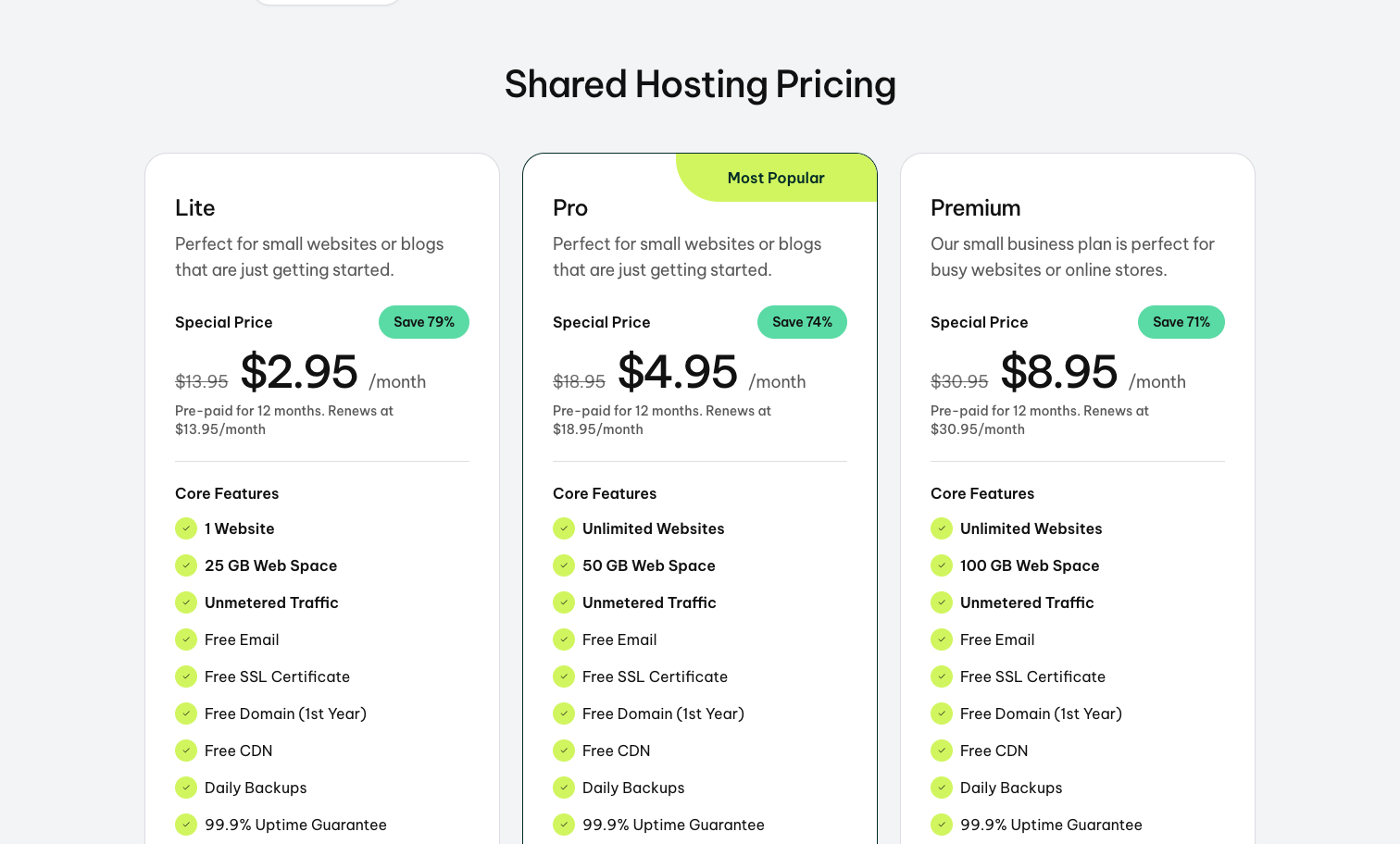
- Steep renewal, moving from about $2.95 to roughly $13.95.
- Only one free restore per month; additional restores cost extra.
- The cPanel interface feels dated, and there are file-count limits.
Pricing (as of 2026): The Lite plan is $2.95/mo intro on a 12-month term, renewing at $13.95/mo. It includes 1 website, 25GB NVMe storage, a free domain for a year, free SSL, 50 email accounts, free CDN, daily backups, and unmetered traffic. Pro runs $4.95 renewing at $18.95, and Premium is $8.95 renewing at $30.95. There is a 30-day money-back guarantee. Prices change.
Best for: Eco-conscious small businesses and WordPress sites that still want good speed.
9. Hosting.com: Best for speed
If you followed hosting for a while, you knew this company as A2 Hosting. In April 2025 it rebranded to Hosting.com after being acquired by World Host Group, retiring a 23-year-old name and buying the premium domain. The old a2hosting.com now redirects here. What carried over is the thing A2 was known for: speed, via its Turbo servers.
What’s new in 2026: Beyond the rebrand, the Turbo platform pairs LiteSpeed with Samsung NVMe and AMD EPYC and supports HTTP/3, with the company claiming up to 20x faster performance on Turbo tiers. It kept cPanel. The transition was not entirely smooth, though, with post-rebrand reports of broken panels, chatbot-only support, and an early-2026 cPanel vulnerability that led to account lockouts and identity checks.
Pros:
- Fast Turbo servers, with Cybernews and others measuring WordPress load times in the 350 to 550ms range.
- Free migration, SSL, Cloudflare CDN, and backups.
- Retains cPanel, which suits users who already know it.
- Anytime money-back window is more generous than a fixed 30 days.
Cons:
- Renewals run roughly 2 to 3 times the intro rate.
- The best hardware is locked to the pricier Turbo tiers.
- The rebrand brought real turbulence: support complaints and a security incident.
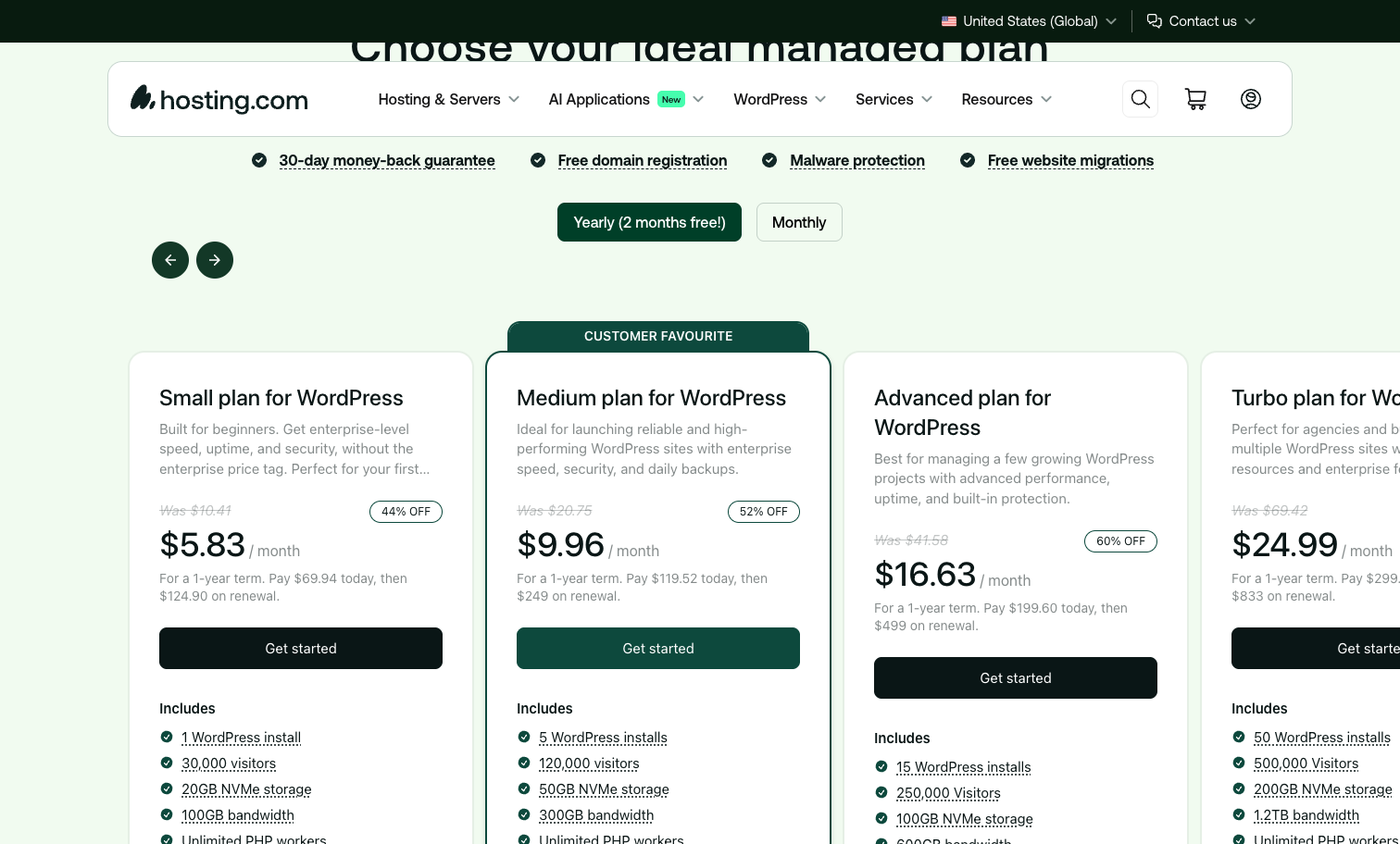
Pricing (as of 2026): The entry WordPress plan, called Small, is $5.83/mo intro on the annual term (billed $69.94 for the year), renewing at $124.90/yr, which works out to about $10.41/mo. It includes 1 website, 15GB NVMe storage, a free domain for a year, free SSL, Cloudflare CDN, and manual backups on entry; there is no email on the entry tier. The Medium, Advanced, and Turbo tiers step up from there. Independent monitoring put six-month uptime near 99.87%, below SiteGround. Prices change, so verify the current intro and term.
Best for: Speed-focused WordPress and developer users who do not need beginner hand-holding.
10. Kinsta: Best premium managed WordPress
Kinsta is the premium end of this list. It does one thing, managed WordPress on Google Cloud’s premium network, and does it for people who will pay for performance and hands-off operation. It is not a budget beginner host, and it does not pretend to be.
What’s new in 2026: Kinsta continues to run isolated container-based WordPress on Google Cloud with an enterprise Cloudflare CDN spanning 300-plus locations, plus an Nginx, MariaDB, PHP 8, and Redis stack. The emphasis is speed, isolation, and reliability rather than bundled extras.
Pros:
- Isolated containers on Google Cloud’s premium network for consistent performance.
- Enterprise Cloudflare CDN across 300-plus locations included.
- Fully managed: the platform handles the server side so you focus on the site.
- Well-suited to agencies and performance-sensitive WordPress projects.
Cons:
- Far pricier than shared hosting, starting at $30 to $35/mo for one site.
- No free domain and no included email.
- Tight visit and storage limits on the entry plan given the price.
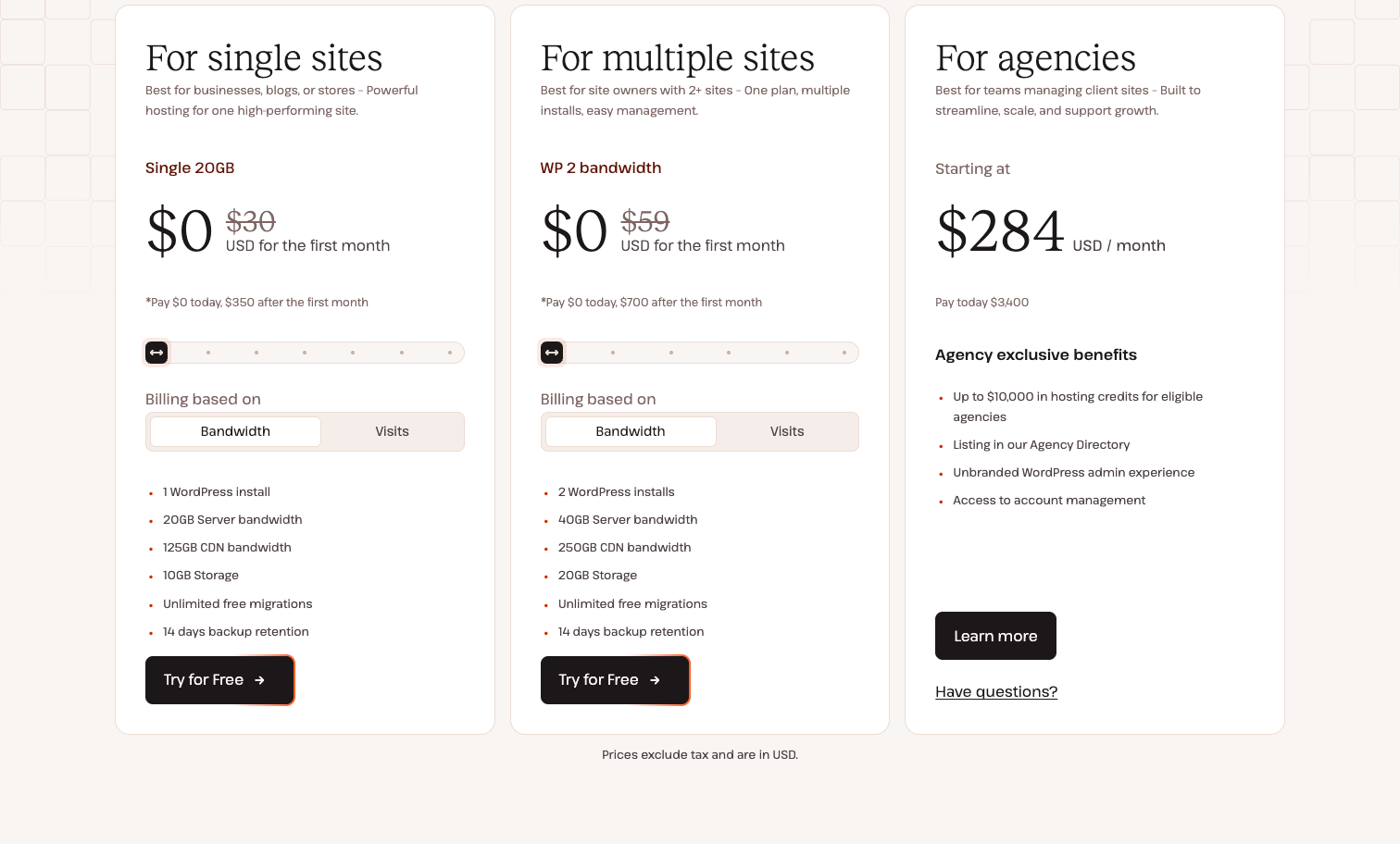
Pricing (as of 2026): The Starter plan is $35/mo, or about $30/mo paid annually at $350/yr, with the first month free. It covers 1 site, 10GB storage, roughly 25,000 monthly visits, and 125GB of CDN. The Pro plan is $70/mo for 2 sites and about 65,000 visits. There is no free domain or email. Kinsta offers a 30-day money-back guarantee. Prices change.
Best for: Businesses and agencies that want premium managed WordPress and will pay for it.
Also considered (and why we didn’t rank them)
- GoDaddy: the most recognized brand in hosting, but weak value and a heavy upsell reputation kept it off the ranked list.
- WP Engine: strong premium managed WordPress, but pricing that starts around $25 to $30/mo makes it overkill for the beginners and small businesses this guide serves.
- ScalaHosting: interesting managed VPS with its own free SPanel control panel, but more of a step-up option than a first host.
- InMotion: solid US-based support and a full feature set, but it did not clearly beat the ten above on value or speed.
- Nexcess / Liquid Web: capable enterprise and ecommerce hosting, but priced and positioned for larger operations than most readers here.
Buyer’s guide: how to choose web hosting in 2026
The ranking answers “which host,” but the questions below answer “which kind of hosting,” which you should settle first.
Shared vs managed WordPress vs cloud hosting
Shared hosting puts your site on a server with many others and keeps the cost low. It is the right starting point for most new sites, blogs, and small-business pages. Managed WordPress hosting is tuned specifically for WordPress: automatic updates, caching, and security are handled for you, which is worth it once your site matters to your income. In 2026 the line blurred, because cheap shared plans now bundle managed WordPress features. Cloud hosting, like Cloudways, spreads your site across scalable infrastructure and suits projects that expect real growth or traffic spikes. Start shared, move up when you feel the ceiling.
What to actually look for
Ignore the biggest number on the marketing page and check these instead. First, the renewal price, not the intro price, because that is what you pay long-term. Second, storage type and amount: NVMe is the 2026 baseline and it is faster than plain SSD. Third, what is actually included, meaning free SSL (assume yes), free domain for a year, backups and how often they run, and a CDN. Fourth, the control panel, because hPanel and Site Tools are friendlier for beginners than raw cPanel. Fifth, support: is there a phone line, chat, or only a chatbot? If you are new to all of this, our step-by-step guide to making a website walks through the whole process, and if you are weighing a builder instead, compare the best website builder tools.
The renewal-price trap and how to minimize it
This is the single most important thing to understand about hosting pricing. The low monthly rate you see is a first-term promotion. When that term ends, the price renews at the standard rate, which can be 150% to more than 500% higher. SiteGround’s StartUp goes from $2.99 to $17.99, GreenGeeks from $2.95 to $13.95, and IONOS from $1 to $12, for example. To minimize the sting: lock in the longest term you are comfortable with, since the promo covers the whole first term (a 48-month sign-up delays the jump for four years). Set a calendar reminder before renewal. Compare renewal rates, not intro rates, when you shop; Namecheap’s mild $1.98-to-$4.48 move is a real advantage here. And if the renewal is unacceptable when it hits, you can migrate elsewhere and start a new intro rate.
Do you need a free domain?
A free domain for the first year is a nice saving, worth roughly $10 to $15, and most hosts here include one. But it is not a reason to choose a worse host, since a domain is cheap to buy separately. Two things to watch: the domain is only free for year one and renews at the registrar’s standard rate, and some hosts (SiteGround, Cloudways, Kinsta) do not bundle one at all. If you would rather keep your domain independent of your host, registering it separately is perfectly reasonable and can make switching hosts later simpler.
Can you migrate later?
Yes, and you should not feel locked in. Many hosts offer free migration, so moving an existing WordPress site to a new host is routine. That is exactly why the renewal trap is survivable: if your host’s renewal rate is not worth it, you can move to a competitor and pick up a fresh intro price. WordPress in particular is portable, so your content is never hostage to one company. Factor migration into your thinking about total cost, which our breakdown of what a website actually costs covers in more detail.
Conclusion
For most people, Hostinger is the best web host in 2026: it is the cheapest way onto a fast, modern, beginner-friendly platform, and its included tools cover what a new site needs. If your project is specifically a WordPress site and you want the most guided setup, Bluehost is the safer default. Pick SiteGround if support quality and managed WordPress matter more than price. Choose DreamHost if you want flexible, no-lock-in billing, IONOS if you are a small business chasing the lowest price with phone support, and Namecheap if predictable renewals are your priority. GreenGeeks is the eco pick, Hosting.com the speed pick, Cloudways the choice for growth, and Kinsta the premium managed option. Whichever you pick, check the renewal rate before you buy, because in 2026 that is the number that decides whether a host is actually a good deal.