Last updated: July 29, 2026. Some links below are affiliate links. If you buy through them, WebsiteSetup may earn a commission at no extra cost to you. It never changes how we rank a host.
Short answer: Hostinger is the best WordPress hosting overall in 2026, the cheapest true managed WordPress on a fast LiteSpeed stack. Pick Bluehost or SiteGround for beginner-friendly managed WordPress, Kinsta or WP Engine for premium and agency work, Rocket.net for raw speed, Cloudways for flexible cloud scaling, and Nexcess for WooCommerce stores.
WordPress hosting in 2026 is a different market than it was two years ago. Managed WordPress features that once cost extra, like automatic core updates, server-level caching, and staging, now ship on entry plans. NVMe storage is the baseline. The one thing that has not improved is honesty about price: most hosts advertise a cheap first-term rate and quietly renew it at two to five times that number. This guide ranks eight WordPress hosts on WordPress-specific criteria, states every verified US price including the renewal, and points you to the right tier for your project. If you want to build the site itself afterward, our walkthrough on creating a WordPress website picks up where this leaves off.
Only need cheap general hosting and not a WordPress-tuned plan? Start with our general web hosting roundup instead. This page is the WordPress-specific sibling to that one, so the lineup leans on managed WordPress plans and WordPress-only hosts like Kinsta, WP Engine, Rocket.net, and Nexcess that do not appear there.
How we tested and ranked WordPress hosts
We rank on criteria that matter for WordPress specifically, not the generic disk-space-and-domains checklist you see on shared-hosting pages. Seven things carry the most weight:
- Managed updates: does the host apply WordPress core, plugin, and PHP updates for you, and does it back you up before it does?
- WordPress caching: server-level caching such as LiteSpeed, EverCache, Object Cache Pro, or SG Optimizer, not just a bolt-on plugin.
- PHP workers: how many concurrent PHP processes the plan allows, which decides how a dynamic or WooCommerce site holds up under load.
- Staging: one-click staging and, on the premium tiers, separate development and production environments.
- Visit caps and overages: the monthly visit ceiling and what happens when you cross it, because per-visit overages can bite hard on a spike.
- WordPress.org status and support: whether the host is officially recommended, and whether real WordPress experts answer support around the clock.
- Honest renewal pricing: the gap between the intro rate and the ongoing rate, weighted heavily.
We do not run a year-long speed and uptime lab, so we do not pretend to publish our own numbers. Any performance claim below is attributed: independent 2026 testing from WPShout, HostingStep, and Tooltester, plus each host’s own published SLA. When a figure comes from one of those labs, we say so, and we never present someone else’s measurement as ours. All prices are current US rates checked on July 29, 2026, for the entry WordPress plan at its best long-term rate. Hosting prices move often, so confirm the current number before you buy.
The renewal-price math, spelled out
This is the single most useful table on the page, and the one most competitors bury. The chart below compares what each host charges to sign up against what it charges to stay, because the renewal is the price you actually live with.
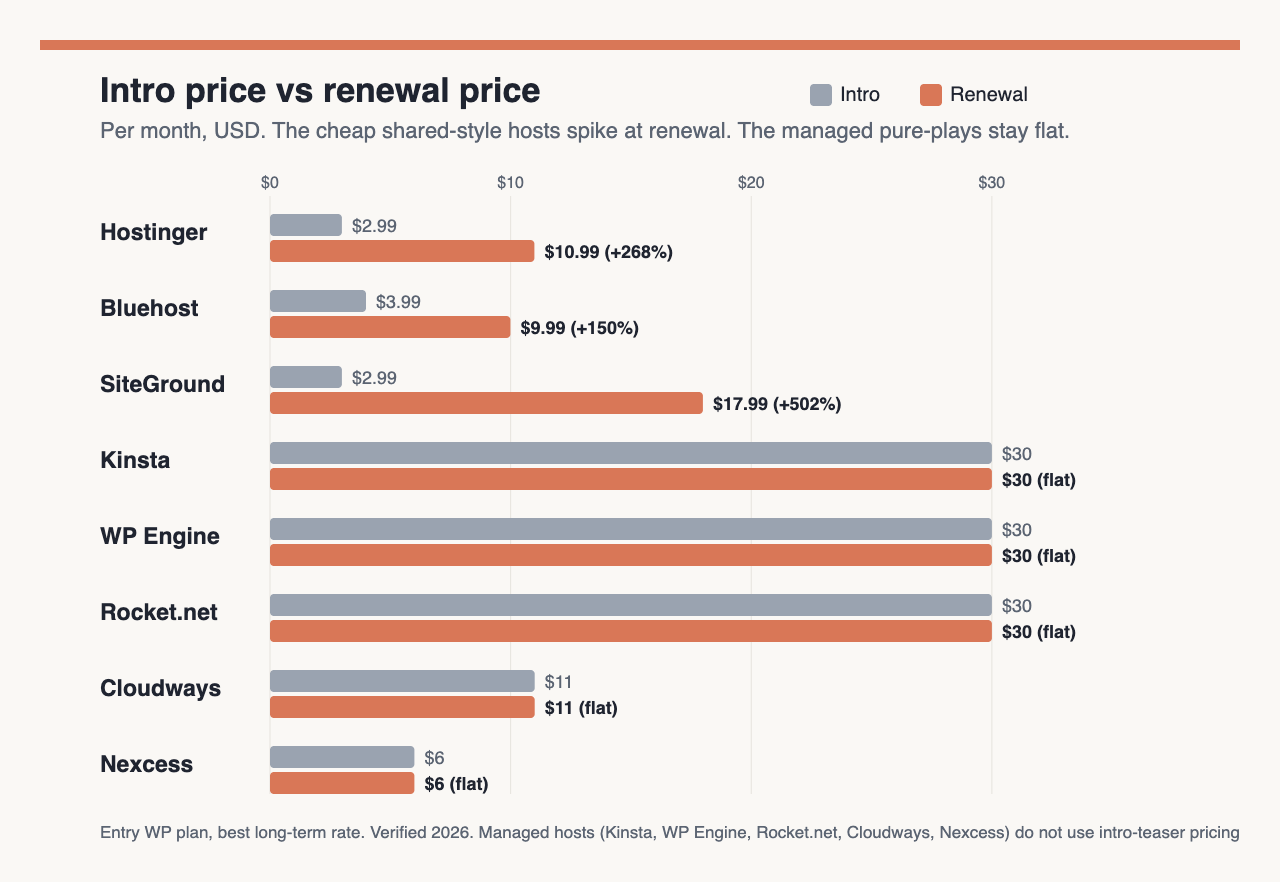
Two patterns stand out. The cheap shared-style hosts (Hostinger, Bluehost, SiteGround) win on the intro rate and then jump hard, SiteGround most of all, from $2.99 to $17.99, a climb of roughly 500%. The premium and cloud hosts (Kinsta, WP Engine, Rocket.net, Cloudways, Nexcess) cost more up front but hold their price, with no intro-only discount waiting to expire. Read the renewal column, not the intro column, when you decide.
| Host | Best for | Intro $/mo | Renewal $/mo | Term | Free domain | Money-back |
|---|---|---|---|---|---|---|
| Hostinger | Best overall value | $2.99 | $10.99 | 48-mo | Yes (1 yr) | 30 days |
| Bluehost | Beginners | $3.99 | $9.99 | 36-mo | Yes (1 yr) | 30 days |
| SiteGround | Support | $2.99 | $17.99 | 12-mo | Yes (bundled) | 30 days |
| Kinsta | Premium managed | $30.00 | $30.00 (flat) | Annual | No | 30 days |
| WP Engine | Agencies & devs | $30.00 | $30.00 (flat) | Annual | No | 60 days |
| Rocket.net | Raw speed | $1 first mo | $30.00 | Monthly/annual | No | 30 days |
| Cloudways | Cloud scaling | $11.00 | $11.00 (flat) | Pay-as-you-go | No | None (3-day trial) |
| Nexcess | WooCommerce | $6.00 | No intro trap | Monthly to 3-yr | No | 30 days |
The table is the summary. The reviews below explain who each host is really for, what changed in 2026, and where the catch sits.
1. Hostinger: Best overall value and cheapest managed WordPress
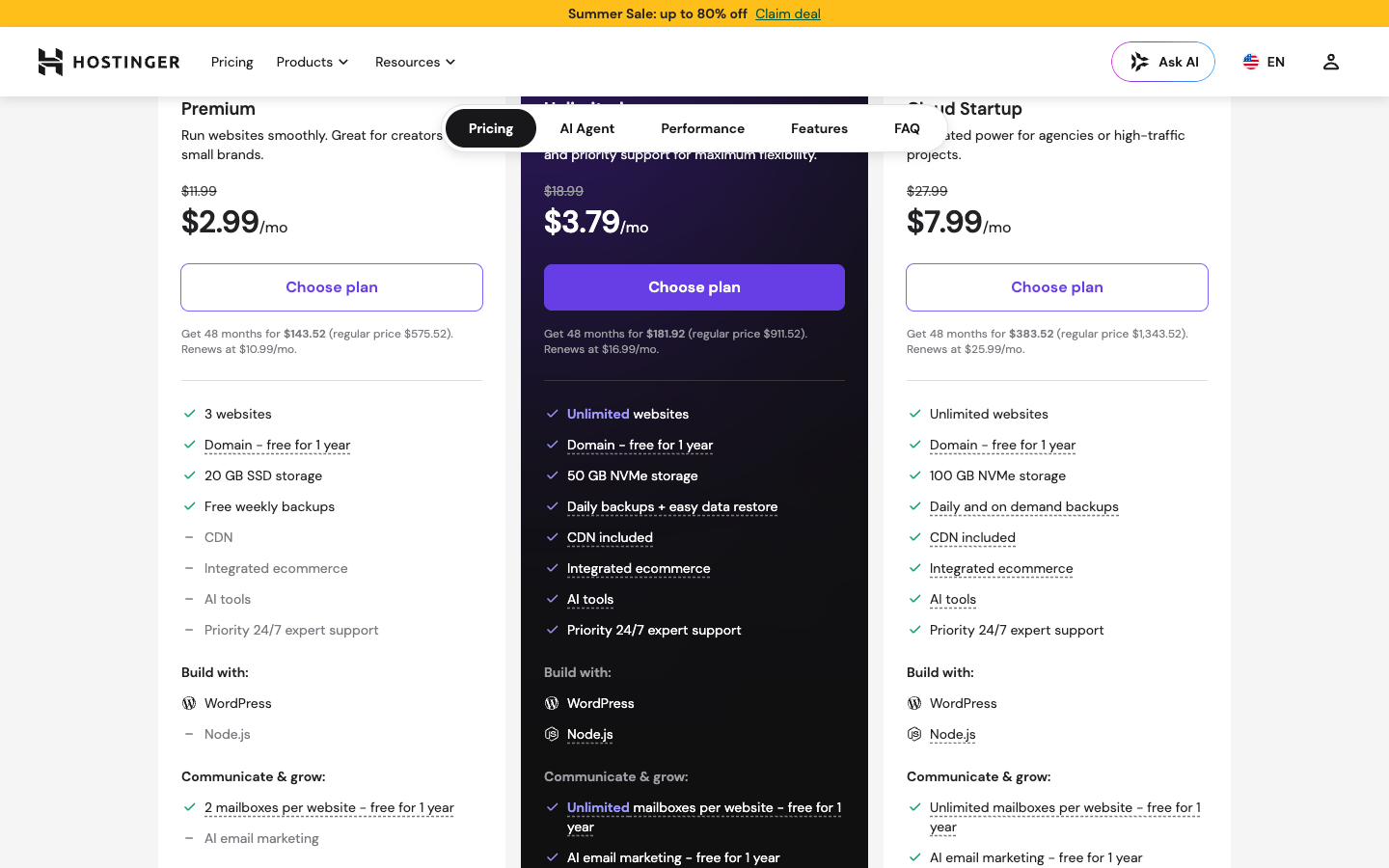
Hostinger is our pick for most people because it delivers genuinely managed WordPress at the lowest entry price in this roundup. The screenshot above shows its current Managed WordPress tiers and the intro rates that make it the value leader. The Premium plan runs $2.99/mo on the 48-month term and renews at $10.99/mo, so plan for a jump of about 3.7 times once the first term ends. Premium covers 3 websites, 20GB of SSD storage (NVMe appears on higher tiers), roughly 25,000 monthly visits, a free domain for year one, free SSL, free weekly backups, and a free Cloudflare CDN. The stack pairs LiteSpeed with AMD EPYC hardware, and the hPanel control panel is easier for a first-timer than cPanel. Stepping up, Business runs $3.79 renewing at $16.99, and Cloud Startup runs $7.99 renewing at $25.99, adding NVMe, daily backups, and more sites. New for 2026, Hostinger bundles its Kodee AI agent, an AI Troubleshooter, the Horizons AI app builder, and WooCommerce out of the box.
Pros:
- The cheapest true managed WordPress plan you can buy, with a free domain, SSL, and CDN included.
- The deepest bundled AI toolset of the group, plus a genuinely global data-center footprint.
- hPanel is beginner-friendly, which matters more day to day than most spec sheets.
Cons:
- The renewal lands near 3.7 times the intro, and the lowest rate needs a 48-month commitment.
- Entry-plan backups run weekly, not daily.
- Support is AI-first through Kodee with no phone line, so reaching a human takes patience.
Best for: Beginners and small WordPress sites that want the lowest all-in cost on a fast, modern platform.
2. Bluehost: Best for beginners
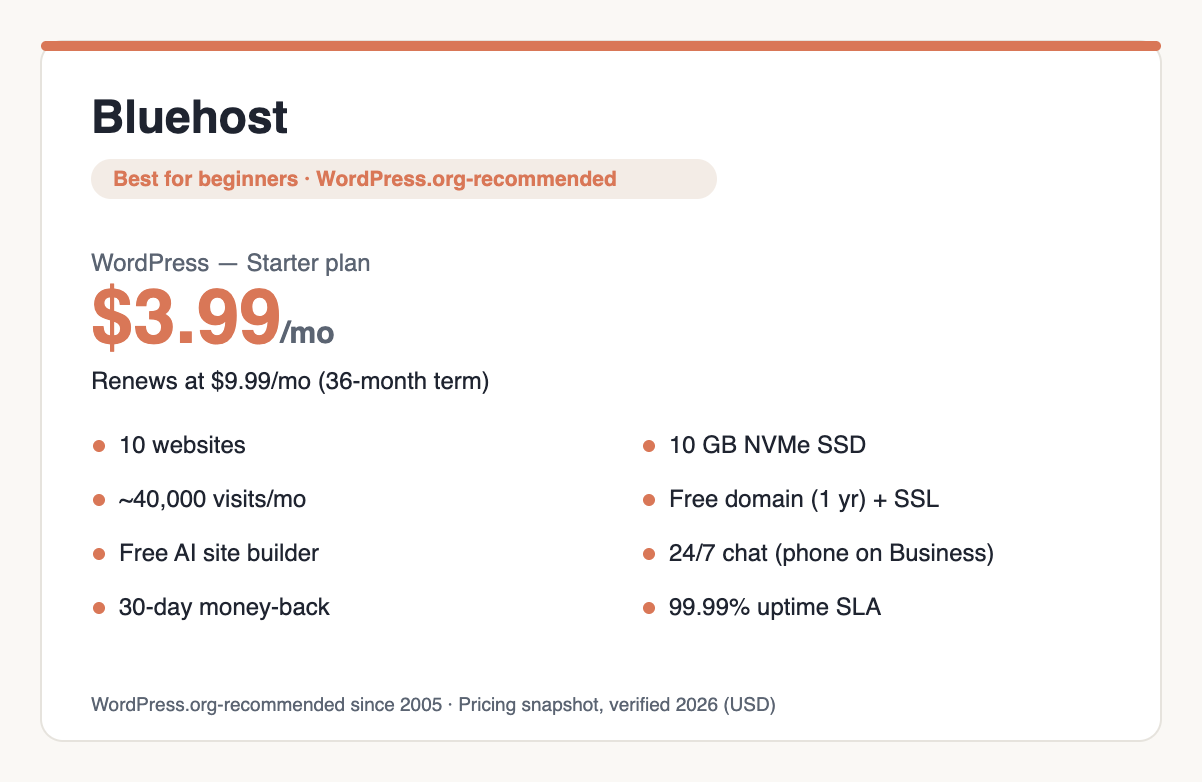
Bluehost has been on the short list of hosts WordPress.org officially recommends since 2005, and that endorsement is the reason it stays the safe default for first-timers. The plan card above shows the WordPress lineup. The Starter plan is $3.99/mo on the 36-month term and renews at $9.99/mo, roughly a 150% increase, one of the milder jumps among the budget hosts here. Starter includes up to 10 websites, 10GB of NVMe storage, around 40,000 monthly visits, a free domain for year one, free SSL, a free CDN, weekly backups, staging, SSH and WP-CLI access, and the free version of Yoast SEO. Business runs $6.99 renewing at $13.99, and eCommerce Essentials runs $14.99 renewing at $21.99. Bluehost cites WPShout testing showing a 0.35-second US load time, which we pass along as the host’s attributed figure rather than our own. The company backs its plans with a 99.99% uptime SLA, and its AI Site Creation builder is now live. New for 2026, phone support opens up from the Business tier.
Pros:
- Official WordPress.org recommendation, the strongest trust signal a beginner can lean on.
- Free domain, free AI site builder, and free Yoast, with a comparatively gentle renewal.
- Staging, SSH, and WP-CLI on the entry plan, which is unusual at this price.
Cons:
- Renewal roughly doubles the intro rate.
- Owned by Newfold, and the support experience leans heavily on upsells.
- Entry backups run weekly.
Best for: First-time WordPress users who want the most guided, officially endorsed path. If a blog is your goal, our guide to starting a blog pairs well with it.
3. SiteGround: Best customer support
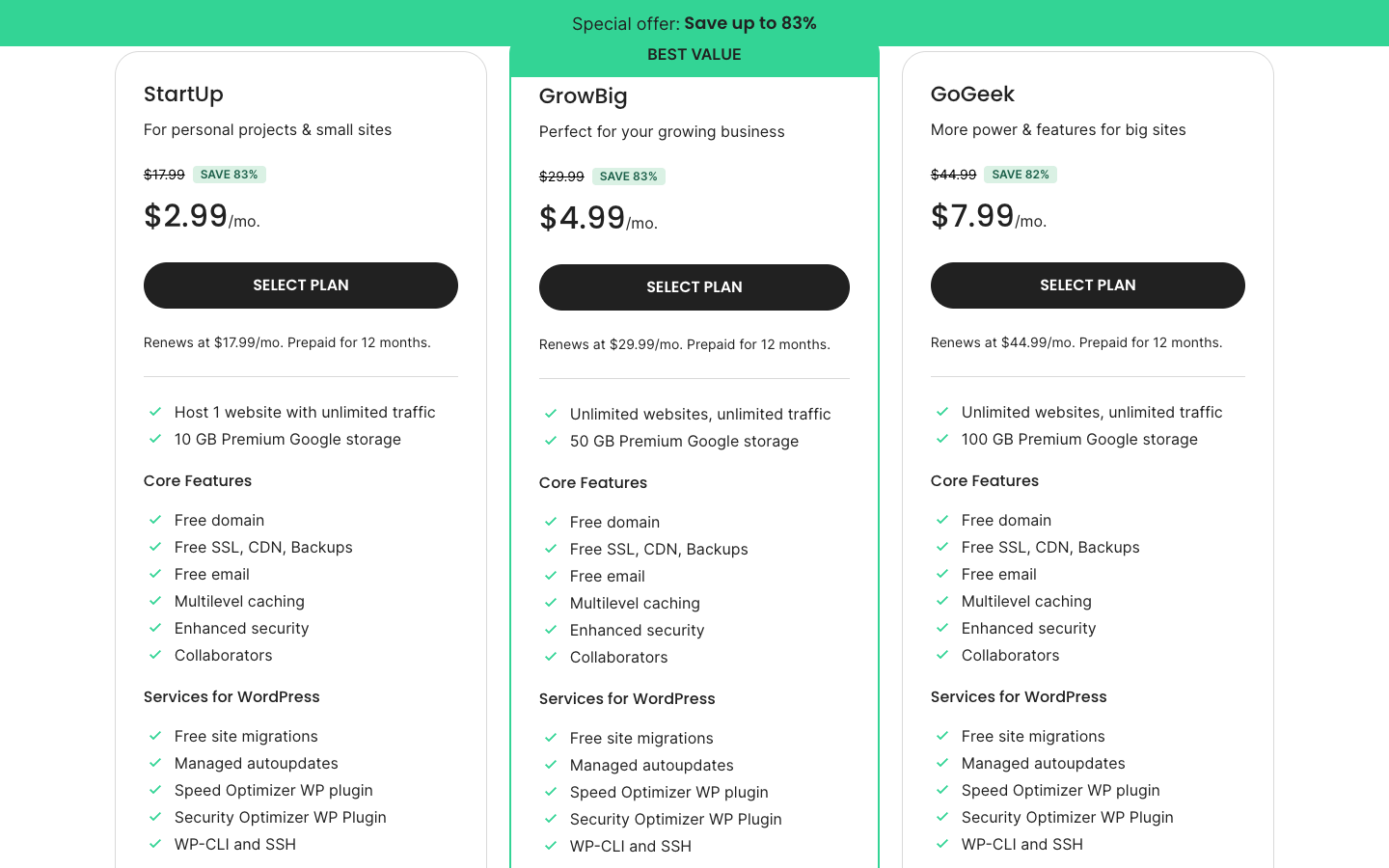
SiteGround is the host people name when support quality is the priority, and the screenshot above shows the managed WordPress plans that back that reputation. Its help desk is the most consistently praised in this roundup, with Tooltester reporting live-chat answers in about four minutes and phone waits under five. The catch is renewal. StartUp is $2.99/mo on the 12-month term and renews at $17.99/mo, a climb of roughly 500%, the steepest here, and SiteGround does disclose it openly. StartUp covers 1 website, 10GB of Google Cloud SSD storage (not NVMe), unlimited traffic with soft guidance around 10,000 visits, a free domain now bundled, free SSL, a free CDN, daily backups with 30-day retention, and unlimited email. GrowBig runs $4.99 renewing at $29.99, and GoGeek runs $7.99 renewing at $44.99. The platform uses a custom Ultrafast PHP setup and NGINX Direct Delivery, and in 2025 it added an AI Agent for WordPress, though it drew criticism for auto-installing that plugin on customer sites.
Pros:
- The best support in the group, on both chat and phone.
- Daily backups, a built-in CDN, unlimited email, and a free domain on every plan.
- Runs on Google Cloud with a genuinely fast custom PHP stack.
Cons:
- The renewal is the steepest on this list.
- Tight storage, visit, and inode caps on the entry plan.
- Storage is SSD, not NVMe.
Best for: People who value responsive human support and hands-off WordPress management and can absorb the renewal.
4. Kinsta: Best premium and high-performance managed WordPress
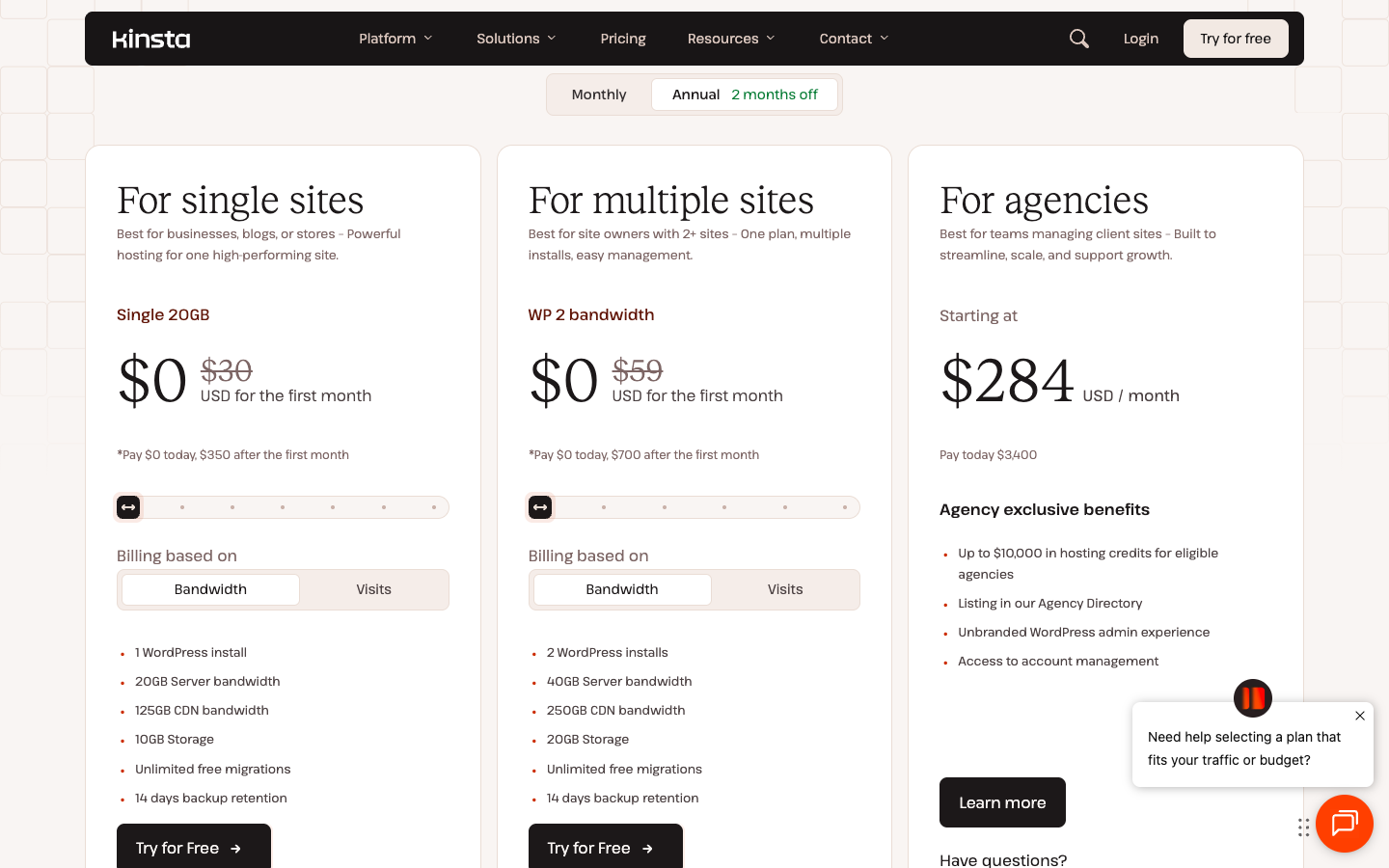
Kinsta sits at the premium end and does one thing, managed WordPress on Google Cloud’s premium tier, for people who will pay for speed and hands-off operation. The screenshot above shows the entry plan. The Single 20GB plan is $30/mo billed annually, the first month free, then $350/yr, with no renewal hike at all (monthly billing is $35/mo). That flat, transparent pricing is a real advantage against the intro-to-renewal traps elsewhere on this page. The entry plan covers 1 WordPress install, 20GB of bandwidth, 10GB of storage, and 125GB of CDN, with billing you can toggle between bandwidth and visits, 14-day backup retention, free staging, and unlimited migrations. What sets Kinsta apart is the infrastructure on the entry plan: Google Cloud C2 and C3D compute, Cloudflare Enterprise CDN across 260-plus locations, an optional Redis add-on, and a built-in APM tool for chasing down slow queries. The ladder climbs to Agency plans at $284/mo. There is a 30-day money-back guarantee and 24/7 expert chat, though no phone line.
Pros:
- Enterprise Google Cloud and Cloudflare Enterprise CDN on the entry plan.
- Flat, transparent pricing with no intro-to-renewal trap.
- Top measured performance among premium managed hosts.
Cons:
- The $30 entry price is steep for a single site.
- No free domain and no email.
- Resource caps on the entry tier, and no phone support.
Best for: Businesses and agencies that want premium managed WordPress and predictable pricing.
5. WP Engine: Best for agencies and developers
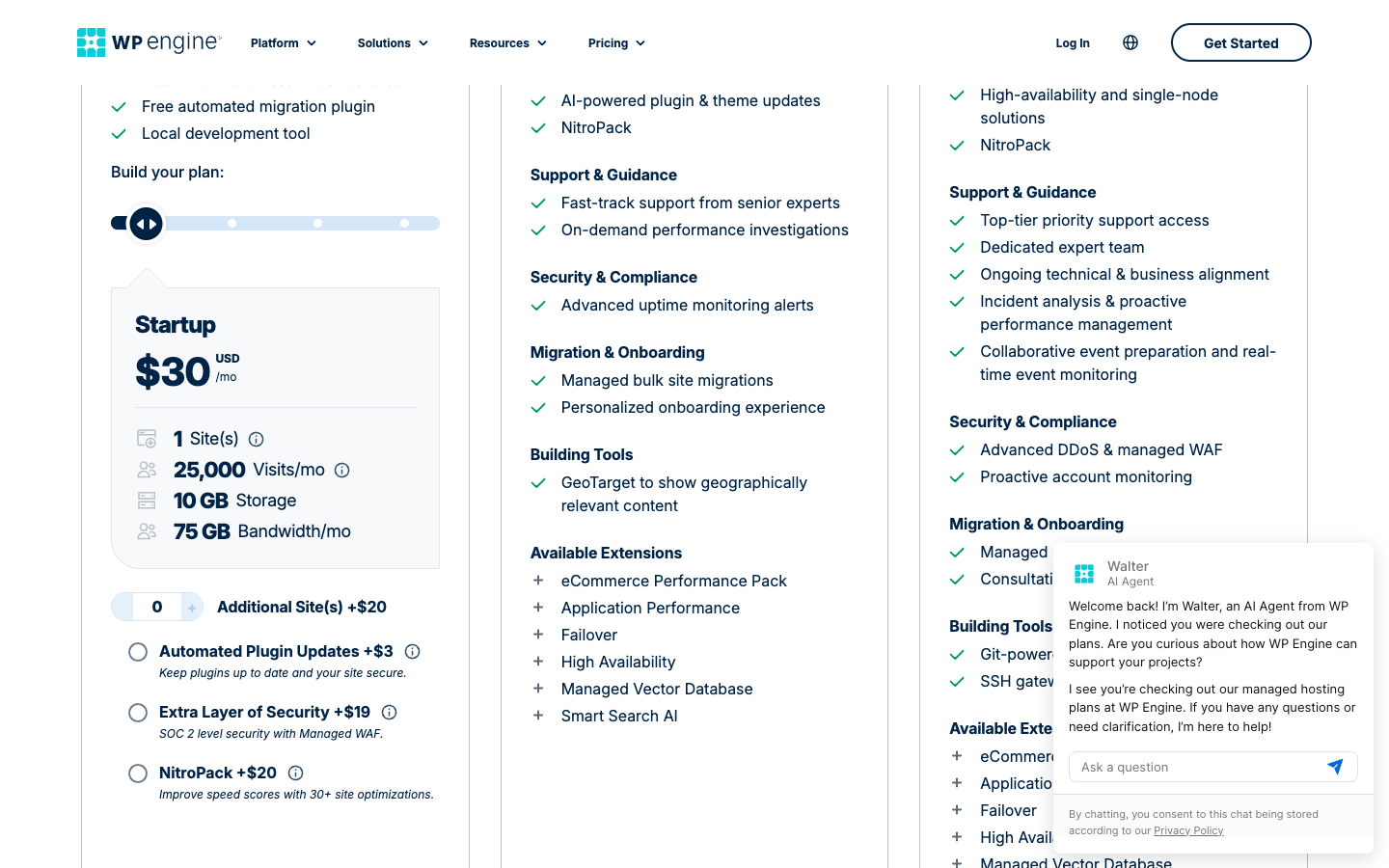
WP Engine is built for the people who build WordPress sites for a living, and the plan screenshot above reflects that developer-first focus. The Startup plan is $30/mo, billed as $350/yr on the annual term, roughly $29/mo, with no fake intro discount that expires. It covers 1 site, 25,000 visits per month, 10GB of storage, and 75GB of bandwidth. Cross the visit cap and you pay $2 per additional 1,000 visits, and an extra site is $20/mo, so the pricing rewards predictable traffic. The developer tooling is the draw: daily backups with 40-day retention, one-click staging with separate development and production environments, automated WordPress and PHP updates, EverCache at the server level, an included CDN, SSH access, and the Genesis framework with StudioPress themes bundled free. It runs on Google Cloud and AWS, and its Atlas platform supports headless WordPress with React. The money-back window is a generous 60 days, longer than anyone else here.
Pros:
- The best development and agency tooling of the group, including staging, transferable installs, Genesis, and headless Atlas.
- Predictable pricing and a long 60-day guarantee.
- 40-day backup retention.
Cons:
- Expensive, and the hard 25,000-visit cap carries per-visit overages that sting on a spike.
- No free domain and no email.
- Only 10GB of storage on the entry plan.
Best for: Agencies and developers who need serious staging, environments, and headless tooling.
6. Rocket.net: Best for raw speed
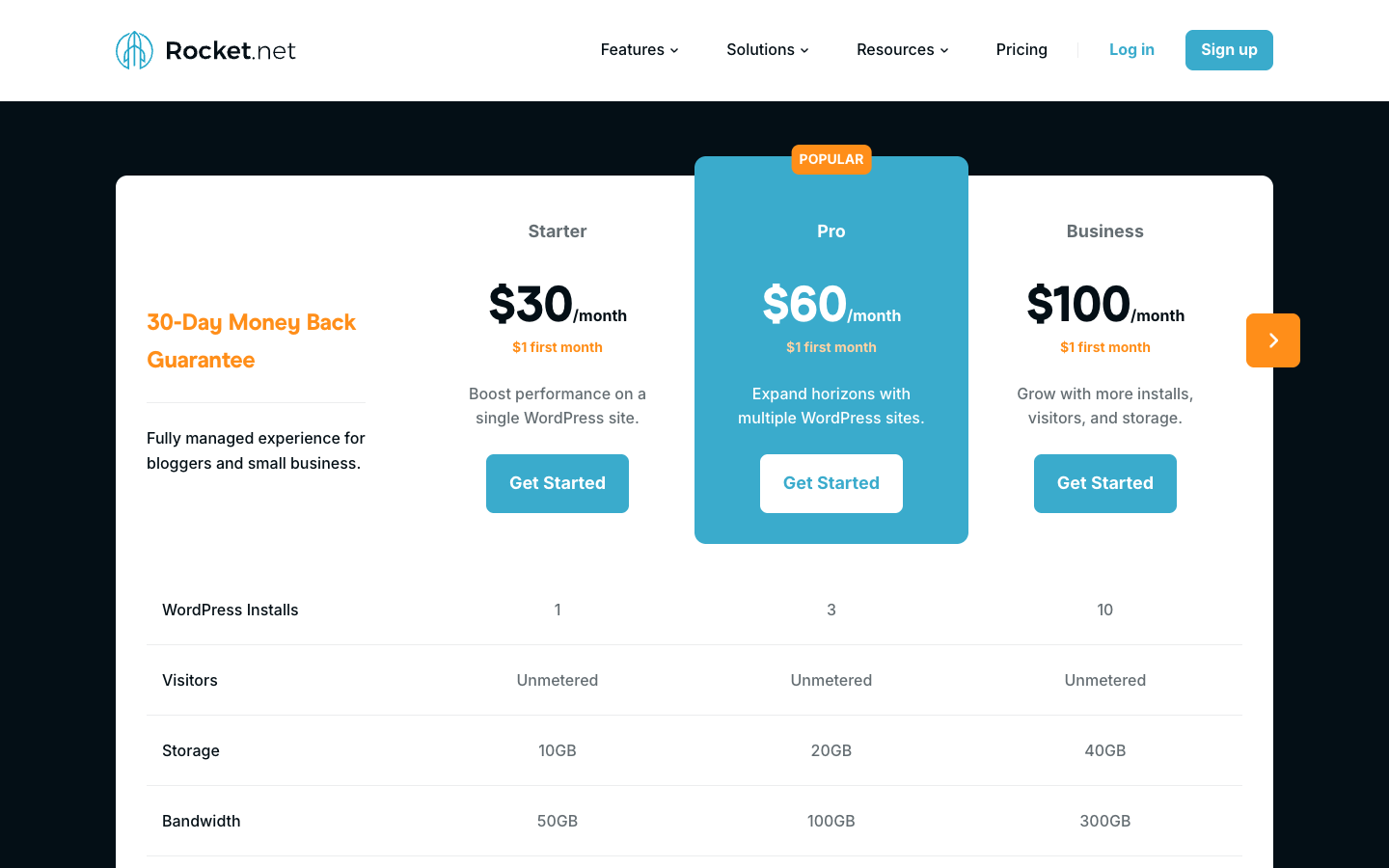
Rocket.net is the speed specialist, and the plan screenshot above shows the Starter tier that gets you onto its edge network. HostingStep’s multi-year speed monitoring ranks Rocket.net as the fastest real-world WordPress host it tracks, a result we attribute to that lab rather than claim ourselves. The Starter plan is $30/mo, with a $1 first-month promo and roughly $25/mo on annual billing, and it covers 1 WordPress install, 10GB of storage, unmetered visitors, 50GB of bandwidth, daily backups with 30-day retention, and free SSL. The reason it is fast is what comes bundled: Cloudflare Enterprise on every plan, across 330-plus edge locations with an enterprise WAF, plus Object Cache Pro and the premium WP Rocket plugin included free, and unlimited PHP workers. Standalone, that Cloudflare Enterprise integration alone would run well over $200/mo. The ladder climbs through Pro at $60, Business at $100, and Expert at $200. There is a 30-day money-back guarantee and a 99.99% uptime commitment.
Pros:
- The fastest real-world WordPress performance in independent testing.
- Cloudflare Enterprise, WP Rocket, and Object Cache Pro all included free.
- Unmetered visitors, so no per-visit overage anxiety.
Cons:
- Premium price for a single site with 10GB of storage.
- No email, and it is WordPress-only.
- A lesser-known brand than the big names here.
Best for: Performance-sensitive WordPress sites that want the fastest edge delivery without tuning it themselves.
7. Cloudways: Best for flexible cloud scaling
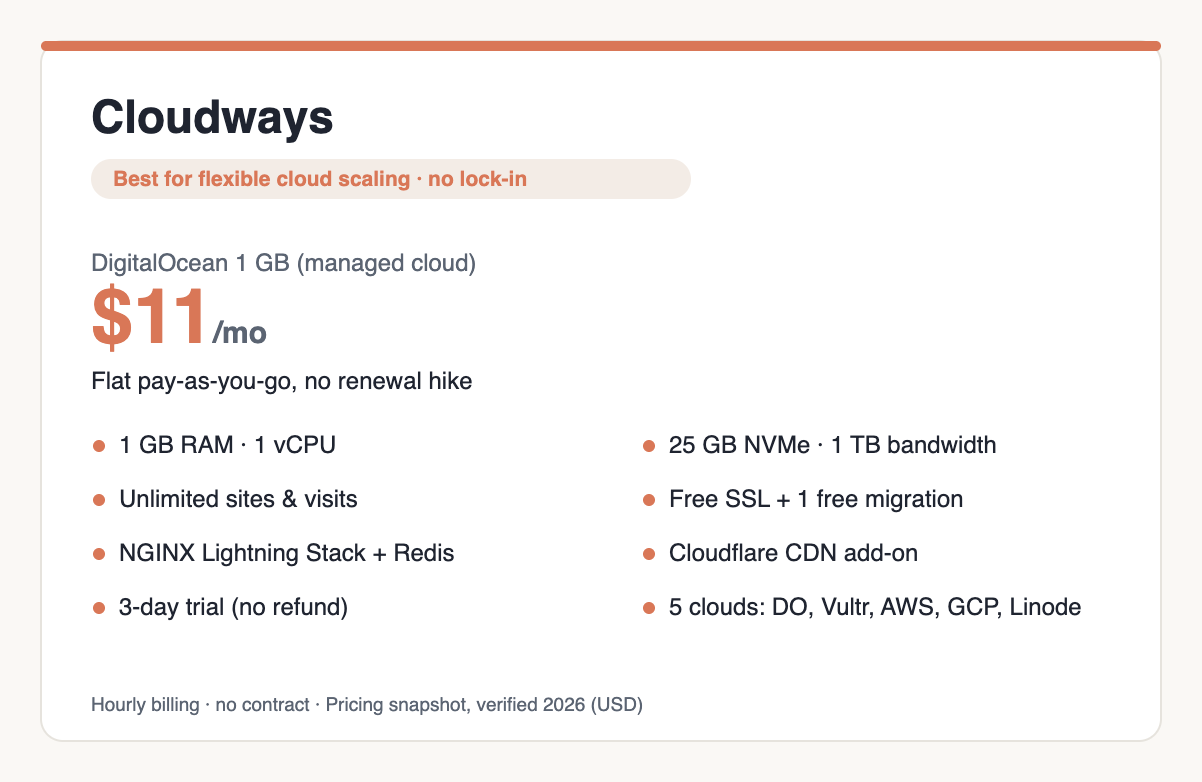
Cloudways is the outlier here by design, and the plan card above shows why. It is not shared hosting; it is managed cloud hosting that sits on top of providers you choose, including DigitalOcean, Vultr, Linode, AWS, and Google Cloud. You pay by the hour with no contract and no renewal spike. The cheapest DigitalOcean plan starts at $11/mo for the standard 1GB tier ($14/mo for the premium Micro), and because billing is usage-based, the price stays flat with no renewal jump. Micro gives you 1GB of RAM, 1 vCPU, 25GB of NVMe storage, 1TB of bandwidth, unlimited visits, and unlimited websites. The larger DigitalOcean tiers run Small at $28, Medium at $54, and Large at $99. Free SSL, one free migration, free staging and cloning, and automated backups come standard, while a CDN is a $4.99-per-domain Cloudflare add-on and email is an add-on too. The stack uses an NGINX Lightning layer with Varnish and Redis. There is no money-back guarantee, only a 3-day free trial, and the separate Cloudways Autonomous product handles autoscaling WordPress.
Pros:
- Five cloud providers to choose from, with pay-as-you-go billing and no lock-in or renewal trap.
- Scales cleanly for traffic spikes and growth.
- NVMe storage and unlimited sites even on the entry plan.
Cons:
- No free domain and no included email; both cost extra.
- No money-back guarantee, just a 3-day trial.
- Owned by DigitalOcean, and CDN plus add-ons raise the real monthly cost.
Best for: Developers, agencies, and growing sites that want cloud power without managing servers.
8. Nexcess: Best for WooCommerce and scaling stores
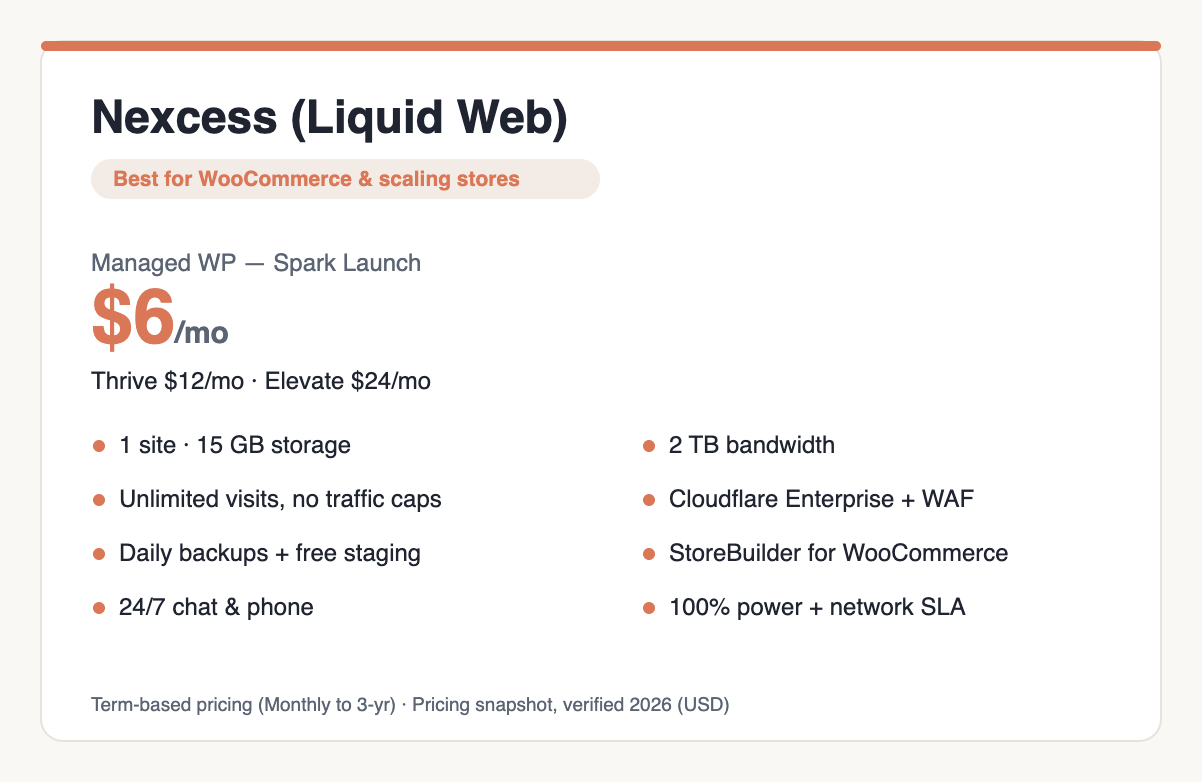
Nexcess, now branded Liquid Web by Nexcess, is the purpose-built pick for WooCommerce and growing online stores, and the plan card above shows its managed WordPress tiers. The entry Spark plan starts at $6/mo, with the lowest rate unlocked by a multi-year term (Monthly, 1-year at 17% off, 2-year at 25%, or 3-year at 33%), and there is no intro-only rate waiting to spike. It steps up to Thrive at $12/mo, the popular tier, and Elevate at $24/mo. Spark covers 1 site, 15GB of storage, 2TB of bandwidth, 10 PHP workers, unlimited visits, and, crucially for a store, no traffic caps or overage charges. Higher tiers add autoscaled PHP workers. Every plan gets Cloudflare Enterprise, DDoS protection, a WAF, free staging, daily backups, and a 100% power-and-network SLA. For stores specifically, Nexcess offers dedicated managed WooCommerce plans with StoreBuilder, object caching, autoscaling on spikes, and sales-performance monitoring, backed by 24/7 chat and phone support and a 30-day money-back guarantee.
Pros:
- Purpose-built WooCommerce and ecommerce infrastructure with autoscaling and StoreBuilder.
- Unlimited visits with no traffic caps or overages, plus Cloudflare Enterprise on every plan.
- Phone support and a 100% SLA.
Cons:
- Pricier than generic shared hosting for a simple blog.
- The brand is mid-transition from Nexcess to Liquid Web, which can confuse the buying flow.
- No free domain.
Best for: WooCommerce stores and sites expecting real traffic growth that cannot tolerate visit caps.
Best WordPress hosting for WooCommerce and online stores
A store is not a blog, and the hosting rules change once a checkout is involved. WooCommerce runs a lot of uncached, dynamic requests, cart pages, account pages, and live inventory that a page cache cannot serve, so PHP workers and database performance decide whether the site stays responsive during a sale. Two things matter more than raw front-page speed: enough PHP workers to handle concurrent shoppers, and object caching (Redis or Object Cache Pro) to keep the database from becoming the bottleneck.
Nexcess is the clearest fit here, since it is built around WooCommerce with autoscaling PHP workers, object caching, StoreBuilder, and no visit caps, so a viral product will not trip an overage. Cloudways is the flexible runner-up: its DigitalOcean Premium and larger tiers give you dedicated resources you can scale up on demand, with Object Cache Pro available, and its pay-as-you-go model suits seasonal traffic. SiteGround is the value option for a smaller store that wants managed simplicity, with WooCommerce preinstalled and good support, as long as you watch its visit ceilings. For a high-traffic store where budget is secondary, WP Engine and Kinsta both handle WooCommerce well on their higher tiers. Once your store is live, our guide to growing your website traffic covers what comes next.
How to choose WordPress hosting
The ranking answers which host. The questions below settle which kind of hosting you need, which you should decide first.
Managed WordPress vs shared hosting
Shared hosting puts your site on a server with many others and keeps the price low, and it is the right starting point for a new blog or small-business site. Managed WordPress hosting is tuned for WordPress specifically: it applies core, plugin, and PHP updates, runs server-level caching, and hardens security for you. In 2026 the line blurred because cheap shared plans from Hostinger and Bluehost now fold in managed WordPress features, so most beginners get the best of both at the entry price. Pure managed hosts like Kinsta and WP Engine take it further with isolated resources, deeper staging, and expert WordPress support. Start with a managed-leaning shared plan and move up when you feel the ceiling. If you are still deciding whether to build with WordPress at all, our step-by-step guide to making a website lays out the options.
When to pay for premium
Premium managed WordPress, meaning Kinsta, WP Engine, and Rocket.net, earns its price in three situations. The first is when the site makes money and downtime costs more than the hosting bill. The second is when traffic is high or spiky enough that PHP workers and edge caching decide whether pages load. The third is when you manage client sites and need staging, environments, and transferable installs to work efficiently. If your site is a hobby blog or a low-traffic brochure, premium is money spent on headroom you will not use, and a $3 to $10 managed shared plan is the smarter buy. You can always migrate up later.
The renewal trap
The low monthly rate you see is a first-term promotion, and when that term ends the price renews at the standard rate, which can run 150% to more than 500% higher. SiteGround’s StartUp goes from $2.99 to $17.99, and Hostinger’s Premium goes from $2.99 to $10.99. To blunt it, lock in the longest term you are comfortable with, because the promo covers the whole first term, then set a calendar reminder before the renewal date. Compare renewal rates, not intro rates, when you shop. And remember the flat-priced hosts (Kinsta, WP Engine, Cloudways, Nexcess) sidestep the trap entirely by charging the same rate on day one and year three.
Migrations: you are not locked in
WordPress content is portable, so you are never hostage to one host. Most hosts on this list offer free migration, and moving a WordPress site is routine. That is exactly why the renewal trap is survivable: if your host’s renewal is not worth it, you can move to a competitor and pick up a fresh intro rate, or move up to a premium host as the site grows. Factor migration into your thinking about total cost, and keep your domain registered somewhere you control to make switching simpler. For the wider category, our web hosting hub covers the fundamentals.
Other WordPress hosts we considered
- DreamHost (DreamPress): WordPress.org-recommended, independent, and upsell-free, with NVMe storage, Bunny CDN, and staging, a solid pick if you prefer a no-nonsense brand.
- Pressable: Automattic-owned managed WordPress from about $25/mo, with Jetpack and a global edge cache bundled, and an agency-friendly setup.
- Flywheel: designer and agency-focused managed WordPress under WP Engine, with the excellent Local development app.
- Namecheap EasyWP: the cheapest managed WordPress around, roughly $5.74 at renewal, on NVMe with about 50,000 visits, though it includes no email.
- IONOS Managed WordPress: around $1/mo in year one rising to $8-plus at renewal, cheap for a small-business site but with thin support.
- GoDaddy Managed WordPress: the most recognized brand, now with Airo AI, but weak value and a heavy upsell reputation.
- WordPress.com: Automattic’s fully hosted WordPress, the simplest way to run the software but with less control than self-hosted plans.
WordPress hosting FAQ
What is the best WordPress hosting?
Hostinger is the best WordPress hosting overall in 2026. It offers genuinely managed WordPress on a fast LiteSpeed and NVMe stack at the lowest entry price of any host we recommend, starting at $2.99/mo. Beginners who want an officially endorsed path should look at Bluehost, and anyone prioritizing support should consider SiteGround.
What is the cheapest WordPress hosting?
Hostinger’s Managed WordPress Premium plan at $2.99/mo is the cheapest true managed WordPress from a host we recommend, though it renews at $10.99/mo. Namecheap EasyWP is cheaper at renewal, around $5.74/mo, but includes no email and thinner features. Read the renewal rate, since that is what you pay long-term.
What is the fastest WordPress hosting?
Rocket.net is the fastest WordPress host in independent testing, with HostingStep’s multi-year speed monitoring ranking it first. It bundles Cloudflare Enterprise across 330-plus edge locations, Object Cache Pro, and WP Rocket on every plan, starting at $30/mo. Kinsta is a close premium alternative on Google Cloud’s premium network.
What is the best managed WordPress hosting?
Kinsta is the best premium managed WordPress host, running isolated containers on Google Cloud with Cloudflare Enterprise CDN and flat $30/mo pricing. WP Engine is the better fit for agencies and developers thanks to its staging, environments, and Genesis tooling. Both handle updates, caching, and security for you.
What is the best WordPress hosting for WooCommerce?
Nexcess is the best WordPress hosting for WooCommerce, built for stores with autoscaling PHP workers, object caching, StoreBuilder, and no visit caps, starting at $6/mo. Cloudways is a flexible pay-as-you-go alternative that scales for seasonal traffic, and SiteGround suits smaller stores that want managed simplicity at a lower price.
Do I need managed WordPress hosting?
Not always. If your site is a hobby blog or a low-traffic brochure, a cheap shared plan with bundled WordPress features (Hostinger or Bluehost) is enough. Managed WordPress hosting earns its higher price once the site makes money, sees real traffic, or needs staging and expert support. You can migrate up later.
How much does WordPress hosting cost?
Entry managed WordPress runs about $3 to $11/mo intro on shared-style hosts like Hostinger and Bluehost, though those renew at $10 to $18/mo. Premium managed hosts like Kinsta and WP Engine start around $30/mo at flat pricing with no renewal jump. Budget for the renewal rate, not the intro.
Bottom line
For most people, Hostinger is the best WordPress hosting in 2026, the cheapest route onto a fast, modern, managed WordPress platform. If you want the most guided, officially endorsed start, pick Bluehost. Choose SiteGround when support quality outweighs price. Go premium with Kinsta for high performance or WP Engine for agency and developer work, reach for Rocket.net when raw speed is the point, use Cloudways for flexible cloud scaling, and pick Nexcess for a WooCommerce store. Whichever you choose, check the renewal rate before you buy, because in 2026 that is the number that decides whether a host is actually a good deal.