
It’s easy to get web developers and web designers mixed up – they both work on websites, use similar tools, and sometimes have overlapping skills. At least, that’s how it looks from the outside.
In reality, designers and developers have very distinct roles and are responsible for different aspects of building a website. Whether you’re considering a career switch or trying to figure out who to hire for your project, understanding the difference matters.
Here’s an easy guide on how to tell the roles apart.
Let’s dig in.
Table of Contents:
- Web Designer vs Web Developer: What’s the Difference?
- What is Web Development?
- Who is a Web Developer?
- What is Web Design?
- Who is a Web Designer?
- The Impact of AI on Web Design and Web Development
- Web Designer and Web Developer Salary Trends
- How to Learn Web Design and Web Development
- To Sum Up: Should You Hire a Web Developer or Web Designer?
- FAQ
Web Designer vs Web Developer: What’s the Difference?
Confused about the roles and responsibilities of web developers vs. web designers? You’re not alone.
Many still struggle to tell these two professions apart. While web designers and web developers work hand in hand to ship new websites to the world wide web, their roles are distinctly different.
A great way to put these career paths into context is to think about the process of building a house.
You need an architect to come up with a vision of the house – the visual elements, the floor plan and layout, materials, and the general look and feel of the space. And then you need construction workers to take these architectural drawings and execute them, turning a vision into a building.
- A web designer is like an architect. The designer’s responsibilities involve developing a vision of how the website will look, feel, and function. And that’s a broad set of tasks – from user research and information architecture to typography and user interface design. Web designers tend to specialize in certain areas: some focus on UX (user experience) design, others choose to work on UI (user interface) design, and there are some unicorn visual designers out there who can do both.
- A web developer will look after the code. Using various programming languages, such as HTML, CSS, or JavaScript, a web developer will build the website’s framework and ensure it’s bug-free and functions as expected. A web developer will also often act as an advisor to the designer, assessing whether the designs can be implemented technically and how complicated or time-consuming the development process will be. Since developers have to cover a wide range of responsibilities – programming the UI and maintaining the server-side of the website – the field is often split into different roles. You have front-end developers, back-end developers, and full-stack developers.
How Web Designers and Web Developers Work Together
Understanding the difference between these two roles is one thing – seeing how they collaborate in practice is another.
On a typical web project, the designer goes first. They research the target audience, map out the site’s information architecture, and create wireframes and high-fidelity mockups. Once the visual direction is approved, the developer steps in to build it.
But this isn’t a one-way handoff. Designers and developers go back and forth throughout a project. A developer might flag that a design element isn’t technically feasible within the budget or timeline. A designer might review the coded version and request adjustments to spacing, animations, or responsiveness.
In many teams, designers and developers share tools like Figma (which supports both design and developer handoff features) to stay aligned. On larger projects, a project manager coordinates the workflow, but even on smaller teams, clear communication between the designer and developer is what separates a smooth launch from a frustrating one.
Over the long term, designers also feed insights back to developers. For example, after running usability tests or analyzing how users interact with the site, a designer might recommend changes that improve conversions or reduce friction – and the developer implements those updates.
Let’s put it this way – countless people are great at both math and literature. Fundamentally, there isn’t anything stopping you from mastering both ends of the skills spectrum. So the short answer is, yes, you can. Many freelancers and solo founders wear both hats, especially on smaller projects. The only catch to becoming a pro in both fields is that it might take you twice as long. In practice, most professionals develop a stronger lean toward one side while maintaining working knowledge of the other.
What is Web Development?
Web development is the process of building, creating, and maintaining websites or web applications. It’s the work that turns a wireframe into a functioning website, ensuring it runs smoothly, loads fast, and delivers a seamless experience to the user.
Who is a Web Developer?
Development skills are some of the most sought-after skills in the market, making it a popular and, often, well-paid career path. That’s mostly because of the rich and varied arsenal of skills a good developer will need to meet the job requirements.
Web developers, or ‘devs’, juggle various coding languages to build and maintain websites. The programming languages they use will depend on the type of tasks they’re performing.
But generally, web development is broken down into two main categories: front-end development, which is the user-facing side, and back-end development, which refers to the server maintenance side. A full-stack developer can look after both front-end and back-end website needs and provide input on user experience and business logic.
Web Development Roles
Now let’s look at what web developers in each role do.
Front-End Developer
A front-end developer is responsible for coding the mockup design for the website. Leveraging several programming languages (mainly HTML, CSS, and JavaScript), a front-end dev will implement the site’s layout, visual elements, and interactivity.
- Fluency in HTML, CSS, and JavaScript languages
- Knowledge of CSS and JavaScript frameworks and their key components
- Experience with TypeScript, which is increasingly standard in modern front-end projects
- Ability to leverage CSS preprocessors like Sass or PostCSS
- Handling of version control software like Git
- Using frameworks such as React, Vue.js, or Svelte to build powerful and modular applications
- Understanding responsive design principles and mobile-first development
- Knowledge of browser developer tools
- Technical testing and debugging knowledge
- Understanding of web performance optimization and modern build tools such as Vite
- Familiarity with accessibility standards (WCAG) and inclusive development practices
- Knowledge of the command line (not compulsory but incredibly beneficial)
Back-End Developer
A back-end developer, often referred to as ‘the engineer’, will work behind-the-scenes, writing and maintaining programs that power the frontend. This includes looking after the server that hosts the website, maintaining the application and the database. Back-end developers leverage a variety of server-side languages, such as PHP, Python, Ruby, Java, and Node.js.
- Mastery of Python, which is often used as a server-side scripting language
- Knowledge of PHP, another scripting language used to request server content
- Familiarity with Node.js for JavaScript-based server-side development
- Knowledge of popular frameworks like Django, Laravel, Express, or Ruby on Rails
- Mastery of SQL, the industry-standard language for querying and managing a database
- Deep understanding of API architectures, including REST and GraphQL
- Understanding of version control systems like Git and platforms like GitHub
- Knowledge of testing and debugging backend systems and applications
- Handling of technical and functional documentation of systems and applications
- Understanding of cloud services and deployment platforms (AWS, Vercel, or similar)
Full-Stack Developer
A full-stack developer has sufficient knowledge in both front-end and back-end development. With a well-rounded understanding of how the web works on all levels, full-stackers make sure the website’s front-end and back-end tie in and work smoothly together. Full-stack developers may also be expected to suggest and maintain best practices, anticipate tech issues, and contribute to the overall development strategy.
- Deep understanding of front-end libraries and frameworks
- Proficiency in website optimization, such as improving site/page load times
- Ability to build a site’s backend using programming languages and frameworks like Node.js, Django, Laravel, or Rails
- Handling of sysadmin and DevOps tasks, including CI/CD pipelines
- Ability to run SQL queries on databases and work with both relational and NoSQL databases
- Ability to manage application deployment, server upgrades, and server-side integrations
Technologies and Tools Commonly Used by Web Developers
Front-end developers create the on-screen reality. What starts as a mockup in design software has to be translated into a scrollable, clickable website, and that’s exactly what a front-end dev does.
The back-end ecosystem, on the other hand, is what powers the website. Think of it as the brain of a site that elegantly combines the server, the database, and the server-side applications to function in harmony.
How do you keep up with the tech requirements?
Pulling together a well-balanced toolkit that covers all aspects of web development is a great way to stay on top of your game:
- VS Code – the most popular code editor for web developers
- React – a widely-used JavaScript library for building user interfaces
- Next.js – a React framework for production-grade web applications
- Vite – a fast, modern build tool for front-end projects
- Tailwind CSS – a utility-first CSS framework that’s become an industry favorite
- Chrome DevTools – built-in browser tools for debugging, profiling, and inspecting web pages
- GitHub – the leading platform for version control, code collaboration, and open-source projects
- TypeScript – a strongly-typed superset of JavaScript that improves code quality and developer experience
- Lighthouse – an automated auditing tool for measuring web performance, accessibility, and SEO
- MySQL – a reliable, widely-adopted open-source relational database management system
- MongoDB – a popular NoSQL document database built for flexibility and scalability
- Postman – a powerful API platform for building, testing, and documenting APIs
Web Developer Portfolio Examples
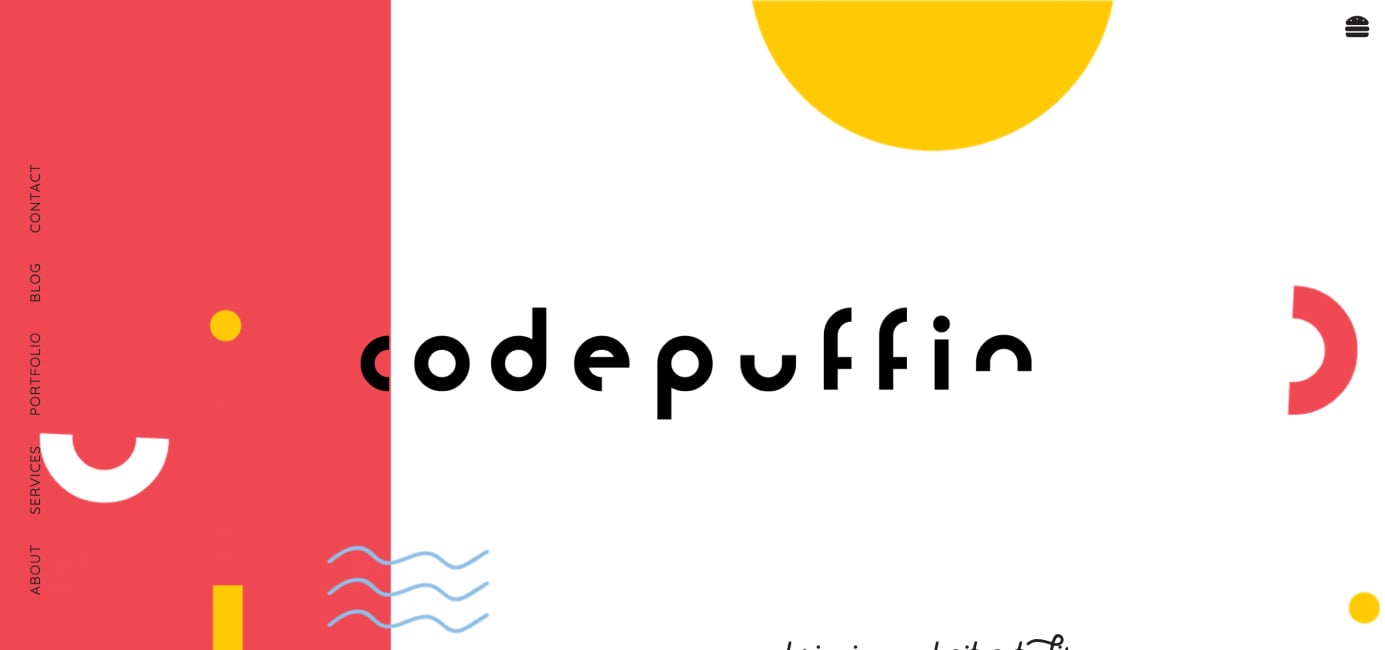
- Codepuffin – a colorful, brand-first web development portfolio that features several beautiful visual elements, including unique typography and bold colors.
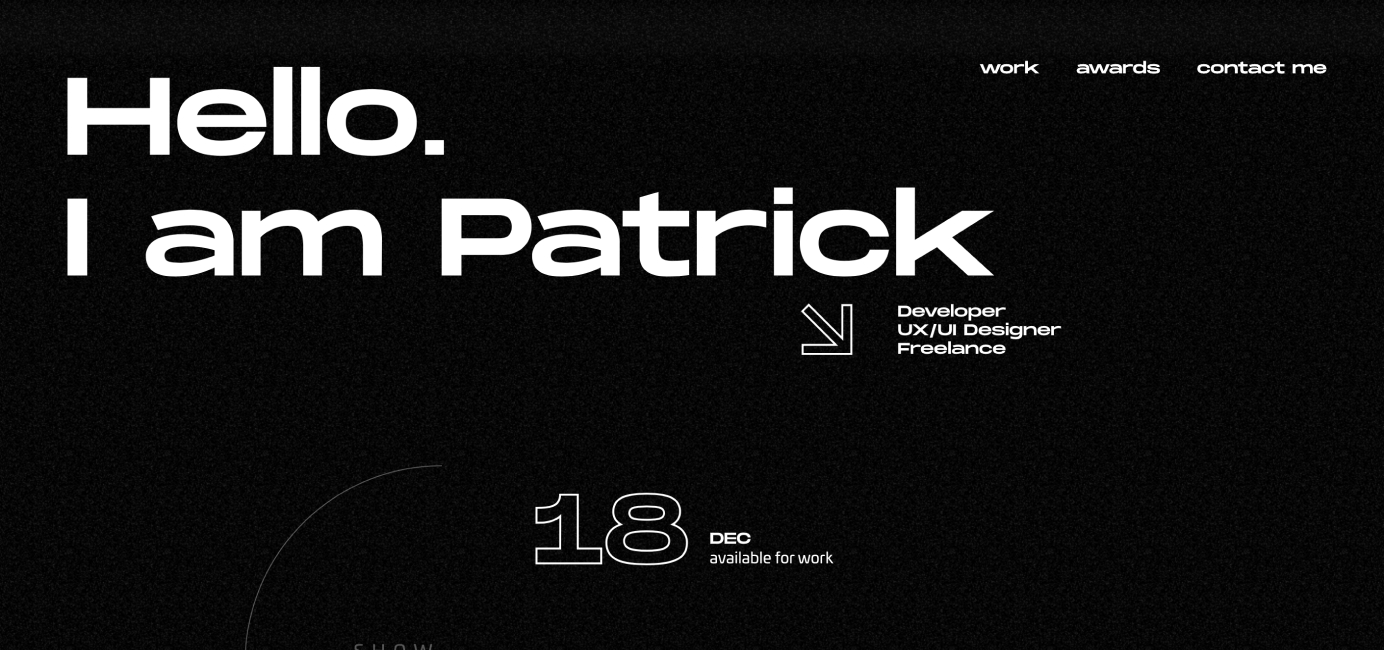
- Patrick David – an example of a front-end developer’s digital portfolio that fits onto a single page.
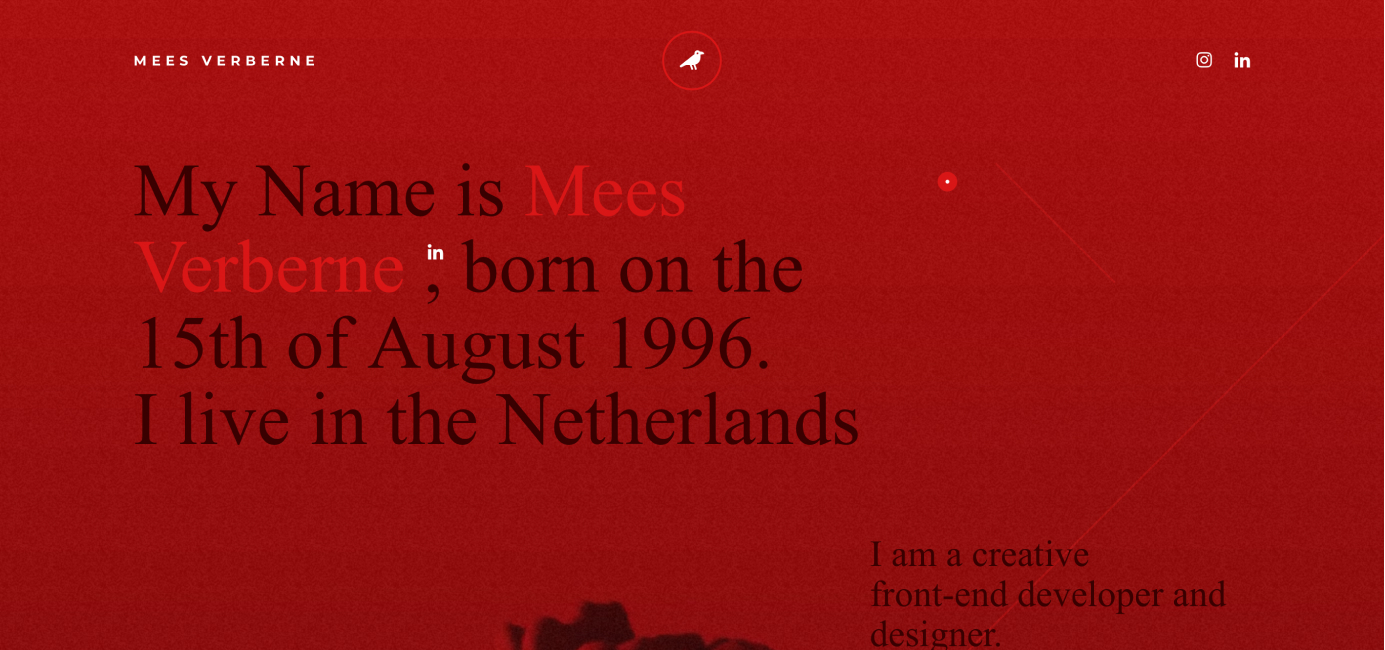
- Mees Verberne – a moody, unique digital portfolio that shows off front-end development and design skills.
Now that we’ve covered web development, let’s move on to design.
What is Web Design?
Web design is the process of researching, planning, conceptualizing, and arranging content or design elements online.
Today, web design goes beyond just aesthetics and encompasses more complex aspects, such as user experience, information architecture, and accessibility. In fact, web design can impact your website’s performance in search engines like Google, ultimately affecting your bottom line.
Who is a Web Designer?
A web designer is responsible for the look and feel of a website. The person is usually well-versed in color schemes, graphic design, typography, and information flow.
Besides designing user interfaces, web designers are also responsible for researching and understanding the end user’s needs and motivations. Equipped with this knowledge, they can create enjoyable user experiences that streamline conversions and keep visitors coming back.
It’s also worth noting that many web designers know some code. While they may not build full applications, familiarity with HTML and CSS helps designers create more realistic mockups and communicate more effectively with developers.
Web Design Roles
Here’s what web designers in different roles do.
UI Designers
A UI designer concerns himself with building clean and appealing user interface designs based on the research gathered by UX designers. UI designers are responsible for every touchpoint and interaction between a user and a device – be that a computer, a mobile app, or a car dashboard.
- In-depth knowledge of color theory, typography, and UI design patterns
- Strong understanding of design approaches, such as the Gestalt Principles
- Proficiency in at least one industry-standard design and prototyping tool
- Understanding of responsive design fundamentals
- Knowledge of how to design UI elements, such as buttons, icons, sliders, and scrollbars
- Ability to develop and establish a design system or style guide to maintain consistency
- Ability to animate and design interactivity
- Understanding of accessibility standards and inclusive design
UX Designers
While there’s some overlap between UI and UX designers’ roles, the latter is responsible for figuring out the needs of the site’s users (and potential users), determining user stories, creating user personas, developing prototypes, and carrying out user testing. A UX designer must also ensure that there’s a logical flow on the website, that all interactions are intuitive and meet user needs.
- Ability to conduct user research
- Knowledge of creating user personas
- Ability to determine and design the information architecture
- Proficiency in designing user flows and wireframes
- Proficiency in industry-standard design and wireframing tools like Figma
- Ability to create prototypes and run usability tests
- Understanding of data analysis to inform design decisions
- Understanding of user testing
Visual Designers
A visual designer role is best described as a hybrid role between a graphic designer and a UI designer, with a bunch of extra skills thrown into the mix. Visual designers typically have a strong understanding of graphic design and branding and are experts at visual messaging. Their primary responsibilities involve aspects like typography, layout, spacing, imagery, and color palettes.
- Strong graphic design basics (balance, harmony, hierarchy, etc.)
- In-depth knowledge of color theory, typography, and design patterns
- Proficiency in design software, such as Figma or the Adobe Creative Cloud
- Ability to work off a brief and interpret information creatively
- Experience with transitions, animation, motion design, and dynamic interaction
- Ability to conceptualize brand elements
- Understanding of responsive design fundamentals
Technologies and Tools Commonly Used by Web Designers
A practical, well-balanced toolkit can be an excellent asset for web designers. The time you save using helpful tools can be invested in more important tasks that drive quality results.
The problem is – web design tools are abundant in the market. Unless you know exactly what you need, it can be overwhelming to choose the best tool for the job.
Here are the most popular web design tools and software in 2026:
- Figma – the industry-standard tool for UI design, prototyping, and developer handoff
- Framer – a design tool that also lets you publish production-ready websites
- Sketch – a macOS design tool still popular with many UI designers
- Penpot – a free, open-source design and prototyping tool
- Adobe Creative Cloud – including Photoshop, Illustrator, and XD
- Miro – for collaborative whiteboarding, user journey mapping, and brainstorming
- Proto.io
- Zeplin – for design-to-developer handoff and asset management
- Material Design – Google’s open-source design system
Web Designer Portfolio Examples
The internet is full of thousands of digital portfolios with hand-picked work examples and case studies that help web designers land their next role or project. Here are a few stellar examples of web design portfolios:
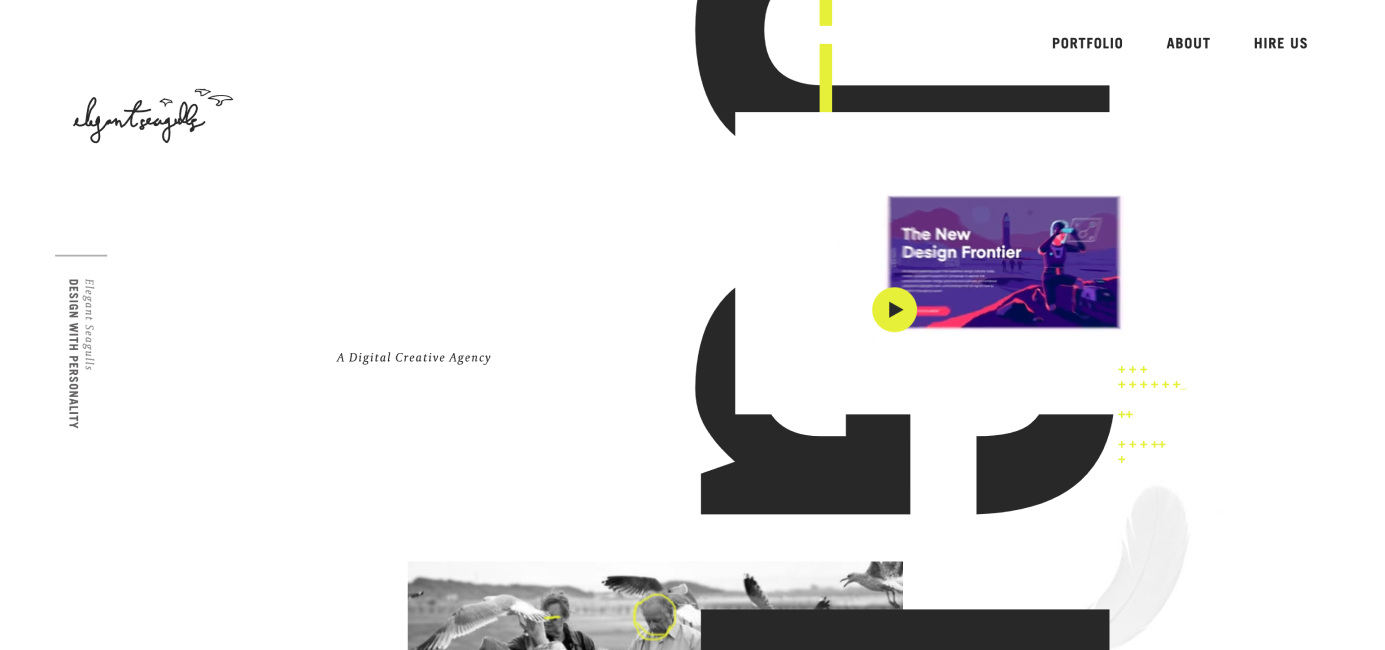
- Elegant Seagulls – showing off highly polished, modern UI, this digital portfolio is a prime example of showing off your skills and taste as a designer.
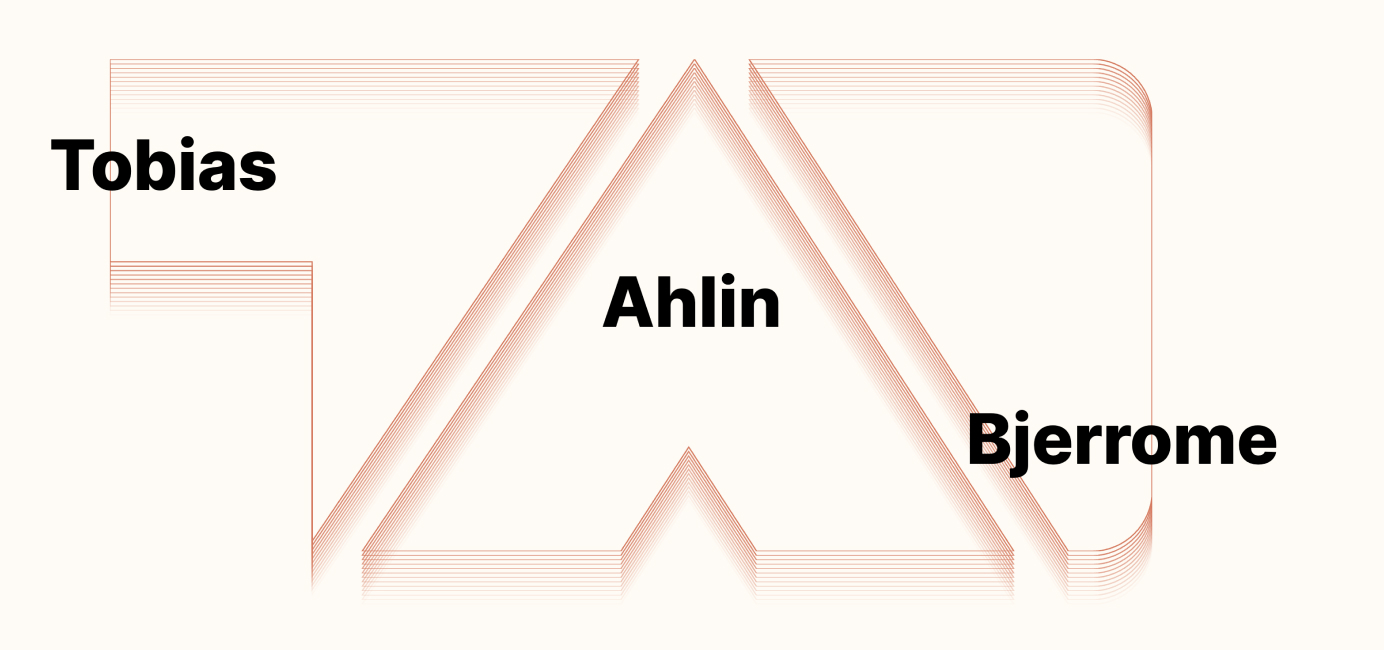
- Tobias Ahlin – a clean, minimalistic digital portfolio of a product designer that consults tech companies and startups.
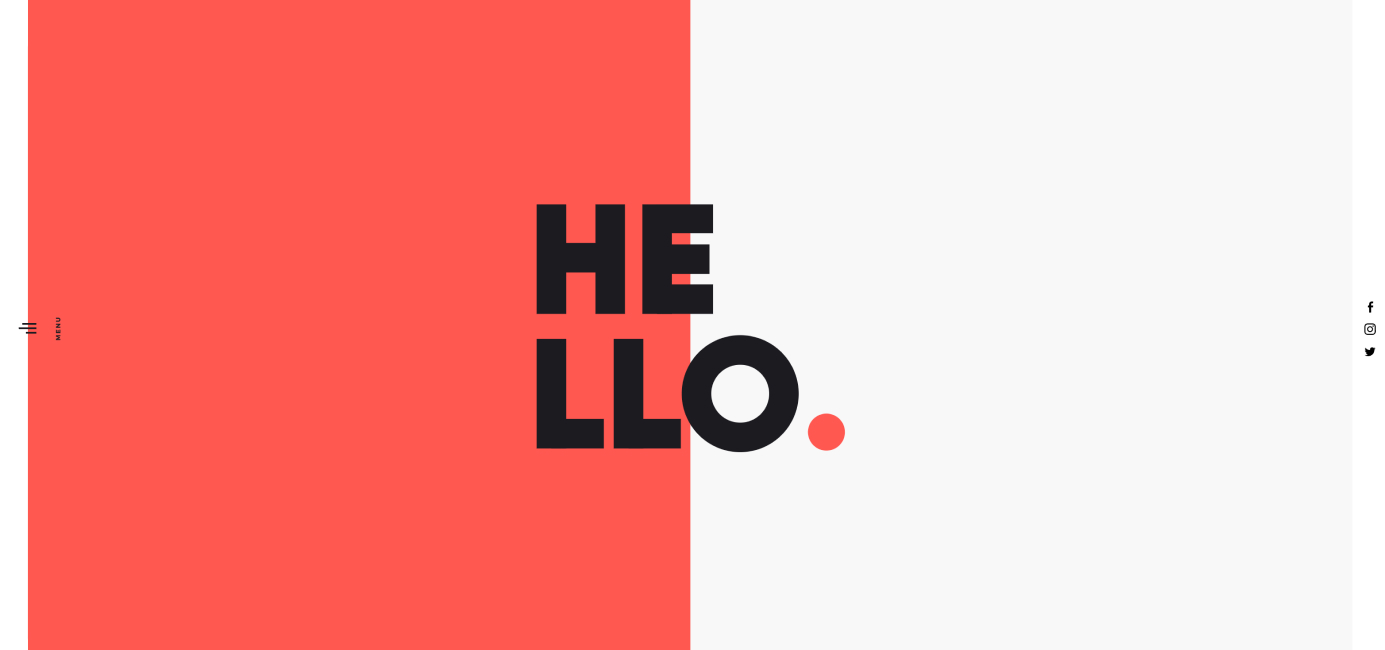
- Wokine – this Paris-based web design agency uses a split-screen design to show off their work and brand.
Now let’s move on to one of the biggest shifts in both fields.
The Impact of AI on Web Design and Web Development
No discussion of web design vs. web development in 2026 is complete without addressing how AI tools are reshaping both professions.
AI in Web Development
AI-powered coding assistants have become a standard part of many developers’ workflows. Tools like GitHub Copilot, Cursor, and similar AI pair-programming assistants can generate boilerplate code, suggest solutions, and help debug issues faster than ever. For developers, this means less time on repetitive tasks and more time on architecture, logic, and problem-solving.
However, AI hasn’t replaced the need for skilled developers. Understanding what the code does, why it works, and how to debug it when it doesn’t is still a fundamentally human skill. AI is best thought of as a productivity multiplier – it makes good developers faster, but it doesn’t turn non-developers into developers overnight.
AI in Web Design
On the design side, AI is making its way into tools like Figma (with AI-assisted layout suggestions and asset generation) and standalone platforms that can generate design mockups from text prompts. Some website builders now offer AI-driven design features that create initial layouts based on a description of your business.
For professional web designers, these tools can speed up early-stage ideation and prototyping. But the craft of understanding users, creating coherent design systems, and making intentional visual decisions still requires human expertise.
What This Means for Career Choices
If you’re considering a career in either field, don’t let AI concerns scare you off. The professionals who thrive in 2026 are those who learn to work with AI tools rather than compete against them. Both web designers and web developers who integrate AI into their workflow tend to be more productive and command higher rates – whether they’re employed full-time or freelancing.
Now let’s move on to the money part.
Web Designer and Web Developer Salary Trends
Who makes more money: web designers or web developers?
In general, surveys consistently show that web developers earn more than web designers, but it really depends on how you slice the data. Even among the different types of developer roles, there are significant differences in salaries. Your salary will depend more on the skills you bring to the table – including AI fluency and specialization depth – than your official job title.
Web Designer Salaries
Web designers earn a decent salary. While the pay can vary depending on the type of design role, location, and the seniority of the position, the average yearly salary of a web designer in the US is in the range of $57k – $104k.
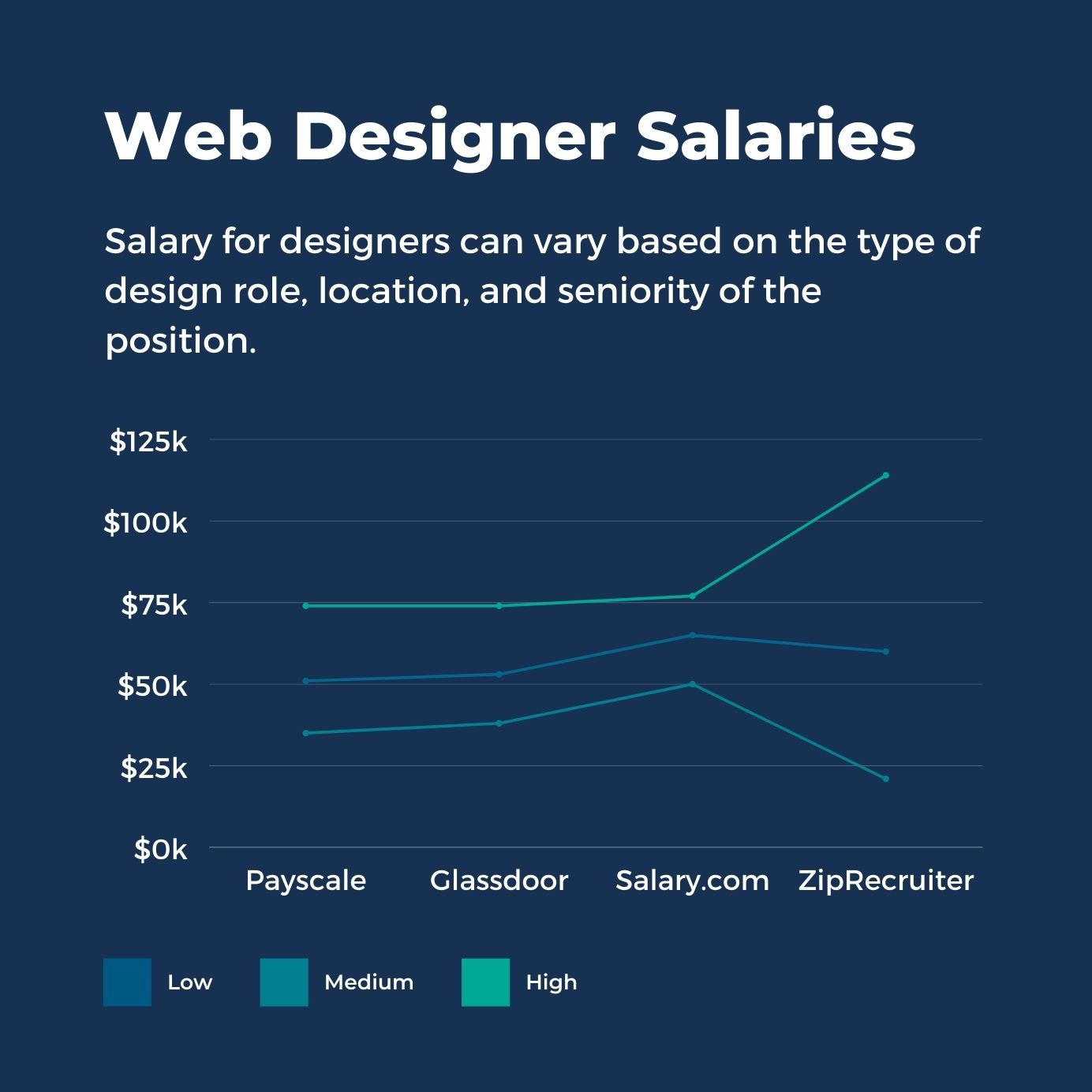
It’s worth pointing out that the available salary ranges differ significantly from source to source:
- Payscale: $61,254/year
- Glassdoor: $85,390/year
- Salary.com: $104,201/year
- ZipRecruiter: $88,321/year
Looking at salary ranges for the different design roles, it’s rather apparent that the hybrid UI/UX designers rake in the highest earnings.
Here’s the full salary breakdown by design role.
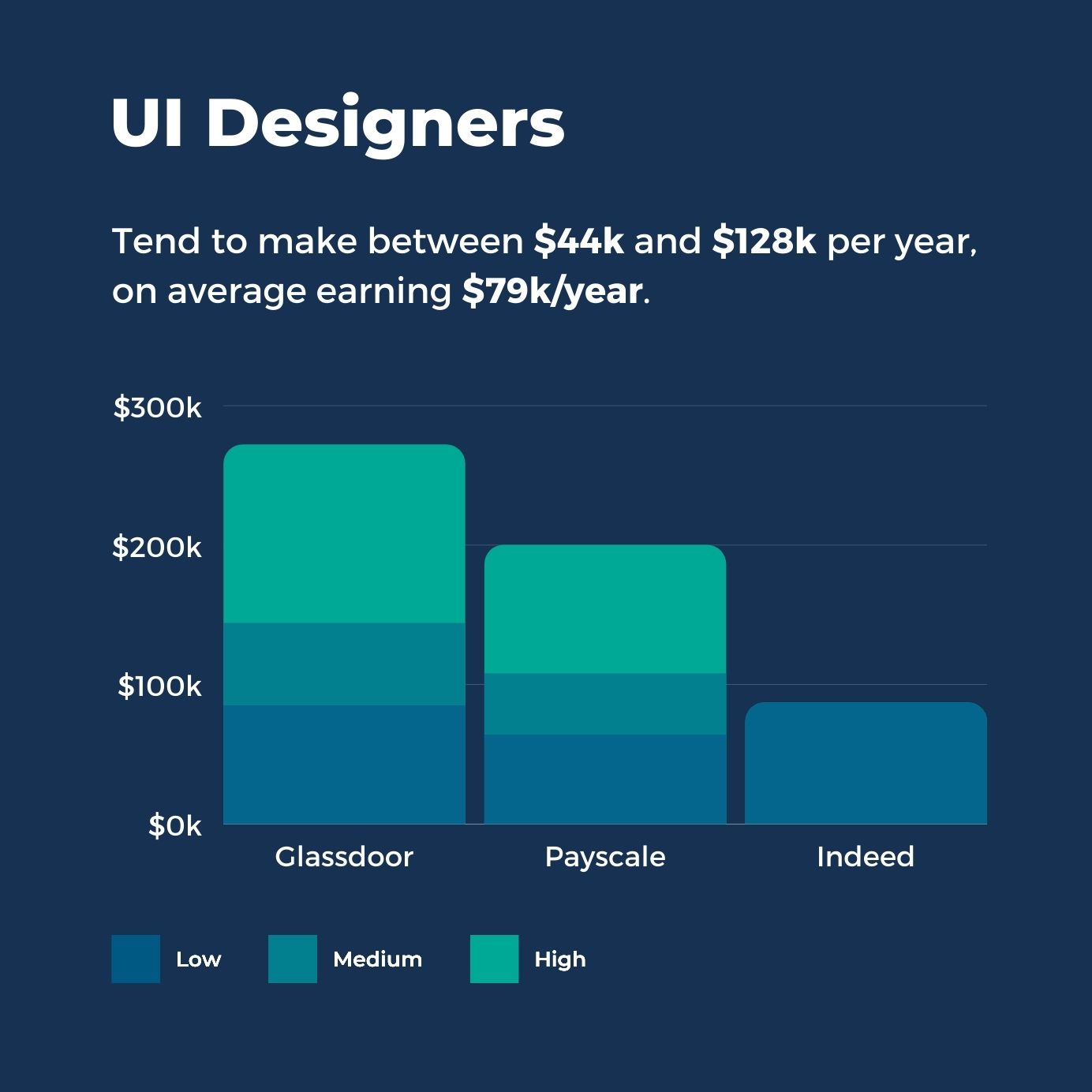
UI designers tend to earn strong salaries, especially those working in tech or product-driven companies.
UI designer salary in the US: average estimates range from about $58k to $115k per year, depending on the source:
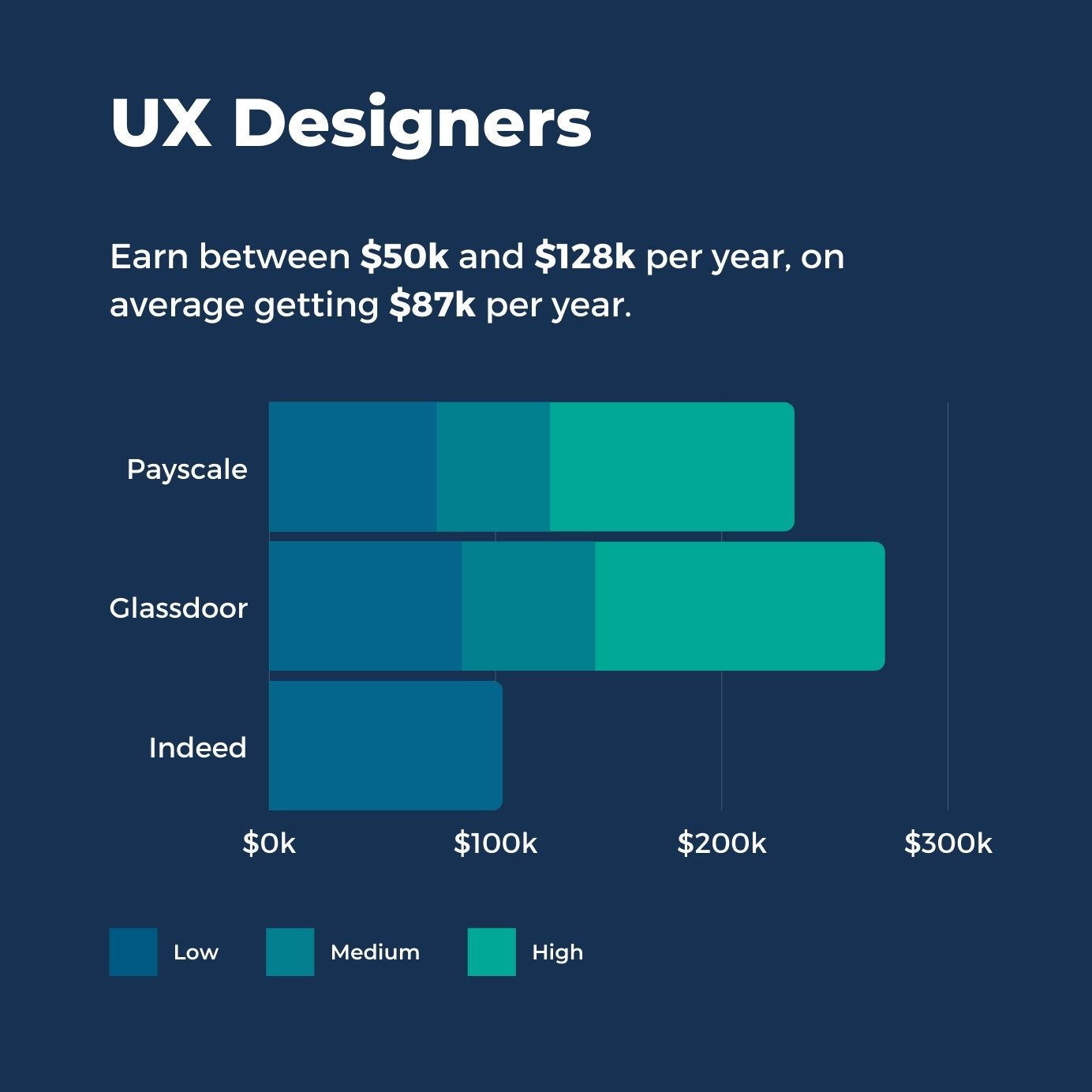
UX designers consistently command higher salaries than general web designers, reflecting the specialized research and strategic skills the role demands.
UX designer salary in the US typically reported around $60k–$151k/year, with average estimates roughly $83k–$113k/year depending on the source:
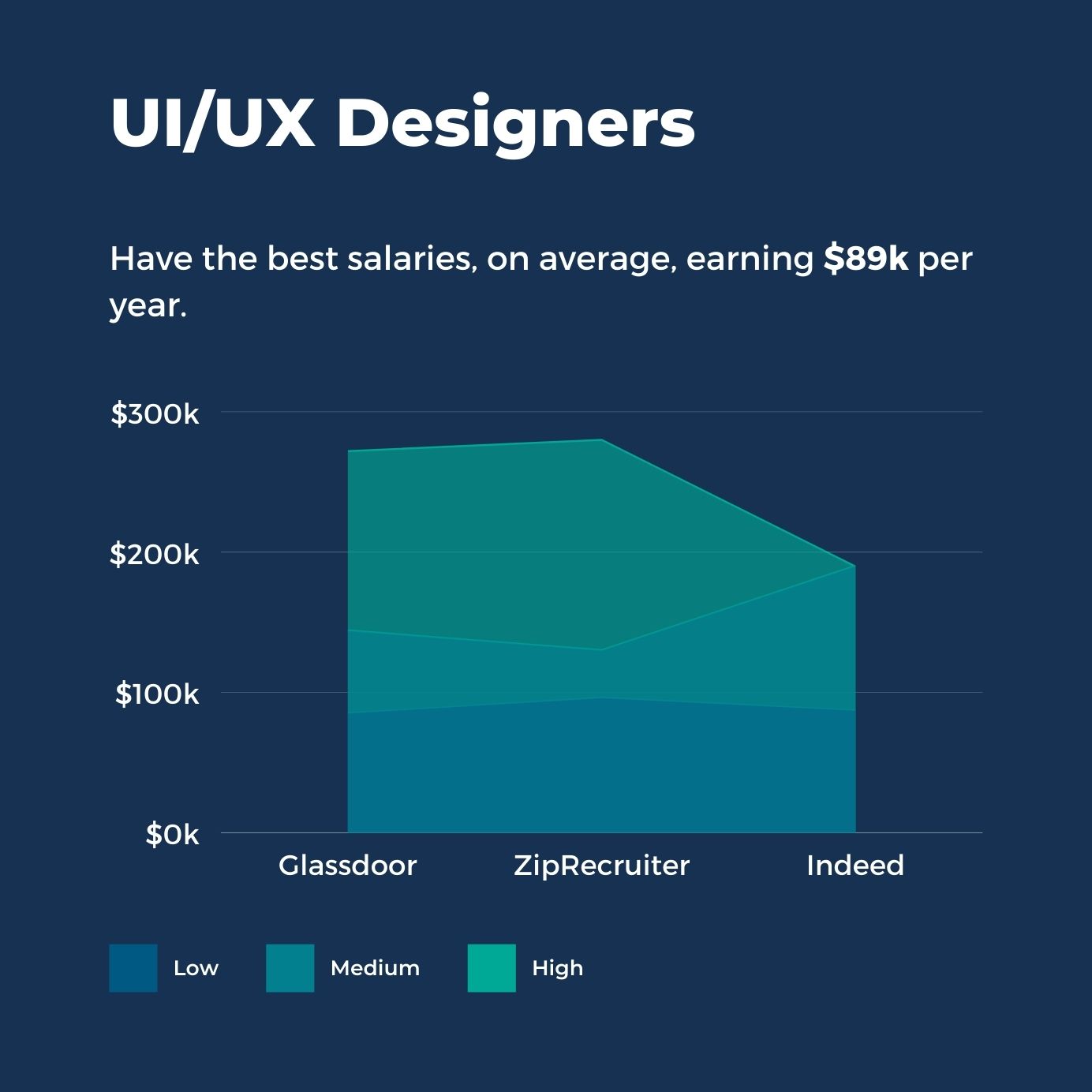
UI/UX designers who span both disciplines often earn at the top end of the design field, with US average estimates sitting around ~$105k per year:
- Glassdoor: $103,109/year
- ZipRecruiter: $108,008/year
- Indeed: $105,480/year
Web Developer Salaries
Although on average, web developers earn higher salaries than web designers, the pay differs based on their specialization.
Developers tend to make more money than designers primarily because of their ability to write code in different languages. Coding is a highly valued skill in the modern, tech-driven world, but not all programming skills are valued equally.
On average, a web developer in the US makes about $70k–$100k per year, depending on the source and how the salary data is measured. Let’s take a closer look at the average salaries for each role.
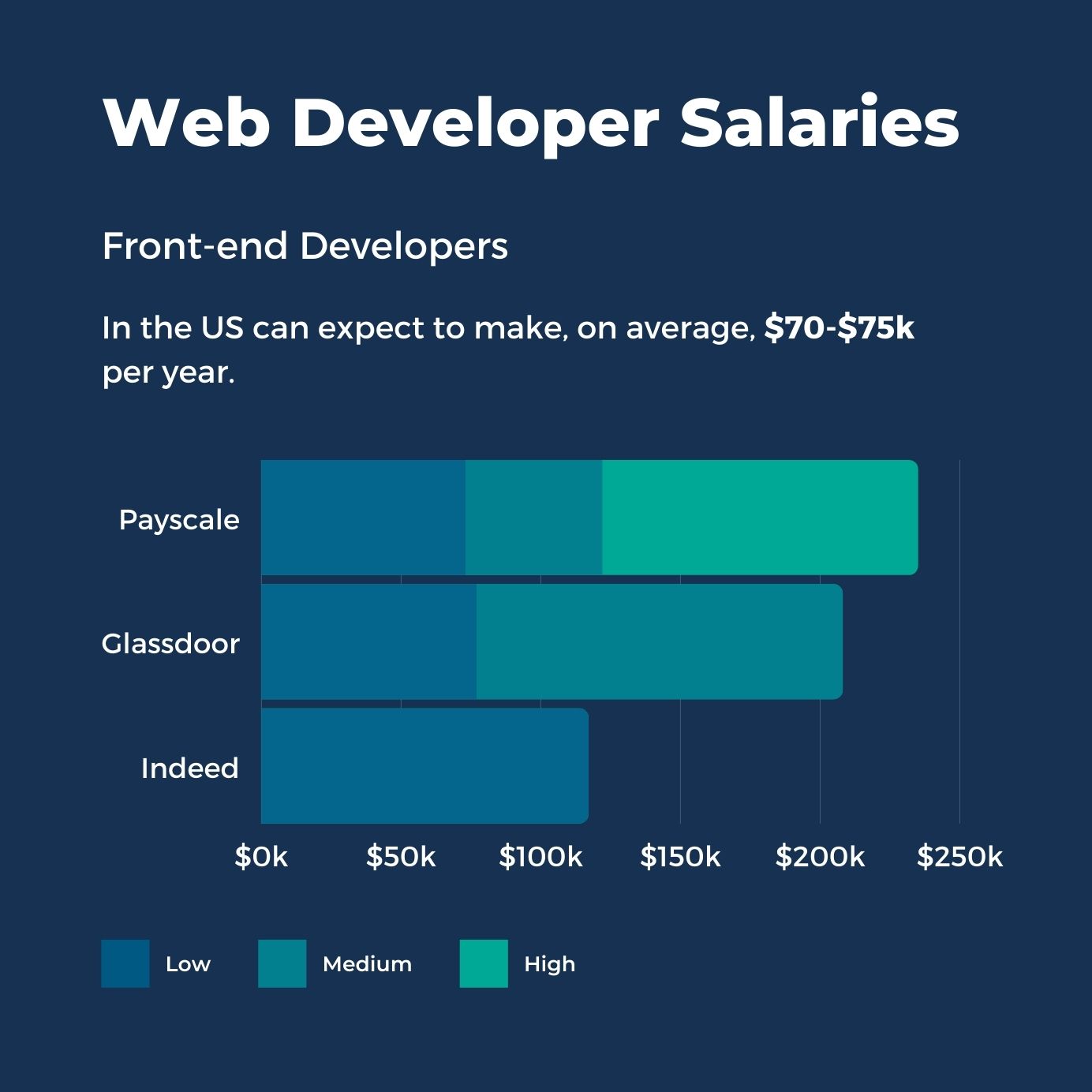
Front-end developers in the US earn competitive salaries, and those skilled in modern frameworks like React or Next.js often sit at the higher end – current average estimates range from about $88k to $122k per year, depending on the source:
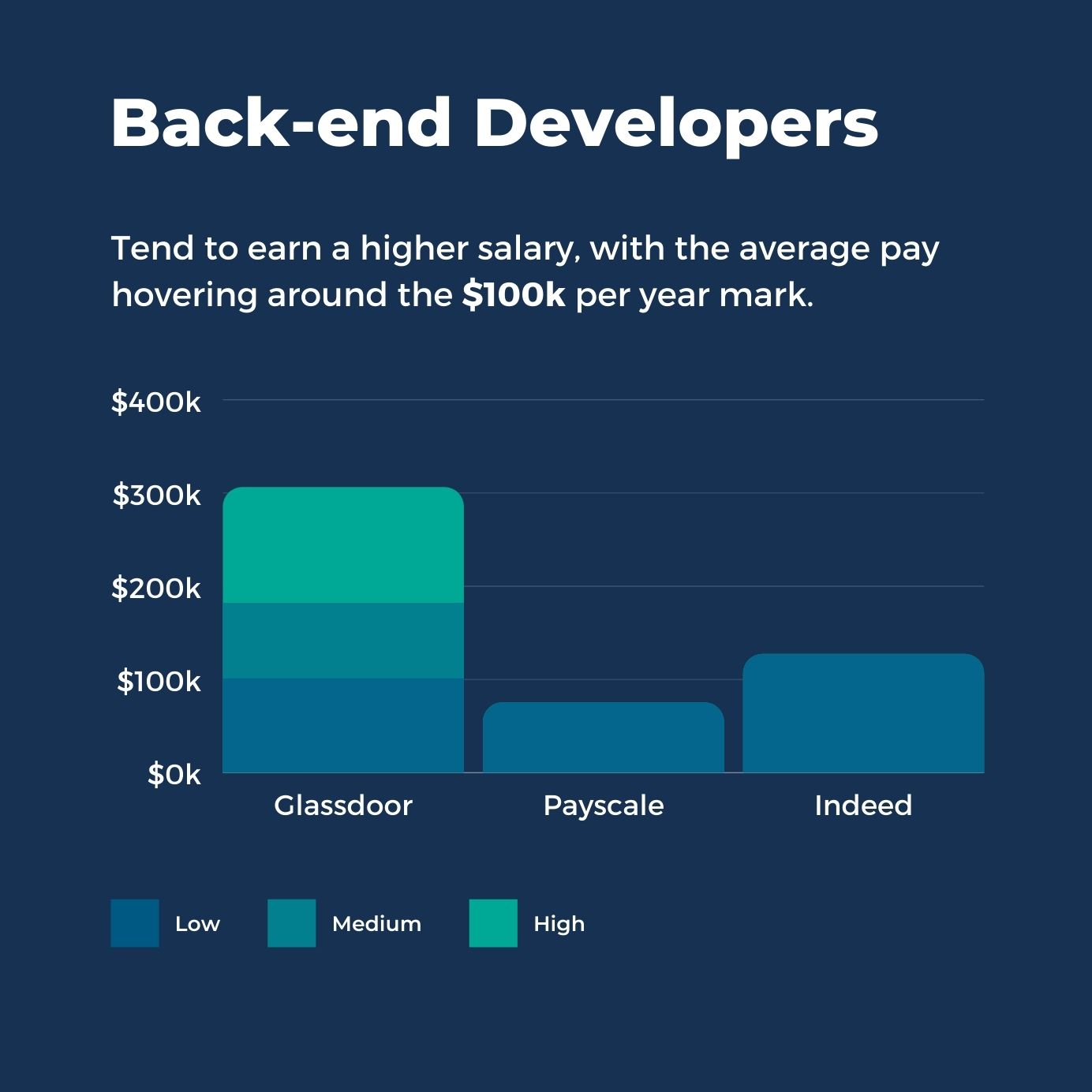
Back-end developers tend to earn a higher salary, given the complexity and security responsibilities of server-side work.
Back-end developer salaries in the US average roughly $102k to $155k per year, depending on the source:
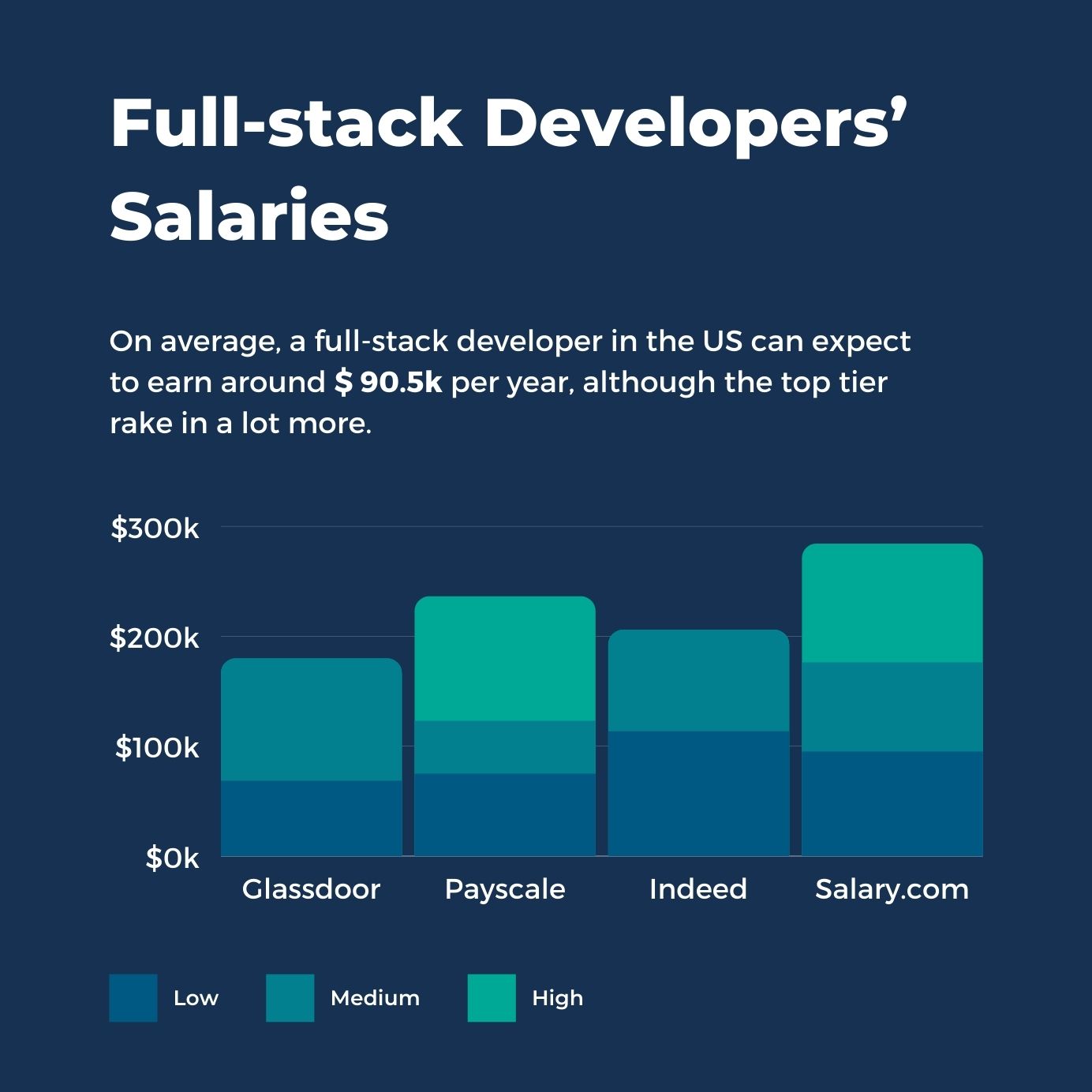
Full-stack developers’ salaries vary significantly, possibly because there are fewer specialists with this range of skills. Full-stack developers who can handle both ends of a project are in high demand, and top-tier talent commands premium rates.
In 2026, full-stack developer salary averages in the U.S. are commonly reported anywhere from about $91k to $134k per year, depending on the source and how the role is defined:
- Glassdoor: $118,781/year
- Payscale: $90,748/year
- Indeed: $133,755/year
- Salary.com: $103,087/year
Naturally, the better you are at your job, the higher salary you can command. With technologies changing so fast, new programming languages emerging, and AI tools reshaping workflows, web developers and designers alike must continue learning and adding new skills to their portfolio to ensure an upward trajectory in their earnings.
How to Learn Web Design and Web Development
Now it’s time to cover where and how to learn web design and web development.
Get a Formal Degree or Get Certified
If you like learning in a structured, offline environment, one of the more traditional routes of education could be the right option for you. Both design and web development learning programs have a lot to offer; you just need to know which profession you want to pursue.
Consider the following paths:
- University – courses take between 2 to 4 years and you get to throw a hat in the air at the end of the course.
- Technical Schools – typically more hands-on, focused on developing practical skills faster, technical schools are great for professionals who know precisely what they’re looking for.
- Boot Camps – intensive full-time & part-time learning programs aimed at equipping students with fundamental skills and knowledge. Besides the valuable training, you also get to connect with a like-minded community, find a mentor, and sometimes, if you’re fortunate, get a job offer at the end of the course.
The advantage of getting a formal education is that you graduate with a degree or an official certification, which can be quite the door opener when job hunting. Structured, teacher or instructor-led courses can help those who are starting from zero.
The downside, of course, is the cost of traditional education as well as the restrictions of your location. If you’re eager to get into a physical classroom, consider and research the options available in your area.
It’s worth noting that in 2026, many employers – especially in tech – care more about your portfolio and demonstrable skills than whether you have a degree. Certifications in specific tools (like AWS for developers or Google UX Design for designers) can be a cost-effective alternative that signals competence to hiring managers.
Educate Yourself
Some of the world’s top web designers and web developers are self-taught. Learning on your own has many benefits: you get to learn in your own time and in a way that fits your schedule. Plus, with the Internet being a free resource, you can educate yourself without incurring any student loan debt.
There are hundreds of free and paid design and development courses online that can teach you everything from design fundamentals to server-side coding languages.
Where do you start?
Here are some top recommended resources for a junior designer and developer:
- YouTube – there are millions of free videos and tutorials from highly experienced professionals that can give you a headstart in your learning journey. Try researching top names in your industry first to avoid having to sift through so many videos searching for the right fit. Once you identify the experts, see if they share any helpful content on YouTube, their website, or another platform.
- Tutorial Sites – with plenty of highly-focused, in-depth courses, tutorial sites can be an excellent stop for picking up technical skills and figuring out how to accomplish specific results in your code or design. One thing to watch out for, though, is content recency – as design software continues to evolve rapidly and new programming languages emerge all the time, you’re running a risk of learning something that’s irrelevant or, worse, incorrect.
- AI-Assisted Learning – in 2026, AI chatbots and coding assistants can serve as on-demand tutors. You can ask questions, get code explained line by line, or request practice exercises tailored to your level. While this shouldn’t replace structured learning entirely, it’s a powerful supplement that wasn’t widely available just a few years ago.
To get the latest, best quality web development and design tutorials and tips, join the WebsiteSetup newsletter and start learning as you go.
Soft Skills That Matter for Both Roles
Technical skills will get you hired, but soft skills will help you thrive. Whether you pursue web design or web development, the following non-technical abilities are essential:
- Attention to detail – one misplaced pixel or one wrong line of code can throw off an entire project.
- Problem-solving – things rarely work perfectly on the first attempt. Being able to diagnose issues and iterate quickly is critical.
- Communication – you’ll need to explain your work to teammates, clients, and stakeholders who may not share your technical vocabulary.
- Curiosity – the web evolves fast. The best designers and developers are the ones who never stop learning.
- Collaboration – as we covered earlier, designers and developers work closely together. Being easy to work with and open to feedback goes a long way.
To Sum Up: Should You Hire a Web Developer or Web Designer?
Hopefully, this guide has provided you with insight into the key differences between a web developer and a web designer. So, let’s recap on what we’ve covered so far.
If you need someone to create visuals for your website, including the brand style, layout, information flow, and user interfaces, you’ll be looking to hire a web designer. Like an architect, the web designer will develop a vision for your website: the look and feel, the stand-out elements, and the must-have functionalities for a seamless user experience.
When you have the mockups and wireframes provided by the web designer, you’ll need a front-end web developer to code them up. Using one of the front-end coding languages, the front-end developer will turn these designs into a functioning website – you’ll have clickable, scrollable elements, site navigation, and content styling that matches your brand guidelines.
You might then need the help of a back-end developer, who will take care of all server-side programming, third-party integrations, and programs that are necessary to power a website’s server and database.
Alternatively, you may look for a full-stack developer who understands both front-end and back-end processes and can build effective programs needed for a website. If it’s a small project, they can probably write all of a site’s code by themselves.
One more thing to keep in mind: you don’t have to pick one path and stick with it forever. Many professionals start in one discipline and gradually move into the other, or expand their skills to cover both. The overlap between design and development continues to grow, especially as tools become more integrated and AI lowers the barrier to entry for adjacent skills.
And that’s how you decide who to hire for your project – easy, right?
Further Reading:
Frequently Asked Questions
Is web design or web development harder to learn?
Neither is objectively harder – they’re different. Web development involves learning programming languages and logical problem-solving, which can feel challenging if you’re new to coding. Web design requires mastering visual principles, user psychology, and design tools, which demands a different kind of creative and analytical thinking. Both fields have easy entry points and deeply complex advanced territory.
Can a web designer become a web developer (or vice versa)?
Absolutely. Many professionals transition between the two fields or expand their skills to cover both. A web designer who learns HTML, CSS, and JavaScript can move into front-end development. A developer who studies UX principles and design tools can shift toward design roles. The two disciplines share enough common ground that switching is very achievable with dedicated learning.
Do I need to hire both a web designer and a web developer?
For most professional websites, yes – or you need to find someone who can do both. A designer creates the blueprint (wireframes, mockups, brand guidelines), and a developer brings it to life with code. For simpler projects, a full-stack developer with a good eye for design or a designer who can code may be able to handle everything. Website builders like WordPress with pre-built themes can also reduce the need for a dedicated designer on smaller budgets.
Will AI replace web designers and web developers?
Not in any foreseeable future. AI tools are powerful assistants that can speed up repetitive tasks, generate initial drafts, and help with debugging – but they don’t replace the strategic thinking, creative judgment, and problem-solving that human designers and developers bring. The professionals who learn to use AI effectively will be more productive and valuable, not less.
